





cybergguy
Members
-
Joined
-
Last visited
-
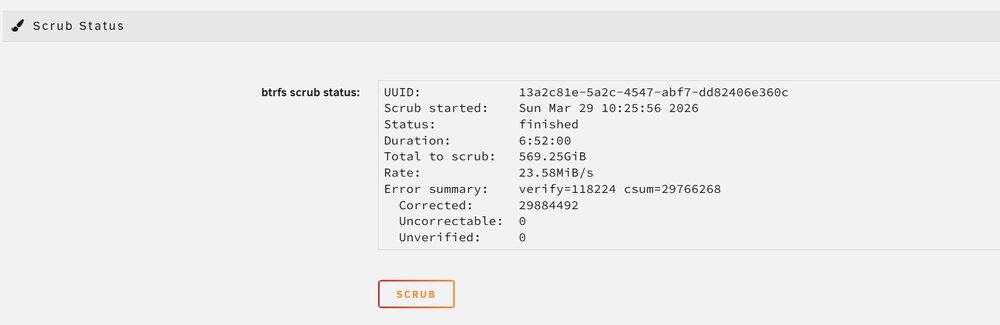
Thanks for the links and direction Jorge, that did the trick! Scrubbed, then went through and deleted the Docker image and recreated it, completely back up and running now thanks for your help!
-
Thanks - gave it a shot, this time the pool started but it doesn't seem to be reading the drive it had previously labeled as unmountable. Docker and VMs are both unable to start because of file system errors it seems. I've attached diagnostics, not sure what my next step would be. It does seem like both of the cache drives have issues. Not sure if there's any way to safely back up what's in cache at this point and start with at least one new drive. labs-unraid-diagnostics-20260328-1206.zip
-
Thanks Jorge - before I give that a shot, that second device (the nvme drive) was the one that had failed. The system refused to recognize the drive at all, other than at the BIOS level. I had been operating on solely the other device for a couple of weeks until I got this error, and now Unraid sees the nvme drive again. Is there any concern that the two are out of sync? Will re-adding that nvme device cause any harm? Thanks for your assistance!
-
root@labs-unraid:~# btrfs fi show Label: none uuid: 13a2c81e-5a2c-4547-abf7-dd82406e360c Total devices 2 FS bytes used 254.13GiB devid 1 size 476.94GiB used 324.03GiB path /dev/nvme0n1p1 devid 2 size 476.94GiB used 324.03GiB path /dev/sdb1 Label: none uuid: 6a1fa145-e043-4f9d-87cb-8b24b473d52e Total devices 1 FS bytes used 372.00KiB devid 1 size 80.00GiB used 2.02GiB path /dev/loop2 Label: none uuid: 0c5702a5-7d58-42ee-acb3-1e311dd15d13 Total devices 1 FS bytes used 416.00KiB devid 1 size 1.00GiB used 126.38MiB path /dev/loop3 root@labs-unraid:~# btrfs fi show Label: none uuid: 13a2c81e-5a2c-4547-abf7-dd82406e360c Total devices 2 FS bytes used 254.13GiB devid 1 size 476.94GiB used 324.03GiB path /dev/nvme0n1p1 devid 2 size 476.94GiB used 324.03GiB path /dev/sdb1 Label: none uuid: 6a1fa145-e043-4f9d-87cb-8b24b473d52e Total devices 1 FS bytes used 372.00KiB devid 1 size 80.00GiB used 2.02GiB path /dev/loop2 Label: none uuid: 0c5702a5-7d58-42ee-acb3-1e311dd15d13 Total devices 1 FS bytes used 416.00KiB devid 1 size 1.00GiB used 126.38MiB path /dev/loop3 root@labs-unraid:~#
-
Had half my cache pool go dark last week when my nvme drive failed, leaving me with only one. Unfortunately, I decided to play it cheap and wait a week for a replacement to come in and now my other cache drive is listed as unmountable. Tried stopping, removing, restarting, adding and stopping and restarting the array, to no avail. Diagnostics attached below if anyone has any suggestions. Looks like there were some SMART errors on the drive but it passed the self-test. labs-unraid-diagnostics-20260326-1304.zip

