





Borealin
Members
-
Joined
-
Last visited
Everything posted by Borealin
-
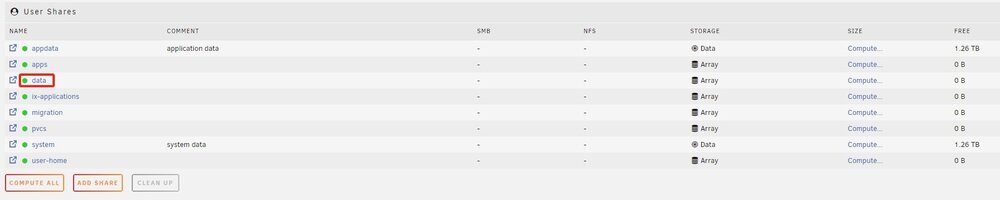
I found the problem is due to share's name and pool's name conflicts, both are 'data', so I rename the pool and everything work well
-
Logs still looks like this, where could I found more related info? Sep 19 00:00:05 BorNAS emhttpd: update_pool: 30 data 0 Sep 19 00:00:05 BorNAS emhttpd: Starting services... Sep 19 00:00:05 BorNAS emhttpd: shcmd (66): /etc/rc.d/rc.samba restart Sep 19 00:00:05 BorNAS rc.samba: Restarting Samba server daemon... Sep 19 00:00:05 BorNAS rc.samba: Stopping Samba server daemon... Sep 19 00:00:06 BorNAS rc.samba: killall smbd nmbd wsdd2 winbindd Sep 19 00:00:06 BorNAS wsdd2[6504]: 'Terminated' signal received. Sep 19 00:00:06 BorNAS winbindd[6508]: [2024/09/19 00:00:06.039352, 0] ../../source3/winbindd/winbindd_dual.c:1980(winbindd_sig_term_handler) Sep 19 00:00:06 BorNAS winbindd[6508]: Got sig[15] terminate (is_parent=1) Sep 19 00:00:06 BorNAS wsdd2[6504]: terminating. Sep 19 00:00:06 BorNAS rc.samba: Samba server daemon... Stopped. Sep 19 00:00:06 BorNAS rc.samba: Starting Samba server daemon... Sep 19 00:00:06 BorNAS rc.samba: /usr/sbin/smbd -D Sep 19 00:00:06 BorNAS rc.samba: /usr/sbin/wsdd2 -d -4 Sep 19 00:00:06 BorNAS wsdd2[9526]: starting. Sep 19 00:00:06 BorNAS rc.samba: /usr/sbin/winbindd -D Sep 19 00:00:06 BorNAS rc.samba: Samba server daemon... Started. Sep 19 00:00:06 BorNAS emhttpd: shcmd (70): /etc/rc.d/rc.avahidaemon reload Sep 19 00:00:06 BorNAS avahi-daemon[2112]: Got SIGHUP, reloading. Sep 19 00:00:07 BorNAS emhttpd: shcmd (75): smbcontrol smbd close-share 'data'
-
My UNRAID version is 7.0.0-beta.2, I just import my pool from TrueNAS, and I want to enable SMB for my dataset. UNRAID seems recognize folder in the disk root as user shares, so I try to exprort user shares from WebGUI Most of them could be found in SMB by set SMB export to Yes, but one of them failed. When I set it's export to Yes, after loading animation finished, export were set to No again, here are my logs Sep 18 08:19:57 BorNAS emhttpd: update_pool: 30 data 0 Sep 18 08:19:58 BorNAS emhttpd: Starting services... Sep 18 08:19:58 BorNAS emhttpd: shcmd (281): /etc/rc.d/rc.samba restart Sep 18 08:19:58 BorNAS rc.samba: Restarting Samba server daemon... Sep 18 08:19:58 BorNAS rc.samba: Stopping Samba server daemon... Sep 18 08:19:58 BorNAS rc.samba: killall smbd nmbd wsdd2 winbindd Sep 18 08:19:58 BorNAS wsdd2[329069]: 'Terminated' signal received. Sep 18 08:19:58 BorNAS winbindd[329073]: [2024/09/18 08:19:58.290345, 0] ../../source3/winbindd/winbindd_dual.c:1980(winbindd_sig_term_handler) Sep 18 08:19:58 BorNAS winbindd[329073]: Got sig[15] terminate (is_parent=1) Sep 18 08:19:58 BorNAS wsdd2[329069]: terminating. Sep 18 08:19:58 BorNAS rc.samba: Samba server daemon... Stopped. Sep 18 08:19:58 BorNAS rc.samba: Starting Samba server daemon... Sep 18 08:19:58 BorNAS rc.samba: /usr/sbin/smbd -D Sep 18 08:19:58 BorNAS rc.samba: /usr/sbin/wsdd2 -d -4 Sep 18 08:19:58 BorNAS wsdd2[329329]: starting. Sep 18 08:19:58 BorNAS rc.samba: /usr/sbin/winbindd -D Sep 18 08:19:58 BorNAS rc.samba: Samba server daemon... Started. Sep 18 08:19:59 BorNAS emhttpd: shcmd (285): /etc/rc.d/rc.avahidaemon reload Sep 18 08:19:59 BorNAS avahi-daemon[1962]: Got SIGHUP, reloading. Sep 18 08:19:59 BorNAS emhttpd: shcmd (290): smbcontrol smbd close-share 'data' Is it due to my folder size? My folder size is around 6~7TB
-
Thanks a lot, removing partition 1 will not affect partition 2, my data is kept and the pool could be import in Web GUI
-
I'm currently migrating from TrueNAS Scale DragonFish to UNRAID 7.0.0-beta.2. My pool has 2 disks in mirror mode, and I've checked that both disks' zfs partitions are on partition 2: root@BorNAS:/# fdisk -l /dev/sdb Disk /dev/sdb: 7.28 TiB, 8001563222016 bytes, 15628053168 sectors Disk model: TerraMaster Units: sectors of 1 * 512 = 512 bytes Sector size (logical/physical): 512 bytes / 4096 bytes I/O size (minimum/optimal): 4096 bytes / 4096 bytes Disklabel type: gpt Disk identifier: 751167D6-C434-4FA6-986B-E85F6DE4D540 Device Start End Sectors Size Type /dev/sdb1 128 4194304 4194177 2G Linux swap /dev/sdb2 4194432 15628053134 15623858703 7.3T Solaris /usr & Apple ZFS root@BorNAS:/# fdisk -l /dev/sdc Disk /dev/sdc: 7.28 TiB, 8001563222016 bytes, 15628053168 sectors Disk model: TerraMaster Units: sectors of 1 * 512 = 512 bytes Sector size (logical/physical): 512 bytes / 4096 bytes I/O size (minimum/optimal): 4096 bytes / 4096 bytes Disklabel type: gpt Disk identifier: EE0D5179-15BE-43C2-AEA9-FED314BAA4EC Device Start End Sectors Size Type /dev/sdc1 128 4194304 4194177 2G Linux swap /dev/sdc2 4194432 15628053134 15623858703 7.3T Solaris /usr & Apple ZFS And the pool could be directly imported with zpool import command: root@BorNAS:/# zpool status pool: data state: ONLINE scan: scrub repaired 0B in 15:17:25 with 0 errors on Sun Sep 8 00:17:26 2024 config: NAME STATE READ WRITE CKSUM data ONLINE 0 0 0 mirror-0 ONLINE 0 0 0 6dfc8125-2607-4d1e-9c63-8c9ca226bd1a ONLINE 0 0 0 be28ba4e-8773-4043-b506-919cbdbb9a31 ONLINE 0 0 0 errors: No known data errors But however, create a Pool in WebGUI and add both disks still result in "Unmountable: unsupported or no file system" I want to follow the above instruction, but found this warning when trying to remove partition 1: root@BorNAS:/# fdisk /dev/sdb Welcome to fdisk (util-linux 2.40.2). Changes will remain in memory only, until you decide to write them. Be careful before using the write command. The device contains 'zfs_member' signature and it will be removed by a write command. See fdisk(8) man page and --wipe option for more details. Command (m for help): Will the partion removing action result in my data lost? Or it's safe to remove partition 1?


