Malbosher
Members
-
Joined
-
Last visited
-
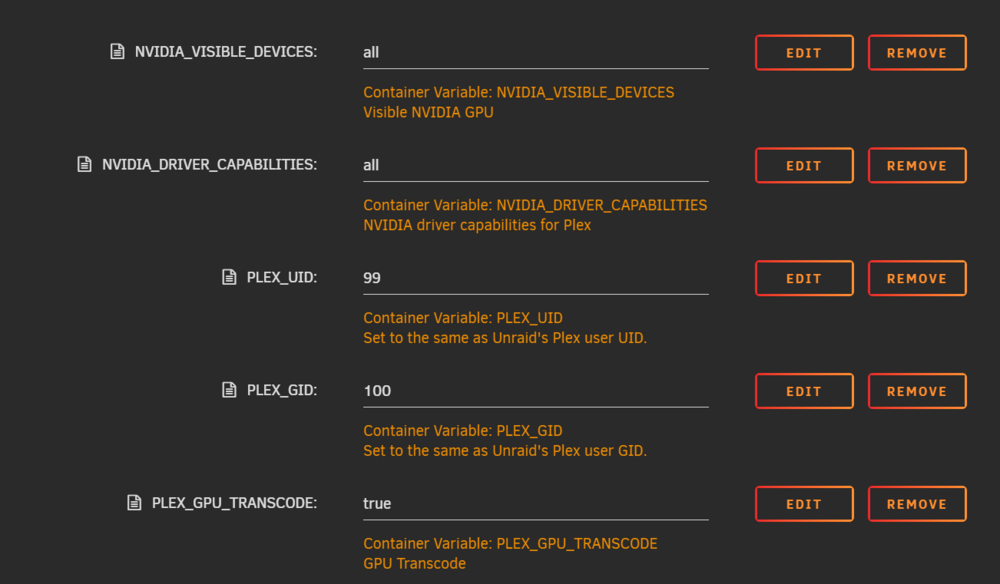
**The Nvidia driver was the cause of the issue with a 10 series GPU driver that works - v470.239.06 ** Hello, I'm trying to setup plex media server ( docker ) to use my GPU. The GPU is recognized by Plex, and hardware transcoding starts but stops almost immediately after beginning, I get a few seconds of transcoded content. There are no clear errors in the logs indicating why the process is being terminated. ( that I can find anyway ) Searched through the Plex Media Server.log for any indication of what’s causing the issue. Relevant entries included: - Transcode process starts successfully but stops without any clear error message. ( checked GPU util using nvidia-smi ) - No explicit nvenc errors or driver-related issues appeared. - No permission-related errors (e.g., /dev/nvidia0 access denied). I have also attempted disabling HDR Tone mapping to try and resolve this but that hasn't worked. I've removed and re-added the container as well as trying another repo other than the official plex version, same result. During the process of trouble shooting the server has been rebooted a few times. I believe my configuration is correct. I have attempted explicitly providing the docker container with GPU ID this did not work either. I am using unraid 7.0.0-beta.2, could this be a major factor? Or is there something I've missed? If anyone can help an Unraid n00bie ❤️ Thanks in advance **The Nvidia driver was the cause of the issue with a 10 series GPU driver that works - v470.239.06 **