atkion
Members
-
Joined
-
Last visited
-
Thank you for the suggestion! Unfortunately, formatting the drive with Rufus did not seem to have an effect. Attempted with version 6.2.13, with both UEFI and Legacy modes. You're a lifesaver. I'll admit I don't love the idea of running beta software on this server, but it's better than no software! UEFI mode is unchanged, but I am able to boot using Legacy mode on version 7.0.0-beta.3. Thank you so much!
-
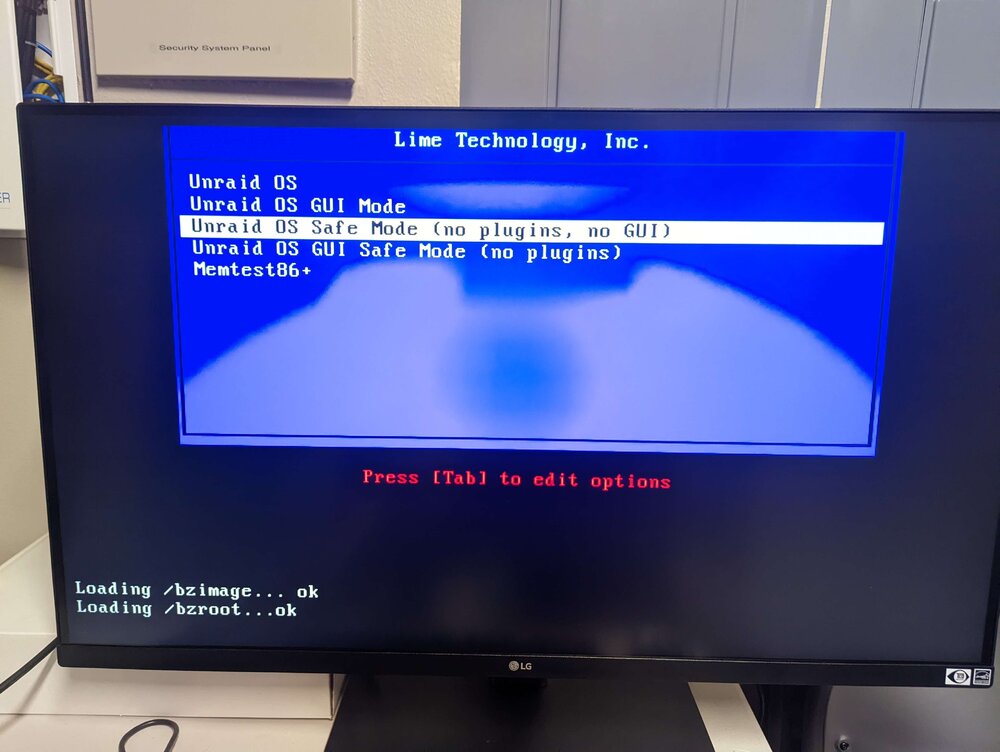
I'm unsure where I could be going wrong at this point - maybe someone has an idea that I haven't thought of yet? This is a new install, so there is no config file or existing data to be preserved. Here's the machine I'm attempting to boot unRaid on: - Dell T7810 - 2X Intel Xeon E5-2690 v4 - 128GB DDR4 Memory https://www.amazon.com/gp/product/B095TRGCSX/ref=ppx_yo_dt_b_asin_title_o00_s00?ie=UTF8&psc=1 I have purchased this SAS HBA to connect my drives to this server, as the chassis only has space for 2 3.5" drives inside. https://www.amazon.com/dp/B0BKQDJLZ9?ref=ppx_yo2ov_dt_b_fed_asin_title&th=1 I've since flashed this HBA into IT mode, and it seems to be working fine - upon booting, the server lists both the HBA and all four connected drives as expected. I've used this machine as a bare-metal Ubuntu server in the recent past, so I doubt there are any major hardware issues. I have tried using both the USB creation tool and the manual method, with unRaid versions 6.12.13 and 6.12.11. All of these have behaved the same. When I try to boot using UEFI mode, I simply get a blank screen for ~5 minutes before the server reboots. Nothing appears on the screen at any point after BIOS. When I try to use Legacy mode, I am able to get into the syslinux selection - but when I try to boot 'Unraid OS', I get 3 "OK"s into the boot sequence before the server suddenly reboots. GUI Mode and GUI Safe Mode both result in the same behaviour as above, while non-GUI Safe Mode gets through 'Loading /bzimage... ok' and 'Loading /bzroot... ok' before getting stuck and idling there until I forcibly power the server down. In a reddit thread, someone suggested adding the intel_iommu=on and iommu=pt flags to the 'Unraid OS' boot option for specifically Dell servers. Doing this results in the same behaviour as non-GUI Safe Mode (gets past /bzroot, then freezes). Thread: https://www.reddit.com/r/unRAID/comments/uyxv83/unraid_wont_boot_after_os_upgrade/ Is there anything obvious I'm missing? I'm really hoping there is. Thanks for your help.