New to Unraid User
Members
-
Joined
-
Last visited
-
Thanks. Lol, I assumed that the View Changelog button will only show me the actual changelog. The popup for changelog does have a button that allows me to upgrade.
-
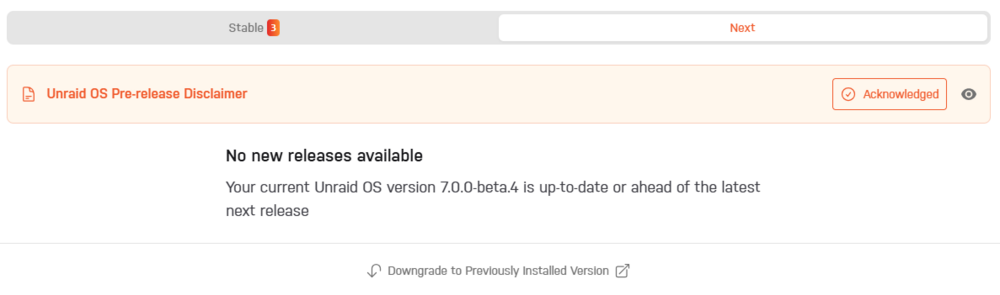
I installed RC 7.0 beta 4 when I first started using Unraid. It's been very stable for me. This morning I tried to update the OS and I see the message in the screenshot below. I don't have a previous OS to downgrade to, The beta was the only one I installed. How do I update the OS now? I see there are 3 updated versions available in the previous tab.
-
Rebuild was successful with no ATA or other errors reported during the rebuild. I had stopped all dockers and VMs during the rebuild. I also stopped the server and mounted Disk2 to verify contents. I'm hoping it was just a bad connection. Anything else I should keep a lookout for? Notice [SERVERUNRAID] - Data-Rebuild finished (0 errors) Duration: 17 hours, 48 minutes, 26 seconds. Average speed: 187.2 MB/s
-
I've been using these drives for a little more than a month on Unraid. I think you may be getting confused with HA-SMR not being compatible with Unraid? These are Hybrid SMR drives, not HA-SMR. The Hybrid SMR drives are shipped from Seagate with CMR as the default and have the ability to be converted to SMR. These were not made for public. The 12TB capacity is the CMR capacity.
-
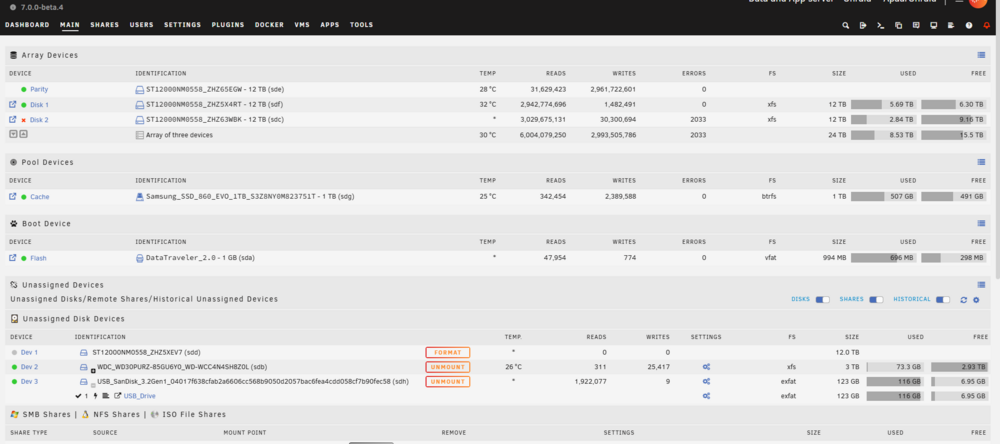
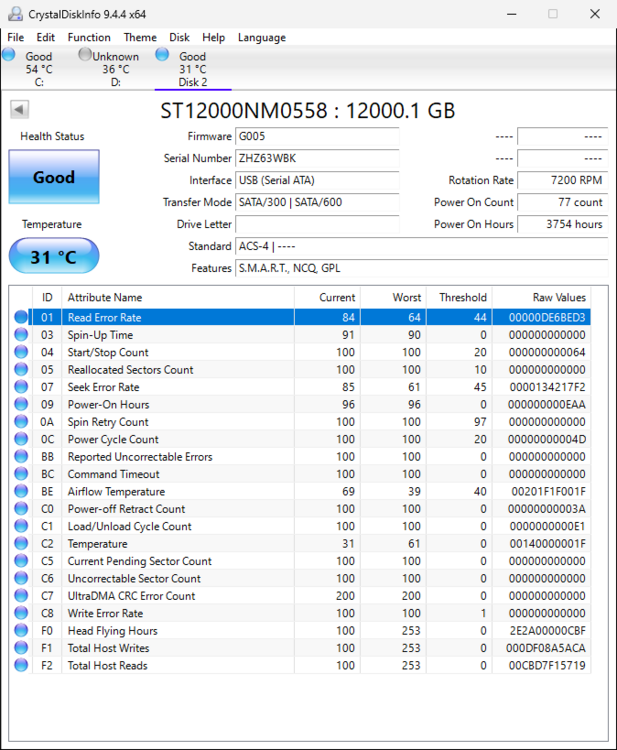
I have an array of 3 12TB disks, one of which is parity. I was copying 3 zip files of Google Takeout pics totaling 110GB from a USB drive. Seems like it stopped writing to the data disk that I was copying to but continued to copy to the emulated drive. I saw the error after the copy was complete. When I unassigned disk2 and mounted it in Unassigned Devices, I could see that all my previous data is there, including the 2 50GB files that I was copying. Copying was interrupted during the last 10GB file and only around 7GB were copied. I removed the disk physically and mounted it on my PC and see no read or write errors in SMART stats. I've now changed the data cable and the SATA port that the disk2 is connected to on the motherboard. Last parity check was done 3 days ago without issues. How should I proceed, knowing that only 1 file is bad on the disk. According to documentation, I should use the "Rebuilding a drive onto itself" option. But would it not try to rebuild all of the 12TB? I guess it would be good because if there is a real issue, it will show up during the rebuild. Is there another way to proceed? I'm attaching some syslogs and disk logs along with screenshots. Screenshot of Array SMART stats of disk2 Actual contents of disk2 (after copy was complete) Emulated contents of disk2 (after copy was complete) syslog to share.txt Disk Log to share.txt



-
Thank you. I followed your write up earlier including downloading the script file and placing it in appdata/scripts but I didn't understand clearly and created the script path in the VPN container. I have now put it in the connected container, and after fixing an error, it's working fine. I had 1 VPN disconnect in the last 6 hours and the 2 connected containers gracefully restarted upon VPN container restart. The issue I ran into was in the linuxserver Firefox container with this log- ---Connection to connected container lost, restarting in 15 seconds...--- /etc/cont-init.d/91-connected-containers: 5: kill: Illegal option -S ---Couldn't connect to connected containers--- I asked ChatGPT and it said "the version of kill available in the container does not support the -SIGTERM syntax for sending signals", it asked me to use "kill -15 1" instead of "kill -SIGTERM 1" and that actually worked. Explanation was : 15 is the numeric signal value for SIGTERM, On systems with minimal utilities, kill often only supports numeric signal values or simpler syntax. I'm new to linux, but I'm assuming that means the Firefox docker has minimal utilities to keep it small? I did not test with Qbittorrent as both containers are using the same script that now has 15 instead of SIGTERM. Thank you for the help!!! I'll go ahead and install your radarr and sonarr containers as well. Oh, and one more thing. Not sure if earlier versions had it, but for Unraid 7, I don't have to select "none" in the network type when setting up the containers, I can choose "container" in the drop down and then select the container name in the next drop down, in this case the VPN container. Thanks again!
-
Should not be an issue with the Internet connection, it's been solid. Maybe the VPN? I've had it for a couple of years but very rarely use it. I'm still just testing, but for the connected container, I have added "--restart=unless-stopped --net=container:OpenVPN-Client" to the extra parameters. Is there something else I need to do? The 2 containers I'm testing with is Linuxserver Qbittorrent and linuxserver Firefox.
-
Yes, I have it pinging google.com every 40 seconds. The VPN reconnects multiple times a day, not sure why. I have FastVPN by NameCheap.com. Also, it looks like the related containers are not restarting. They only restart when I edit some setting on the vpn container. But other than that, they don't restart when VPN container restarts due to ping fail. I'm attaching the logs from the VPN container when the ping fails and it restarts and does not restart the connected containers. The 216.x.x.x address is the VPN endpoint. I am on Unraid 7 beta4. I'm also attaching logs of when I edit something in the Edit page and save. This triggers the connected containers to restart after maybe 10 seconds or so. Thank you for the help. logs vpn container when it restarts due to failed ping.txt logs vpn container when I make a change on the edit page and save.txt
-
FYI, my VPN container ran fine for a few hours and then I lost connection in my other container. And seemed like the VPN container wasn't able to connect to my VPN, so I decided to change the ovpn file, I renamed the original one to VPN_LS.ovpn and copied a new vpn.ovpn to connect to a different server. This seemed to break the container with the following errors in the log: Error: ipv4: FIB table does not exist. Dump terminated grep: /vpn/vpn.conf: No such file or directory ---Checking for optional scripts--- ---No optional script found, continuing--- ---Taking ownership of data...--- ---Starting...--- ---Starting service for connected containers on port: 27286--- ERROR: VPN not configured! ERROR: VPN CA cert missing! I tried renaming the new file and reverting the original file to vpn.ovpn and had the same issue. I was about to post my error here when I tried deleting the renamed file so only one ovpn file existed in the appdata/openvpn-client directory and that seemed to have resolved my issue. So seems like there can only be one ovpn file in that directory, even if the other file is named something like vpnxx.ovpn.
-
All right. Thanks. I also set up another container to restart automatically using your instructions from earlier this year below. I had to google a couple of things but glad I did because I learnt more. I'm new to Unraid and the Linux ecosystem.
-
I'm new to Unraid, setting up some docker containers.... I installed the OpenVPN-Client container and looks like it working now, I installed the Firefox container to test and it reports the VPN IP address. Is there a way to test if the firewall rule will kill the internet for the connecting containers when VPN gets disconnected but the VPN container is still running? I mean can I open console and disconnect VPN and test from my firefox container?
-
I tried this on 6.12.13, that didn't work, and I got the same error when I tried with 6.12.11. I get a popup that says "Error: Trial Start" when I click on the button. Same error from my phone as well as when trying from the Server UI. On the server browser, I opened dev tools and seems like it's getting a 500 error from the server. I'm using a MicroSD card in a USB reader with a GUID that is recognized by the installer. It recognizes it, installs the boot image. But when I start the server, I get this error when I try to start the trial. Unfortunately, the installer says my Sandisk USB drive doesn't have a GUID. I may have other USB drives around somewhere but wanted to check here about the error before I try another drive.