Zeuss
Members
-
Joined
-
Last visited
-
Tried a cable that I know for sure was cat6 and it now shows 1000 Mbps. Thanks!
-
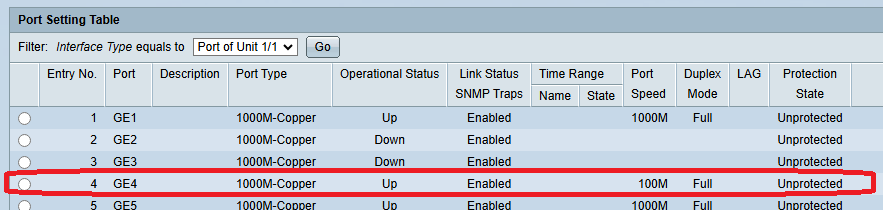
As best I can tell my unraid server should be operating at gigabit speeds but it doesn't seem to be. Any recommendations / suggestions? Perhaps a new driver is needed? I don't know how to install a new network driver in Unraid though. Under Tools -> System Devices I have this line: IOMMU group 25: [14e4:1639] 0b:00.0 Ethernet controller: Broadcom Inc. and subsidiaries NetXtreme II BCM5709 Gigabit Ethernet (rev 20) [14e4:1639] 0b:00.1 Ethernet controller: Broadcom Inc. and subsidiaries NetXtreme II BCM5709 Gigabit Ethernet (rev 20) But on my dashboard my Interface widget shows: Interface Inbound: 188.3 Kbps Outbound: 5.3 Mbps bond0 eth0 eth1 lo General info Counters info Errors info Network traffic Mode of operation bond0 fault-tolerance (active-backup), mtu 1500 eth0 100 Mbps, full duplex, mtu 1500 eth1 interface down lo loopback The server connects to a SG500-28P 28-Port Gigabit PoE Stackable Managed Switch and it shows: Any suggestions are appreciated, thank you!