





jverret
Members
-
Joined
-
Last visited
Everything posted by jverret
-
everything is looking much better now. Just did a reboot and everything came back online as expected without any missing data. Thank you so much for sticking with me on this. Much appreciated!
-
ok, sorry for the delay. So i made the small change, did a clean reboot and here is my diag. tower-diagnostics-20250812-0940.zip
-
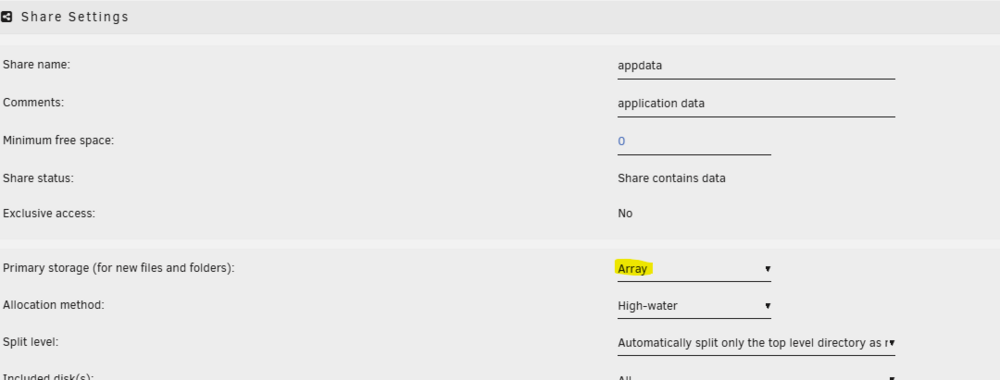
ok, just found that and it was already set to Array. In fact, that is the only option available. Any thoughts on the owner=nobody thing causing me to lose appdata perhaps?
-
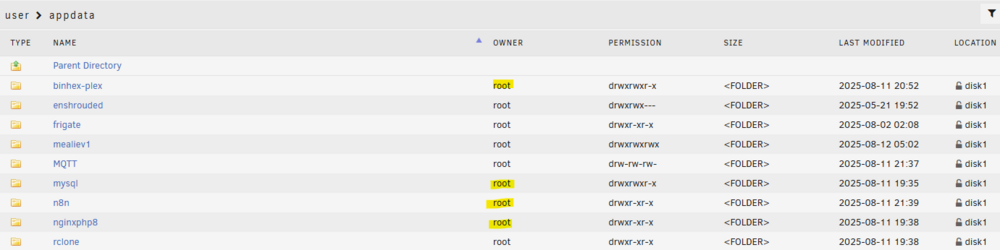
I tried setting the appdata share to array but i believe since i don't actually have any real cache drive that setting doesn't exist. Is this true or did i find bad information? OK, so I was able to do some digging last night. I ended up finding that not only did the N8N Docker get set to /mnt/cache/ by default but also some of the MySQL docker default locations were set there as well. I also found that the remaining volumes on MySQL Docker(from the App Store) were set to /mnt/usr instead of /mnt/user which i thought was odd. I switched everything i could find to /mnt/user. I then ended up restoring most of my Dockers from appdata backup and had to update some permissions to for those dockers to access those volumes. The thing im noticing now is that a chunk of my Dockers are reverting/losing appdata every time i reboot now. The picture below you can see now all my Locations now saw disk1 instead of cache which i think is good. The odd thing was that i noticed the owner of my shares(highlighted in yellow) said "nobody." I just changed them to "root" instead this morning. Do you think that is why my appdata is dropping off after reboot or would it be something else?
-
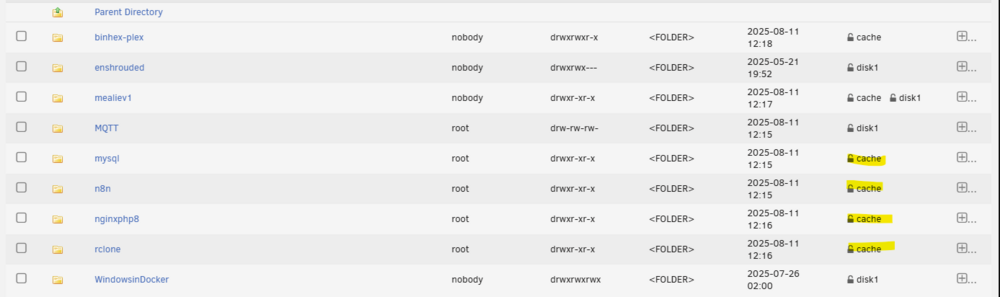
ok, so i went through my Dockers and found that N8N defaulted to /mnt/cache so i changed it to /mnt/usr/ instead and did a reboot. It didnt seem to fix anything just yet. Do I have to get rid of that cache folder it created? I also found this interesting in my shares it show several dockers are stored in cache which i know they aren't because the the docker setup is for mnt/usr. Dont know if that helps or not. Is it possible unraid is confused now? Im afraid to ask but if N8N was setup to save in mnt/cache would that mean ive lost everything since the reboot since i dont have an actual cache drive.
-
that is correct. I only have 2 4TB disks. I dont have any SDDs connect to my machine. The only things i have connected are a CORAL USB chip(for frigate), the USB drive with the unraid image and an SMLIGHT zigbee coordinator. Is it possible to cache on the USB stick with the unraid image on it?
-
I believe there is supposed to be a cache pool but im honestly not 100%. Im kind of new to this stuff. Is there a way to know one way or the other? for the /mnt/cache/appdata folder, is there a way to tell which container is creating this? Would is be in the docker settings? Also, excuse my ignorance but what is "AM"? EDIT: Also, I do have a MySQL docker and N8N and i thought that those are stored in cache if I'm not mistaken or atleast mySQL is? Thank you so much for your help btw!
-
sure thing. Just did a reboot and waited for the array and docker containers to spin up and took this diag. just after. SHould i have done this before docker or is this fine? tower-diagnostics-20250811-0954.zip
-
I dont have much experience debugging this but the only error i found in the diagnostics was this in the syslogs.1.txt about the time being unsynchronized. This seems insignificant but im not sure. Aug 10 18:56:23 Tower ntpd[1559]: ntp-4 is maintained by Network Time Foundation, Aug 10 18:56:23 Tower ntpd[1559]: Inc. (NTF), a non-profit 501(c)(3) public-benefit Aug 10 18:56:23 Tower ntpd[1559]: corporation. Support and training for ntp-4 are Aug 10 18:56:23 Tower ntpd[1559]: available at https://www.nwtime.org/support Aug 10 18:56:23 Tower ntpd[1559]: ---------------------------------------------------- Aug 10 18:56:23 Tower ntpd[1559]: DEBUG behavior is enabled - a violation of any Aug 10 18:56:23 Tower ntpd[1559]: diagnostic assertion will cause ntpd to abort Aug 10 18:56:23 Tower ntpd[1561]: proto: precision = 0.068 usec (-24) Aug 10 18:56:23 Tower ntpd[1561]: basedate set to 2023-05-25 Aug 10 18:56:23 Tower ntpd[1561]: gps base set to 2023-05-28 (week 2264) Aug 10 18:56:23 Tower ntpd[1561]: initial drift restored to 6.603000 Aug 10 18:56:23 Tower ntpd[1561]: Listen normally on 0 lo 127.0.0.1:123 Aug 10 18:56:23 Tower ntpd[1561]: Listen normally on 1 br0 192.168.68.103:123 Aug 10 18:56:23 Tower ntpd[1561]: Listening on routing socket on fd #18 for interface updates Aug 10 18:56:23 Tower ntpd[1561]: kernel reports TIME_ERROR: 0x41: Clock Unsynchronized
-
Ahh thank you so much. I just edited the original post. Are you able to see the attachment now?
-
Hey All, I'm a bit new to Unraid. I had an unexpected server reboot over the weekend(pretty certain is was my Frigate docker) and when i got everything back up, everything looks normal except that the shares --> appdata folder structure is there but all of the folders appear empty in the GUI. My Docker containers are up and running but they aren't doing anything atm. Its almost as if the shares/appadata are pointing to somewhere else now? It's weird because I'm fairly certain the data is all there somewhere as my array is still sitting at the same usage it was at before the crash. Another thing is I have 1 VM for Home Assistant and that is 100% running normally as expected. About the only thing that is running ATM. I've tried booting in "Safe mode with GUI" to see if it happened to be one of my plugins that is messing with something. I also tried deleting one of my docker images and reinstalling it to see if that would restore the share or folder I'm just not sure what else to try. Im really hesitant to restore from one of my Appdata backups because i lost my sql database last time not realizing that it wasn't being backed up and it took a ton of time to get everything back. I'm trying to go through all avenues before trying that. Any help would be greatly appreciated. tower-diagnostics-20250811-0913.zip
-
My apologies for such a nooby question. I know how to code PHP and HTML but am unfamiliar with the full setup needed to get PHP working. I am just trying to get an internal webpage to use as a PHP sandbox. I have installed your docker and placed my index HTML/PHP file in nginxphp8\www\index.php. I was thinking this docker already had PHP installed on it. If i rename my file to 'Index.html' then the web gui works but if i change it back to 'index.php' it doesn't. Am i missing something simple here?



