





cup089
Members
-
Joined
-
Last visited
-
Yeah copying to this particular share manually is working without any issues. Edit: Okay I just disabled the option to include a system recovery disk (actually do not know how its called in English) and after that the backup runs without any issues.
-
Hi, I attach the diagnostics as Zip file. tower-diagnostics-20250914-1310.zip
-
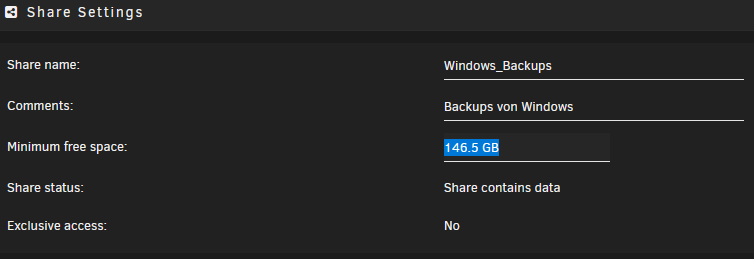
Hi, I have the same problem by trying to use the "Backup and restore (Windows 7)" function. The backup runs and it seems almost to be finished but then I get the error due mssing space. I have created a separate pool for backups - 1.5 TB disk space - so plenty enough to backup my home folder from Windows. I already retried the backup and also completely restarted from scratch (deleted the backup from the unRAID backup pool) but no luck. What ist the matter with the "Minimum free space"? On my pool it was predefined to 146.5 GB and I cannot even set it to zero: Does this option really matter or is the failure caused by something else. I am a bit confused and have no idea. Can somebody help, please?
-
Short Update: Tried to disable the "enhanced MacOS compatibility" after that you have only read only access to the SMB shares. Then I tried several other things like described here: https://wiki.samba.org/index.php/Configure_Samba_to_Work_Better_with_Mac_OS_X Unfortunately this also does not have any effect. In the meanwhile I updated to iOS 18.1.1 and the files app is still not able to communicate correctly with the SMB shares. So I give up and stick to GoodReader, a PDF editor and files management app, which I have bought several years ago at a time where the files app was not even released. GoodReader has no issues at all no matter which MacOS specific setting is set.
-
Ok thanks for the clarification. However I do not think that the exclusive share option is the right one I need. According the explanation: This is not what I want to achieve.
-
Thanks for your comment. Then I will give the exclusive access a try. What do you mean with "keep that on its own system" regarding the virtualized pfSense? I also use the pfSense with a passthrough Quad NIC on unRaid and the VM is sitting on the cache drive and not the array. So It should also not affected by such settings which requires to stop the array. But probably the cache drive also belongs to the array...
-
Hi, I still have the issue with the files app on iOS 17.x and I just wanted to disable the "Enhanced macOS interoperability" setting. But since I am running a virtual pfSense on the unRAID server I a have a dead-lock situation: I cannot stop the array to change the corresponding setting within the Web UI without loosing the connection to my server. So I tried to disable this setting via the command line by modifing the /etc/samba/smb.conf and reboot the server. Unfortunately the configuration file is generated somewhere else during boot process and I just cannot find out where. Can someone give me a hint please? Or is there another workaround to disable the "Enhanced macOS interoperability" setting for testing in my situation?
