





jlwitherell
Members
-
Joined
-
Last visited
Everything posted by jlwitherell
-
I understand that too, I specifically was asking claude and gemini about the best settings for my use case. The .pdf included here was the end result. They said they quadruple checked through every source (including forums). What I was hoping to get was a ZFS expert to say, yeah, those settings look great, or no, don't do those specific settings because of x/y/z, to have someone, other than ai actually verify the settings look good.
-
My post specifically says that I know this is overkill and that I'm doing it anyway. This is how I'm setting up my server. I've already been using zfs. I'm sticking with it. My question was about the settings in the pdf. What would make anything a lot worse? It's ok to say that you don't know either.
-
Thanks. Yeah, I'm aware of all that. I am actually just wondering about the specific drive settings when setting up the new pool. Did you look at the .pdf attached? Any input there?Thanks!
-
Hi and thanks, I just moved all media off and was going to do a brand new raidz2 pool with the 8 drives. As far as not doing the standard unraid, I already have all the nvme's and everything - mirrored special read cach and even including an optane for the slog (lol), so was just going to do the full meal deal zfs. Yeah I know, way overkill, but correct me if I''m wrong, the zfs will still make the plex browser experience quite better through this zfs system. I will also be hosting immich, and a small chance down the road for other stuff running but not likely.
-
Heya ya'll! Smooth brain here, just enough knowledge to get into trouble. The short story - I'm getting ready to add new drives to a Plex and soon to be Immich server and go from a 4hdd raid z-1, to a 8hdd raid z-2. Everything has been working great, but per Claude and Gemini some of my original settings should have been optimized differently (i.e. recordsize). At any rate, here is a pdf of what we all (they, lol) gathered and wanted to run it by the forum. Yes, my system has all the vdevs, specials, etc. and is probably overkill. My biggest questions are regarding the settings to be optimized before making the pool, and before adding any data. Thanks for any help and remember, I am still just a n00b. Cheers ya'll! Tower_ZFS_Settings_Reference_FINAL.pdf
-
For sure there is an issue with the Optane drive I tried to set up as slog, my motherboard doesn't support Optane drives. I have a pcie optane coming and will replace that. Diagnostics attached. What is the process to replace the slog vdev drive? Thank you so much for the help! tower-diagnostics-20250518-0959.zip
-
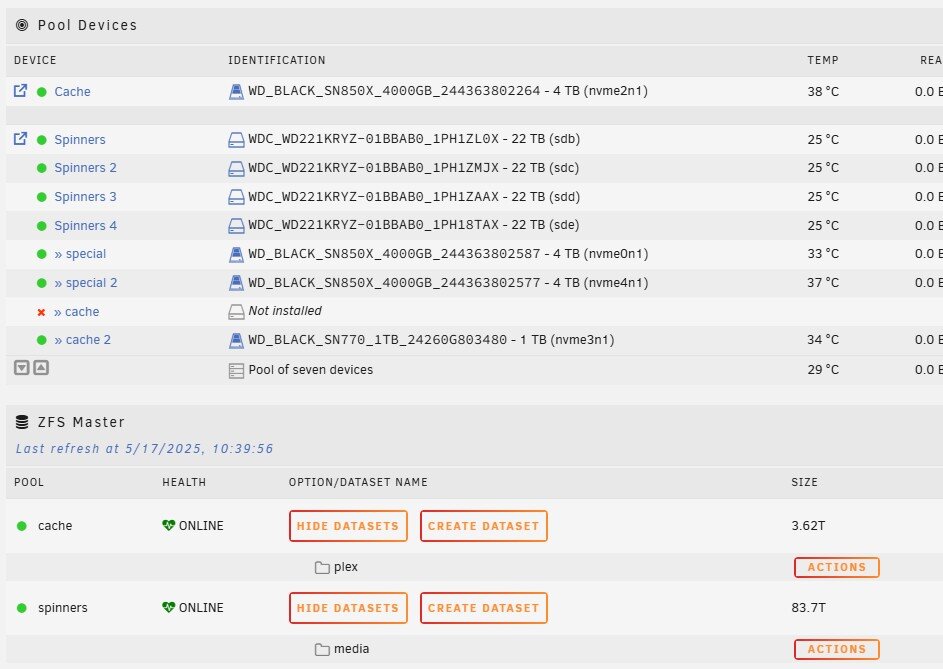
Thank you, that let me start the array but it looks different now (see pic), though Plex seems to be working fine. The cache not installed is the unsupported optane drive as the write cache. The other, now showing as cache 2 is the read cache. Is this right now, even though it looks different than before - not showing "slots"? Sorry for my ignorance on the matter. and thank you again!
-
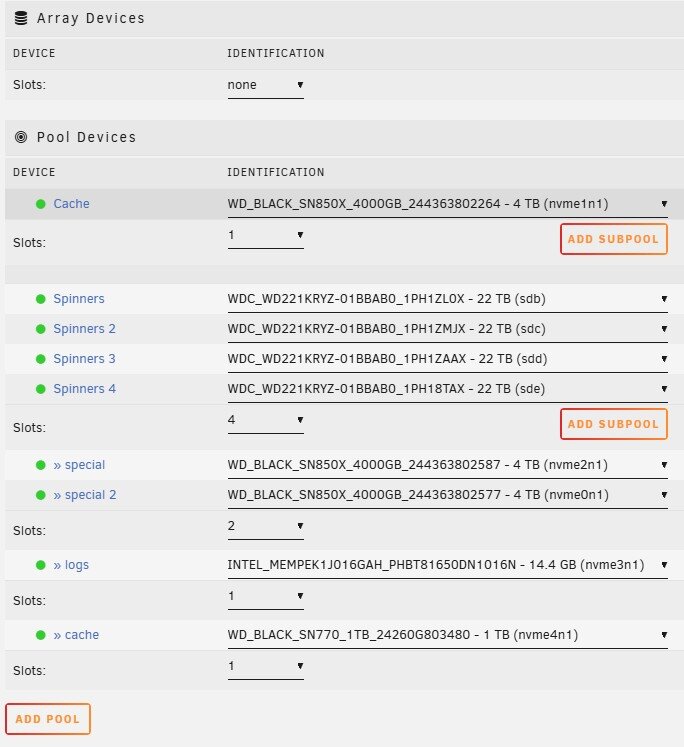
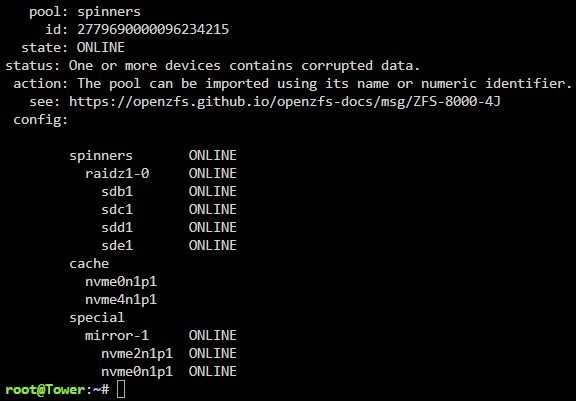
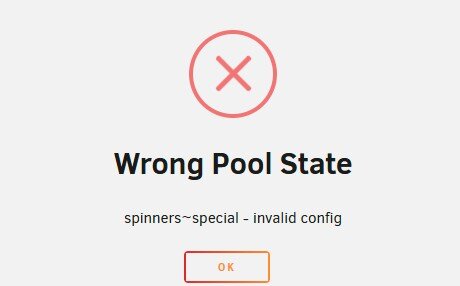
Not unraid literate yet, but server was up and running for some time. However, upon a reboot (nothing changed on my end) I get the error shown below. Also is a pic of my setup, as well as the zpool import command data, and config file attached. The slog says corrupted, but I believe that is just because the slog is an intel optane drive while the motherboard does not support it, and I haven't taken it out, because I'm still a n00b and don't even know how to safely do that. Though it has been working with it in since I built it several months ago. I've read that you can unassign all the drives, start array, stop array, reassign all drive then start again to fix, but that just gives me more errors. My USB stick may be going bad, as now it seems the motherboard only finds it about half the times on a reboot. tower-diagnostics-20250516-1316.zip
-
Hey Kitty. You have to install the unraid connect app and do it through there..
-
Noobie here, trying to get things up and running. First time on linux and unraid. Server is up and running and I have a lifetime key, which shows up in unraid.net. But when I try to register my server (for remote access) I get Error - Something went wrong - Signing In. Seems so simple buy I have a smooth brain. Thanks for any help, hope you are all well
-
You mentioned earlier about formatting the single NVMe used for appdata/dockers as BTRFS. I should not do that as zfs too? This does does not have a mirrow, so with zfs could do snapshots if wanted?
-
Ah, that's great to know and thanks for the videos. I think I've watched the 1st and 3r one, I'll watch these and a few others again. Thank you again for all of your help, hope all is well
-
Thanks, as always very good information for me to make the next steps. Now I'm pretty sure I can set up the pools, but I need to figure out which tweaks to make along the way (block sizes allowed somewhere I think I need to look at - all for best performance type stuff). Then figure out how to do the dockers/app data and install them to the single SSD.. (?), and figuring out their configurations. But yay, I think now, with just figuring out a little tweaking of the subpool setups I can at least get the whole thing framed (I had a video regarding some of the tweaks when using sub pools, but need to try an find that again and/or and also do a bit more research).
-
He Bmartino thanks again for all the info. I have been busy but back to trying to figure this out. One question about this potential setup that has popped up is should I designate an SSD for docker installs and/or appdata for performance, in addition to the special vdev, slog, L2ARC, or is this not necessary with having these subpools? My apologies again, still a first time newbie. I'm also confused on the z master app. I installed it, and went to create the pools, but I can't seem to get zfs master to create anything. In Unraids gui I creat the main pool of spinners and zfs master will only see it when I start the array. Then, that pool shows up in zfs master but the only way I see to create the sub pools is from within the pool devices, nothing like that in zfs master. I have been searching for a step by step guide for a bit, but so far have been unfruitful. I know that I should be tweeking some of the parameters for the sub pools which I still need to also figure out how to do, then figure out how to use docker/plex as well.
-
Fantastic information as per usual my friend, thank you. Good to know about the NVMe's being not a complete no-no, but just make sure mirrored and monitored - specifically for the special vdev/slog. Your first sentence also brings up another question. Since the hardware I have would be good for zfs (now and going forward), do you think that I should use truenas instead? Again, I'm new to this and basically got into the direction of unraid from my initial searches, and namely before diving into, or even knowing about zfs. Seem that unraid is likely better for their traditional array and if you have mixed and matched hardware (drives), but, since zfs has been established longer in truenas, should I just go there instead?
-
Hey bmartino hope all is well! Ordered x4 4tb sn850x NVMe's, but doing more research may be over-kill for SLOG/L2ARC? Also, I've seen info that I may be hard pressed to really need an L2ARC, given already having 128gb of ram (though this could change with say maybe 5+ people streaming 4k?). From what I'm reading is that for the slog, very little capacity is needed since the system refreshes every 5 seconds, though that can be changed. I may still do both, but use the smaller drives and not mirrored. For the special VDEV, I would still plan to mirror two 4gb NVMe's, but what I've also since read is that maybe that's not a good idea with these unless they are Intel Optane, due to significantly lower write lifespans. Do you know if this is really something to worry about? Guess I'm a little nervous even mirrored as it seems if doing the special VDEV, that if these go back the whole pool goes bad.
-
Man, I truly cannot thank you enough. You have laid out and answered all of my questions. And done so in a way that such a newbie like me can comprehend. I think that I will get some larger drives and leverage the sub-pools. I know I still have a lot to learn and it's not the easiest way, but I like a challenge. How do I buy you a cup of coffee or something?! Thanks so much again, and hope you have a great weekend Oh wait, I see your gofundme. I'm sorry I didn't see that earlier. I hope your health turns for the better very soon, I'm very sorry to hear that. I am donating now.
-
Wow! That is great and perfectly described info for what I was looking for. I greatly appreciate your time and effort to provide this Thank you so very much. So if I were to leverage the sub-pools, do I still need a basic cache pool? I'm sorry, I am very new to this... I can send the NVME's back and get larger and/or more to do this (more) correctly. The z690 has 5 NVMe slots. I do anticipate a large plex library, should I go for larger NMVE's? One thing I don't know is if I find that I need more space for these cache and/or subpools later, if it's easy to add to later or not.. Thank you again and have a wonderful day!
-
Thank you friend. Yes I have the beta and have the HDD's in a zfs pool. The simple raidz1 cache pool is nice and easy. I didn't know if I should simply do that, or use the sub pool feature of the main zfs pool to create a l2arc cache, slog, special zfs pool or not. And/or if I should have larger/more nvme's to do it all proper.
-
Hello all - building my 1st server. Mainly will be used for plex, but also some video editing, and maybe some VM in the future and/or who knows. Hardware: 12600k z690 gigabyte aorus master 4 x 22TB HDD's 3 x 1TB M2's 128gb ram 2gb fiber optic Thinking I want to do zfs pool of the HDD's mainly as I plan to allow several people to stream plex Obviously want zfs as pools but with this setup, and UnRaid 7.0, my main question right now is should I create a single cache pool with raidz of the M2's, or use the new "sub pools" to create various pools (L2Arc, slog, special?), or both?. I've spent a lot of time scouring the net but haven't been able to find out. Welcome any insights and thanks.

