





kitharo
Members
-
Joined
-
Last visited
-
Missed reading that! Here it is It does! Thank you very much! nut-debug-20241124112740.zip

-
Here it is:

-
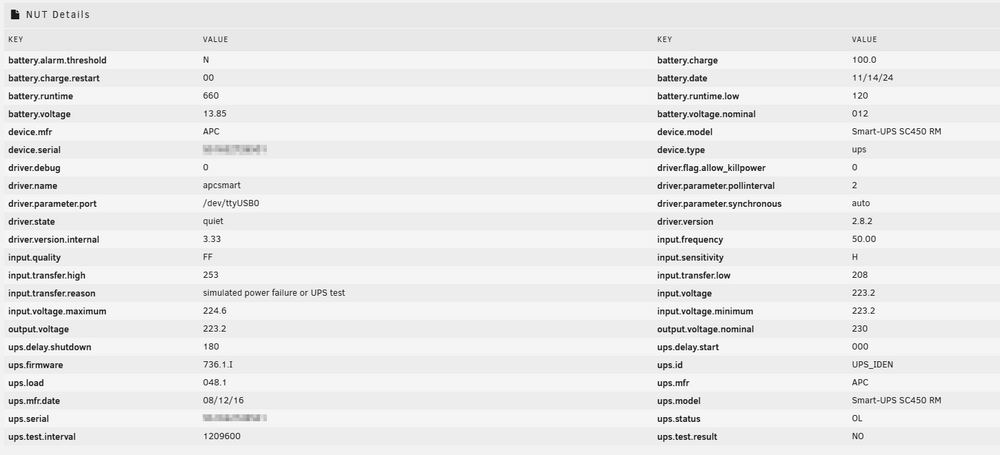
Hi Rysz, you saved my sunday! Thank you very much! If other looking for an solution in the future with the SC450RMI1U and an usb to serial cable that comes with an CP210x USB to UART Bridge Virtual COM Port:

-
Here it is. Thank you in advance! nut-debug-20241124111031.zip
-
I'm not sure about how can I do this. How do I know the path (sorry for that dumb question). I installed the USB Manager Plugin with the USB Manager Serial Options addon but there is also no option to show the path. Can you help me out? From the log of the device: USB to Serial cable are always confusing


-
Hi there, do someone got an SC450RMI1U working? I was missing the origin cable so I bought that one (Link). It worked on my windows server with the PowerChute and the CP210x USB to UART Bridge Virtual COM Port (VCP) drivers (link). Refer to this Network UPS Tools - Smart-UPS SC450 RM I should be able to set the apcsmart as driver. But I missing it in the dropdown menu. Is there a way to get the CP210x USB to UART Bridge Virtual COM Port on NUT? Or should I use another cable?




