





elatedgoat
Members
-
Joined
-
Last visited
Everything posted by elatedgoat
-
So, maybe I should have realized this noob mistake but it seems like I need to use the FQDN for local resolution and that it is working now. So I needed to use something like `hostname.local` and not just `hostname`. Thanks for all the help!
-
I do see both networks and they seem to be configured correctly. To reiterate, the container gets an IP address on that second subnet and I am able to access it. Though that container does not have DNS properly configured to use my local resolver to access other devices on that subnet by hostname.
-
Sorry to be a pain. But I followed your steps above and I am still not able to get DNS working in that network. I even deleted the existing network and recreated it with your command above. I am at a loss of what to do at this point. I can believe it is this complicated to get a docker network to work on a second nic.
-
What do you mean by "no diag to further assist"? I created the second bridge `br2` via the GUI and as described in this post. Then I saw that `custom br2` docker network show up as an option when creating the container. So I chose that when configuring the container. I am able to reach other devices by using the IP address. My setup is ISP Modem > opnsense > sub network 1 switch > unraid eth0 > br0 > sub network 2 switch > unraid eth2 > br2 > device 1 > device 2 > ... device n I am not using vlans. How can I get a container to use eth2 and be able to communicate to other devices via hostname on sub network 2? If there are some commands you need me to run just let me know and I can share the output.
-
@Espressomatic - you are right. I do have a local resolver and the paste above was from a different one, but the concept is the same.
-
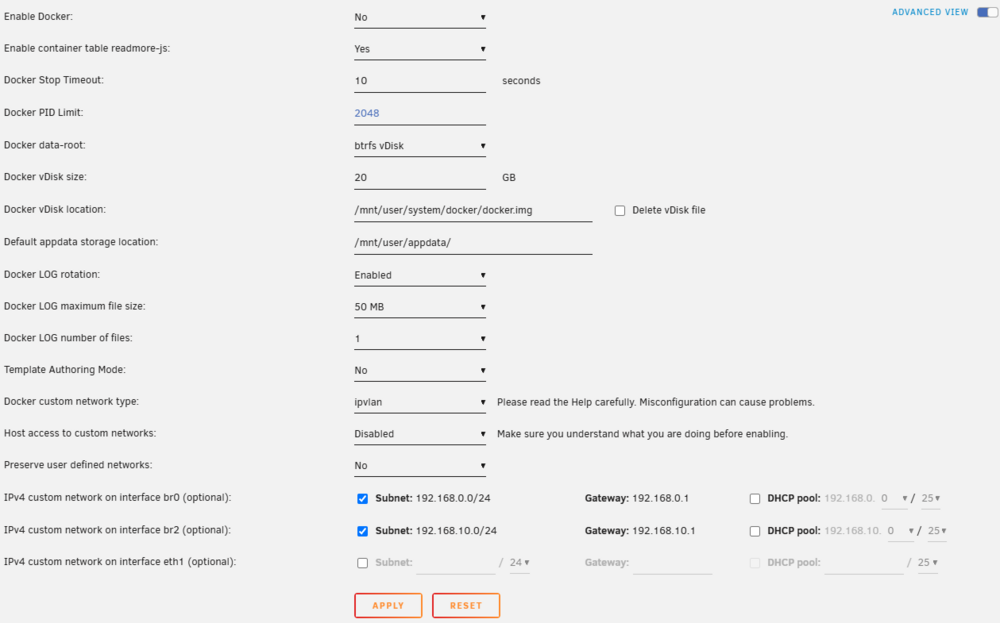
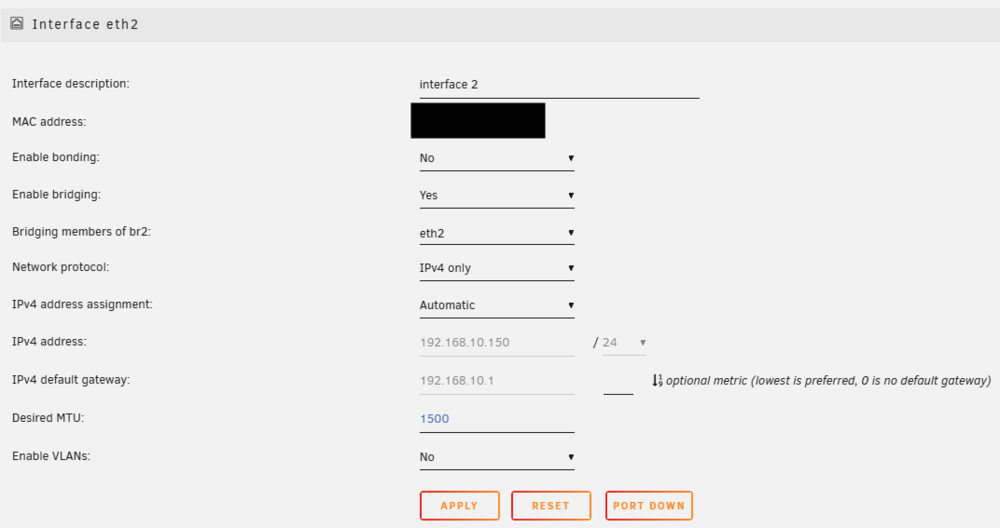
@bmartino1 - thank you for the detailed solution. Though I am struggling to find some things. Where on the host do I configure `br2` correctly? I don't see anything in the GUI that allows setting DNS for that bridge (Settings > Network). I also don't see anything under `/etc/network/interfaces` where they would be set in other flavors of linux. Below is my output from the `docker network inspect` command: # docker network inspect br2 [ { "Name": "br2", "Id": "753d54cbc6b6428486e96892c751391df0408b3b39e5270668f0000000000000", "Created": "2024-11-27T20:11:42.502122994-00:00", "Scope": "local", "Driver": "ipvlan", "EnableIPv6": false, "IPAM": { "Driver": "default", "Options": {}, "Config": [ { "Subnet": "192.168.10.0/24", "Gateway": "192.168.10.1", "AuxiliaryAddresses": { "server": "192.168.10.150" } } ] }, "Internal": false, "Attachable": false, "Ingress": false, "ConfigFrom": { "Network": "" }, "ConfigOnly": false, "Containers": {}, "Options": { "parent": "br2" }, "Labels": {} } ] I do not see any field called "Docker Custom Network Settings" under Settings > Docker to add the DNS. The below are the only fields I see. Below are the settings for `eth2` of which there is no DNS fields like there is for `eth0`. If I am creating a new network, how am I ensuring it only uses eth2 which is physically connected to the subnet? Also, I tried to test out your create command to see if maybe I could create a new one and it seems that the `--dns` option isnt recognized. Also as per the docs. # docker network create \ --driver=bridge \ --subnet=192.168.10.0/24 \ --gateway=192.168.10.1 \ --dns=8.8.8.8 \ --dns=1.1.1.1 \ custom_test unknown flag: --dns See 'docker network create --help'.
-
Complete noob to unRaid here and testing this out to replace my other NAS. Thanks for bearing with me. I have a server with 2 nics (eth0, eth2). Each nic is attached a separate physical subnet. I have created 2 bridges in unraid (br0, br2) and assigned each nic accordingly. When I am creating a docker app, I am selecting `Custom: br2` for network type. The container creates correctly and I am able to access it, but for some reason the dns is wrong and it cannot access other devices on that subnet by hostname. From the host itself (like via console) I see the DNS is correctly set and I can access other devices From inside the docker container: # cat /etc/resolv.conf nameserver 127.0.0.11 options ndots:0 On the host: # cat /etc/resolv.conf # Generated by dhcpcd from br0.dhcp domain local nameserver 8.8.8.8 nameserver 1.1.1.1 I have tried adding the `--dns='xxx.xxx.xxx.xxx'` to the extra parameters section. Does not work. Furthermore it seems like it is not supposed to work as per the docker network documentation. It seems like it should just adopt the host dns settings. It would seem like `br2` is not configured correctly with my networks dns. What I effectively want is that this container should only connect on the eth2 subnet and that it should have the DNS properly configured so that it can access other devices via hostname. How can I achieve this?

