





JohnVIDnr5
Members
-
Joined
-
Last visited
-
Does nobody really have a clue after 11 days?
-
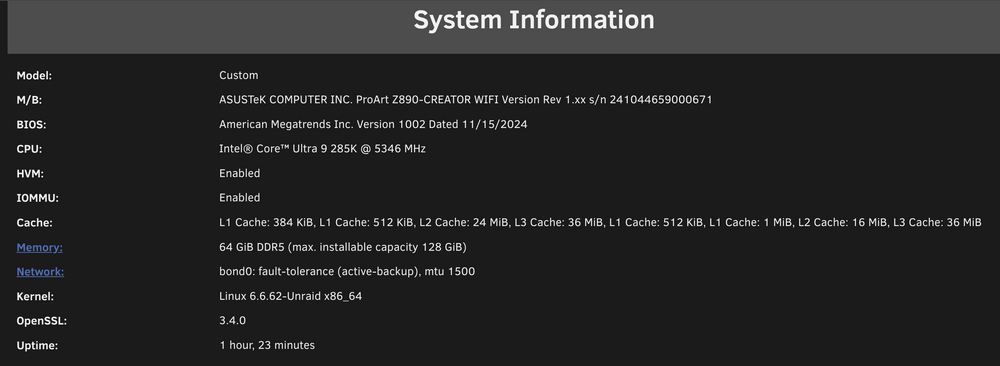
Hi there, I have a problem with Emby/Unraid on my new hardware. Hope someone can help me out. My new server consists of an Intel Ultra 9 285K, 64GB RAM and an Asus Z890 ProArt mainboard. On Unraid 7.0 there was no support for the iGPU of my 285K. But now I have Unraid 7.1 Beta and that support is there. However, I can not choose hardware en/decoding in the Emby settings. The iGPU is not present there. When I use the EmbyServerBeta image I do see my iGPU in the settings. However, if I then play a 4K movie at 8Mbps, the processor still does all the work and the iGPU remains at 0% usage and 0W consumption. In both Emby images I have tried both the /dev/dri and the --device=/dev/dri:/dev/dri parameters method. Has the same effect. Does anyone have any idea how I can fix this? skynet-diagnostics-20250320-1632.zip
-
No problem. I did restart the system but no luck. But.... I also installed the EmbyServerBeta and that one gives me the option in Emby to set the Hardware en/decoders to the iGPU. Unfortunately when I play a big 4K file and choose 8Mbps my CPU goes crazy but the iGPU is still at 0% and 0W usage. So I think it still must be a emby/unraid software related issue.
-
Is there anything else I can try?
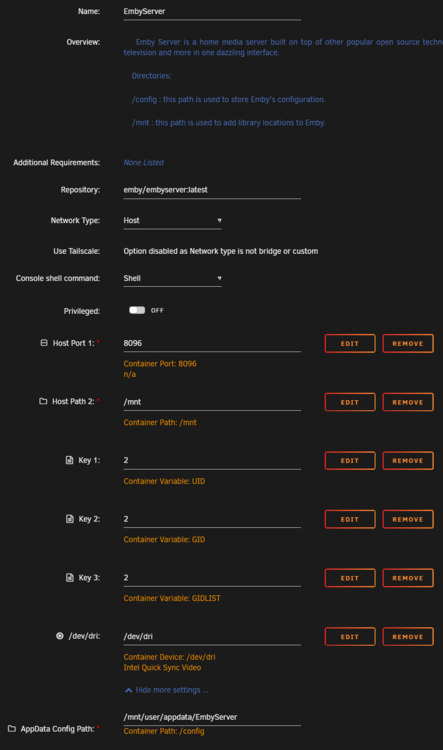
-
These are my Emby settings: And I also included my diagnostics file. Hope we dan figure this one out. skynet-diagnostics-20250318-1238.zip
-
Hi ich777, Thanks for your quick response. I am using the official release. Details Application TypeDocker CategoriesMediaServer:Video, MediaServer:Music, MediaServer:Photos AddedMay 30, 2015 DownloadsMore than 100,000,000 Repositoryemby/embyserver:latest DockerHub Stars:638 Last Update:Mar 14, 2025 Which I have been using for years and where previously the Intel iGPU of my previous configuration did the heavy lifting. Yes I did try that. The fans of my CPU are getting wild. And no change in the monitoring stats. In Emby I also don't see a device for hardware decoding. 😞 Do you have maybe some other suggestions?
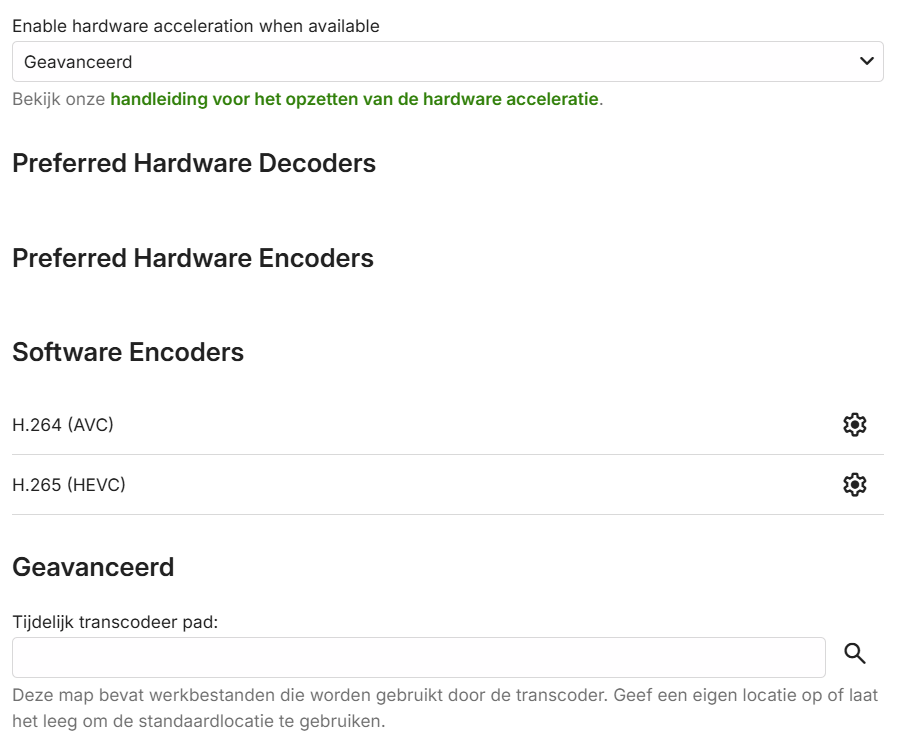
-
Hello, and good day to you fine people. I was surprised today by an Unraid 7.1.0-beta.1 update. Which brings the Linux kernel to 6.12.19. And if I'm correct, it finally supports the iGPU of my Intel Ultra 9 285K. Of course I installed the update immediately and I now see an Intel i915 Arrow Lake-S [Intel Graphics] on my dashboard. But all values are at 0% with also 0W power drawn. This while the monitor does show an image with all the startup rules of Unraid. Even if I did nothing, the GPU should still consume something, right? Also tried to connect the iGPU to my Emby container with the following lines: root@Skynet:~# /dev/dri bash: /dev/dri: Is a directory root@Skynet:~# modprobe i915 root@Skynet:~# ls /dev/dri by-path/ card0 renderD128 root@Skynet:~# chmod -R 777 /dev/dri and then created a device in the Emby container with: Config Type -> Device Name -> /dev/dri Value -> /dev/dri Description -> Intel Quick Sync Video But unfortunately the iGPU does not appear in the Transcode section of Emby. Does anyone know if I am doing something wrong and how I can fix this by chance?
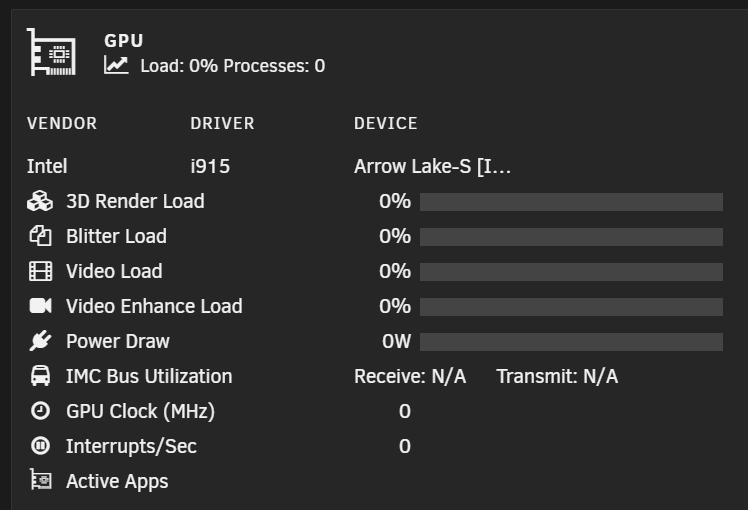
-
Hmm guess I’m stuck with software transcoding for now. Thanks for all the support. If I make any progress I’ll let it know.
-
Main and only purpose is hardware transcoding for the Emby Docker for as long as the iGPU from the intel Ultra 9 285K is not supported.
-
Yes the card is in an external GPU enclosure.
-
Yes it is a PCIe card. Just in an external eGPU case. Connected to the laptop with a Thunderbolt 3 cable. I downloaded the driver and installed it on Windows. It showed up like it should without question marks. However I did not try to connect a HDMI cable to it. Next step for me is to try to create a VM with it and have the VM boot up. Did not tried that yet. Could it be something with my Thunderbolt settings perhaps? Does Unraid support Thunderbolt 5?
-
Ok, I removed the lines from the go file. The card did work on my work laptop and the GPU is present in Windows Device Manager without a problem. And the GPU does not have a extra PCIe power connector. Bios is updated to the latest version before I installed Unraid on it. Running in UEFI mode. Resizable BAR was already enabled But could not find "Above 4G Decoding" or "Support for Huge Addres Tables". My bios has a search function and it gave no result. Restarted the computer but still same problem. Anything else we can try? Here is also the new Diagnostic file from after the change. skynet-diagnostics-20241211-2311.zip
-
🙃 now with Diagnostics file skynet-diagnostics-20241211-2221.zip
-
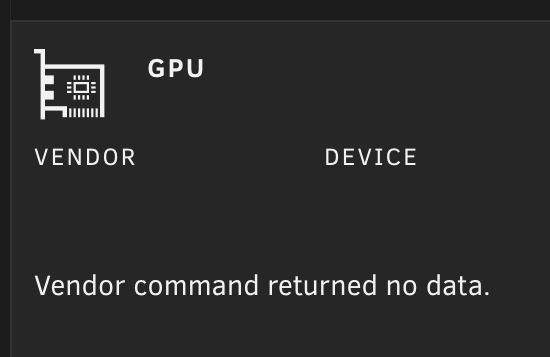
Ok, I'm still having a problem. Hope someone knows what to do next. I just installed an Intel Arc A380 in an external case from Razer (Core X). It shows up in "System Devices". And I can pass it thru to a VM So I installed the INTEL-GPU-TOP and GPU Statistics and selected the card from the GPU Statistics settings. But... it does not give any stats. And also when I go into the console and type "cd /dev/cri" it tells me that there is "No such file or directory" I believe this should result in something else correct? Does anyone know what to do and how I can get this and Emby working with this GPU? I have a Unraid 7.0.0 RC1 installed on a Intel i9 285K. Help is very appreciated.
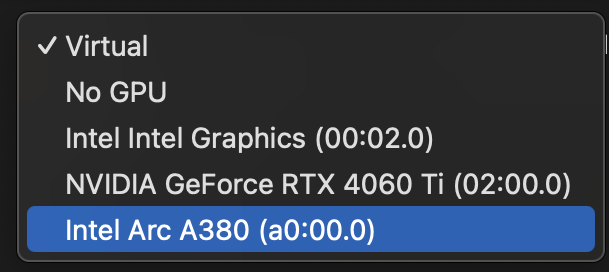



-
You are right. Thanks for your advice but for me this is only a temporary solution. As soon as the iGPU works it will be removed from this setup. I had not thought in advance that the iGPU from the 285K would not be supported for this setup. And then I am glad that I found out so quickly via this forum what the problem exactly is.





