




Skip to content
View in the app

A better way to browse. Learn more.

Unraid

A full-screen app on your home screen with push notifications, badges and more.

To install this app on iOS and iPadOS
  1. Tap the Share icon in Safari
  2. Scroll the menu and tap Add to Home Screen.
  3. Tap Add in the top-right corner.
To install this app on Android
  1. Tap the 3-dot menu (⋮) in the top-right corner of the browser.
  2. Tap Add to Home screen or Install app.
  3. Confirm by tapping Install.

powertower

Members
  • Joined

  • Last visited

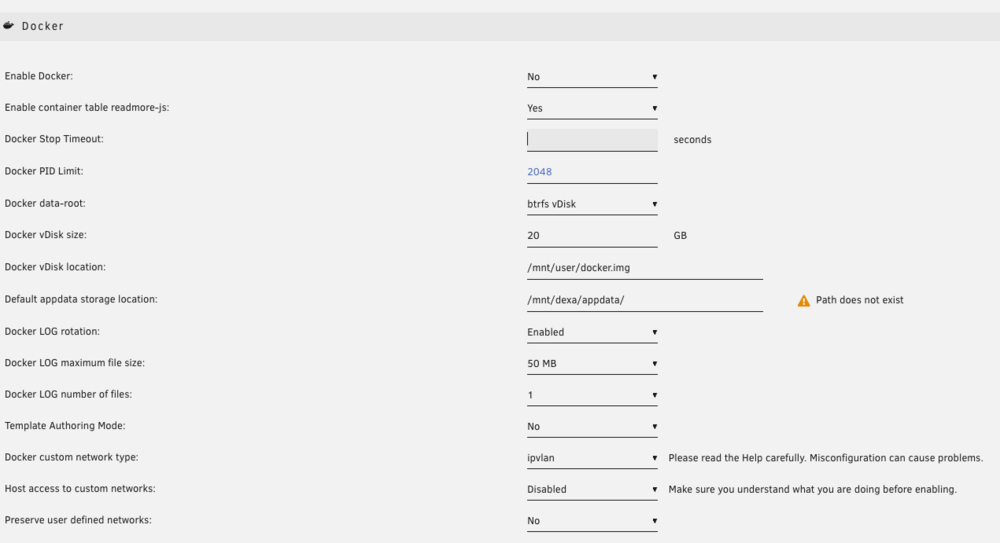
  1. Please help.. Having similar issue on first time installation>> Docker Failed to start error In Docker settings it shows the error : Default appdata storage location: "Path does not exist" Path is /mnt/user/appdata Docker LOG rotation: Enabled Docker LOG maximum file size: 50 Docker LOG number of files: 1 Template Authoring Mode: No Docker custom network type: ipvlan Host access to custom networks: Disabled Preserve user defined networks: No
Account

Navigation

Search

Search

Configure browser push notifications

Chrome (Android)
  1. Tap the lock icon next to the address bar.
  2. Tap Permissions → Notifications.
  3. Adjust your preference.
Chrome (Desktop)
  1. Click the padlock icon in the address bar.
  2. Select Site settings.
  3. Find Notifications and adjust your preference.