





gustolf
Members
-
Joined
-
Last visited
-
Thank you for all your help so far! Now, the fact that the disks show without the expander does this mean that the expander is not compatible with the new firmware?
-
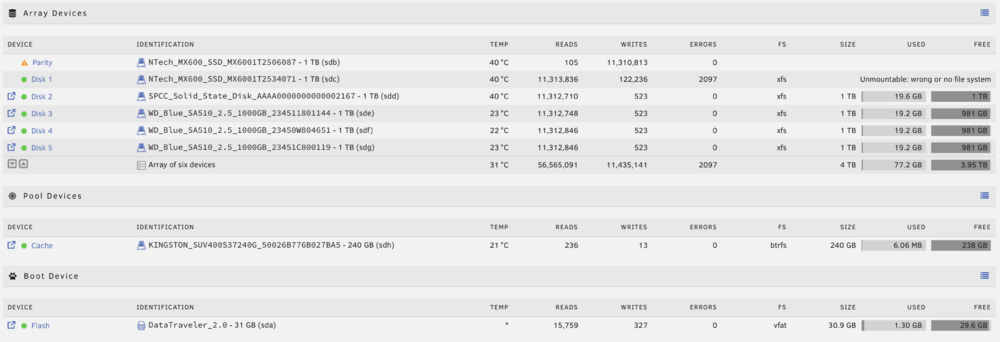
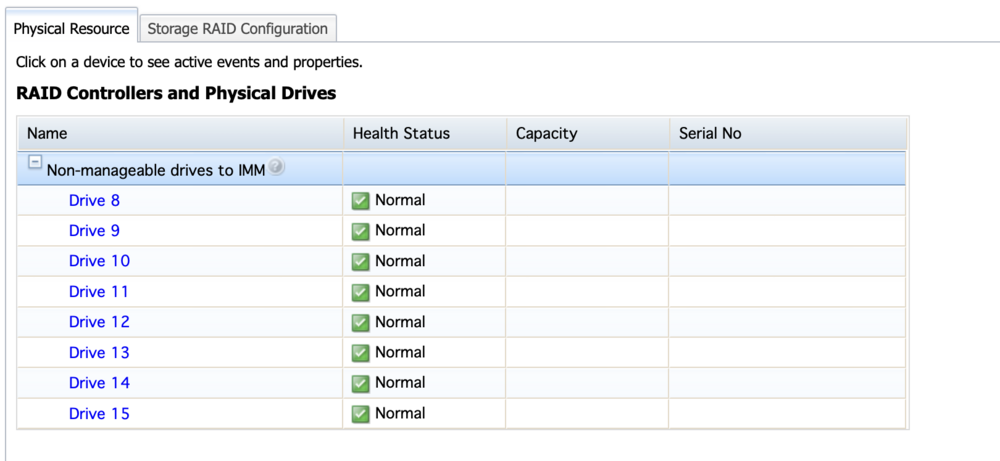
Okay, I went down to the basement to recheck the cabling, and I realised that I forgot to power the SAS board without the expanded plate, so that’s why the disks were not being recognised anyways. Whoever, one of them still shows errors when I'm trying to format. The diagnostics and system log are attached. I still don't know if it's something I'm doing wrong or just hardware incompatibility. Plus, in the IMM, the system detects eight drives while Unraid only sees seven? concorde-diagnostics-20251112-1202.zip syslog.txt
-
The problems still persists when directly connected.
-
Okay I will try that today and let you know thank you. Could it be because I gave a random SAS address during the flashing? Also I don’t know if it helps in anyway troubleshooting this but the tutorial I followed was this in the attachment. 1. INSTRUCTIONS.pdf
-
They’ve on an IBM SAS expander backplane, not direct.
-
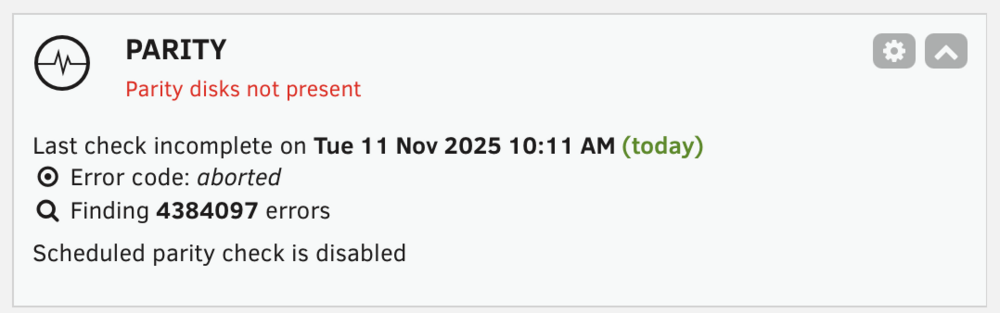
Sorry this upload is just to show the crazy amount of errors...
-
Okay, so I managed to find a very old tutorial on the web archive on how to flash the M5110e into IT mode, and that has been done successfully... However, now whenever I boot into Unraid, all my disks don't show up or take a huge amount of time to appear. When they do appear, and I try to make an array, some disks cannot be formatted, and the ones that can only produce errors when I'm trying to build the parity. I have no idea what triggers the disks to appear when they do... I saw somewhere here in the forum to add append pci=realloc=off initrd=/bzroot. I did. I have no idea if that makes any difference. I appreciate any help. I'm very lost. default menu.c32 menu title Lime Technology, Inc. prompt 0 timeout 50 label Unraid OS menu default kernel /bzimage append pci=realloc=off initrd=/bzroot label Unraid OS GUI Mode kernel /bzimage append initrd=/bzroot,/bzroot-gui label Unraid OS Safe Mode (no plugins, no GUI) kernel /bzimage append initrd=/bzroot unraidsafemode label Unraid OS GUI Safe Mode (no plugins) kernel /bzimage append initrd=/bzroot,/bzroot-gui unraidsafemode label Memtest86+ kernel /memtestsyslog.txt concorde-diagnostics-20251111-1825.zip
-
I know but I really do not have the knowledge to flash it and I dont find any easy enough tutorial or one that works I'll have a look and come back to you
-
Hello, I'm sure this was asked a lot of times, but I can't find anything in particular about my case. So, I own an IBM x3650 M4, and I don't know how to flash the LSI board to make it expose the disk straight into Unraid, so what I did was I created a virtual drive managed by Mega RAID with all my disks and then used Unraid. However, yesterday after a power outage, the server went down, and now the array says "Unmountable disk - No File System". I tried maintenance mode and changed the disk slot to see if it would solve it, but not really. The file system is ZFS, and it detected it but won't let me change it to anything else; it is greyed out. I really do not want to format this disk; it has a lot of personal stuff and backups. Any solution to this problem? Really appreciated, Augusto syslog.txt concorde-diagnostics-20251108-0711.zip

-
Yes it always recovers by it self after a minute or two… then I after a bit happens again I don’t believe it’s hardware from the tests I’ve done. And definitely not network configuration because it’s the only device this happens.
-
Is it this? Don't know if I did it correctly. it happened minutes ago. syslog.txt
-
Hi all, I’m running Unraid on an IBM x3650 M4 with a Tesla K4 and dual CPUs (can’t recall exact models off-hand). Lately I’ve been dealing with a very frustrating issue: At random but frequent intervals, the Unraid web UI becomes completely unresponsive. At the same time, all Docker container web UIs are unreachable, both from within my local network and through my reverse proxy. This happens regardless of how I access it — local IP, hostname, or public domain through reverse proxy — the result is the same: browsers just hang with no response. What’s odd is: Pings to the server IP remain stable throughout. No packet loss, no latency spikes. After a couple of minutes, everything starts working again on its own. Sometimes it crashes in the middle of deploying or modifying a Docker container, which makes it even more frustrating. I’m completely lost on where to start troubleshooting this. CPU and RAM usage seem normal. No obvious signs of NIC failure either (I’m using bonded interfaces with active-backup mode, all interfaces are up and appear stable). Has anyone experienced something similar or can point me in the right direction? Is this a networking issue, system load issue, Docker bug, or something deeper in the OS? Any help appreciated — this is driving me nuts. Thanks.
-
I’m writing this to help anyone who might encounter the same error I faced while configuring Meilisearch. I was trying to deploy a Meilisearch container to work alongside Hoarder. However, Hoarder wouldn’t retrieve any search results. As someone mentioned earlier, it kept showing the error message: “Something went wrong.” When I checked Hoarder’s logs, I saw that it was a communication problem with the Meilisearch service. So, I went ahead and checked all the ports and IP addresses, but everything seemed correct. Next, I tried looking into the Meilisearch logs, but they wouldn’t open, which I thought was strange. The Docker dashboard showed that the container was running, so I was stuck trying to figure out what was wrong. I also noticed that every time I refreshed the page, the container status showed something like: “Restarted XX seconds ago.” This led me to check the advanced settings for Meilisearch, and that’s when I noticed an extra parameter for restarting the container unless it was manually stopped. Once I removed that parameter, I was finally able to access the logs. It turned out the issue was caused by an invalid master key. For anyone using the Unraid template, keep in mind that the version there appears to be outdated. The version in the GitHub repository is already at 1.1.3, which I successfully pulled and deployed without further issues. Cheers, everyone!


