ZaPHoN
Members
-
Joined
-
Last visited
Everything posted by ZaPHoN
-
I tried using lsusb with the kvm usb plugged in and without the usb being plugged in after a reboot and it seems the results for lsusb don't change. This is what I get before and after plugging in the KVM USB. The only thing that seems to work in Unraid with the Tesmart KVM is the HDMI video. lsusb Bus 006 Device 001: ID 1d6b:0003 Linux Foundation 3.0 root hub Bus 005 Device 001: ID 1d6b:0002 Linux Foundation 2.0 root hub Bus 004 Device 002: ID 0951:1666 Kingston Technology DataTraveler 100 G3/G4/SE9 G2/50 Bus 004 Device 001: ID 1d6b:0003 Linux Foundation 3.0 root hub Bus 003 Device 001: ID 1d6b:0002 Linux Foundation 2.0 root hub Bus 002 Device 001: ID 1d6b:0003 Linux Foundation 3.0 root hub Bus 001 Device 004: ID 058f:6364 Alcor Micro Corp. AU6477 Card Reader Controller Bus 001 Device 003: ID 0b05:1939 ASUSTek Computer, Inc. AURA LED Controller Bus 001 Device 002: ID 13d3:3571 IMC Networks Bluetooth Radio Bus 001 Device 005: ID 15c2:0038 SoundGraph Inc. GD01 MX LCD Display/IR Receiver Bus 001 Device 001: ID 1d6b:0002 Linux Foundation 2.0 root hub
-
Yes the correct channel was selected on the KVM. I made sure it was in the correct channel prior to booting into Unraid as well to make sure the drivers would transfer from the KVM but it didn't work If I use this as an example for lsusb -vvs bus:Dev what am I doing wrong? "/: Bus 03.Port 1: Dev 1, Class=root_hub, Driver=xhci_hcd/4p, 480M" I used this in terminal: lsusb -vvs Bus 03.Port 1:Dev 1, Class=root_hub, Driver=xhci_hcd/4p, 480M Returns (obviously incorrect) I'm not familiar with using commands. Sorry. Usage: lsusb [options]... List USB devices -v, --verbose Increase verbosity (show descriptors) -s [[bus]:][devnum] Show only devices with specified device and/or bus numbers (in decimal) -d vendor:[product] Show only devices with the specified vendor and product ID numbers (in hexadecimal) -D device Selects which device lsusb will examine -t, --tree Dump the physical USB device hierarchy as a tree -V, --version Show version of program -h, --help Show usage and help
-
Can you expand on what you mean "Was the keyboard and mouse selected to be on server". I think this could be one of my issues https://pwr-solaar.github.io/Solaar/ because my keyboard is a Logitech MX Keys keyboard. "Solaar is a Linux manager for many Logitech keyboards, mice, and trackpads that connect wirelessly to a USB Unifying, Bolt, Lightspeed, or Nano receiver; connect directly via a USB cable; or connect via Bluetooth. Solaar does not work with peripherals from other companies." However, my mouse won't work unless it's plugged in directly to the Unraid NAS. Any devices I plug into the KVM won't pass through for some reason but those same devices will work if plugged directly into the Unraid NAS. The Tesmark KVM are Linux compatible. I can't seem to get lsusb -vvs bus:Dev to work properly. Here are the results for lsusb -t while I have the KVM plugged into the Unraid NAS. root@HTPCNAS:~# lsusb -t /: Bus 06.Port 1: Dev 1, Class=root_hub, Driver=vhci_hcd/8p, 5000M /: Bus 05.Port 1: Dev 1, Class=root_hub, Driver=vhci_hcd/8p, 480M /: Bus 04.Port 1: Dev 1, Class=root_hub, Driver=xhci_hcd/4p, 10000M /: Bus 03.Port 1: Dev 1, Class=root_hub, Driver=xhci_hcd/4p, 480M |__ Port 4: Dev 2, If 0, Class=Mass Storage, Driver=usb-storage, 480M /: Bus 02.Port 1: Dev 1, Class=root_hub, Driver=xhci_hcd/4p, 10000M /: Bus 01.Port 1: Dev 1, Class=root_hub, Driver=xhci_hcd/10p, 480M |__ Port 5: Dev 2, If 0, Class=Wireless, Driver=btusb, 12M |__ Port 5: Dev 2, If 1, Class=Wireless, Driver=btusb, 12M |__ Port 6: Dev 3, If 0, Class=Vendor Specific Class, Driver=, 12M |__ Port 6: Dev 3, If 2, Class=Human Interface Device, Driver=usbhid, 12M |__ Port 7: Dev 4, If 0, Class=Mass Storage, Driver=usb-storage, 480M |__ Port 7: Dev 4, If 1, Class=Human Interface Device, Driver=usbhid, 480M |__ Port 10: Dev 5, If 0, Class=Human Interface Device, Driver=, 1.5M |__ Port 10: Dev 5, If 1, Class=Human Interface Device, Driver=, 1.5M
-
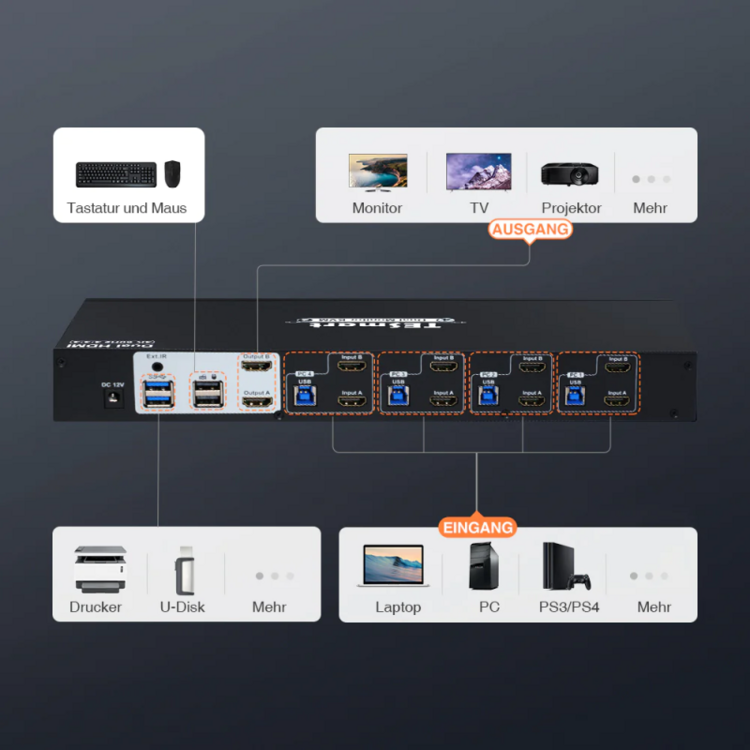
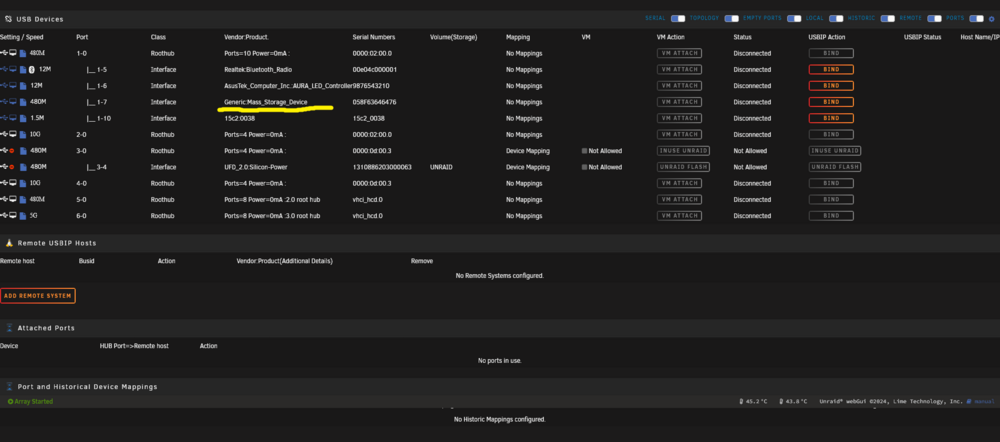
Very new to this so forgive me for my ignorance. I'm trying to figure out how to get the keyboard and mouse to work with unraid through my TESmart HKS0402A2U KVM. At this point I have no VMs and the reason I need to do this is I'll eventually be upgrading my network and will be installing a NIC so if in the event that I cannot connect for whatever reason I'd like to be able to manage Unraid via the GUI. The internal USB switch in the KVM I've identified in the underlined image in Unraid as Generic:Mass_Storage_Device which I see in other systems connected to the KVM. Graphics passes through without any issue. I'm currently only managing it through browser right now because it was frustrating having two keyboards and two mice on my desk but need to have the option to use the GUI.