StoneAges
Members
-
Joined
-
Last visited
-
The motherboard arrived earlier this week and I finally had time to set it up today. I haven't fully tested it yet but UNRAID now fully boots up to the initial setup screen, so I consider this solved. I am now using ASUS Prime N100I-D D4. Happy new year everyone.
-
I've tried to install Windows 10 but it hangs at the startup logo. I wouldn't be surprised if W10 simply isn't compatible. I actually needed to run an exe file to update the BIOS and had to resort to FreeDOS which worked perfectly. I don't have a copy of W8 around, and I'm a bit wary about downloading the ISO from anywhere outside Microsoft's website, so I haven't tried that. However, I could run Linux perfectly and have shared everything related to hardware above. I'm happy to run any additional troubleshooting apps on Linux (or DOS, but I assume the options are limited there haha) if you have any suggestions on that. I actually found this forum post earlier today that has the same motherboard and appears to experience the exact same issue since 6.10. They never followed up so not sure if this is coincidence or not, but it does make me suspect there may be compatibility issues with this motherboard in particular. I may be wrong of course, I've never used Unraid before let alone I know about its exact hardware requirements (beyond what's in the docs)! I did end up ordering a new motherboard (with Intel N100) though. The pc's PSU should still be working and I still have some RAMs that I can reuse, so if that setup works at least I didn't have to spend that much.
-
Any other suggestions before I buy a new motherboard+CPU+RAM in hopes that'd work?
-
Thanks for the suggestion. I gave this a try but it seems to make no difference unfortunately. This also prompted me to try out another USB but same issue still occurs. But at least with that we can probably rule out that this is a USB problem.
-
I really mean it when I say the BIOS settings are extremely limited. - Fast boot is already disabled. - There's no option for security boot, but I checked the value on Zorin using "mokutil --sb" and it's disabled. - There's no option for TPM 2.0. I think it didn't exist at the time of this BIOS at its latest version so I assume it's not available to begin with. - There's no option for CSM, but there is an option to have boot mode set to either "UEFI" or "UEFI+legacy". It's already set to "UEFI", without legacy support. I went through all settings and I don't think there are any settings enabled that will cause problems. Happy to share pictures if you'd like to see all settings.
-
No it doesn't, I haven't even been able to attach a license to the USB.
-
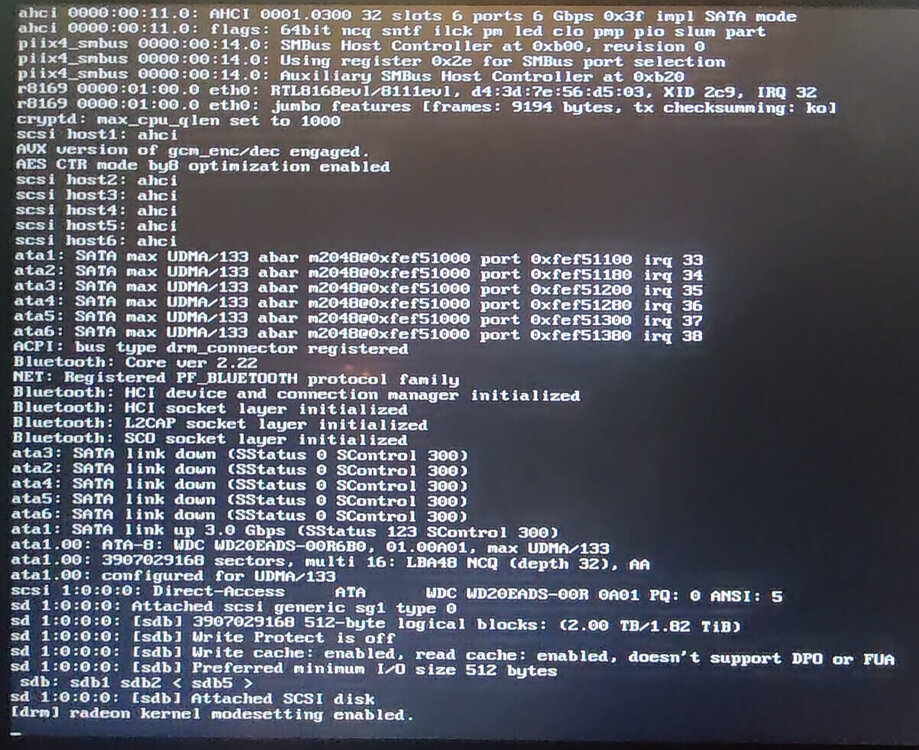
[Unraid version 6.12.14, using Unraid USB creator for Windows] Hi everyone, this is my first time setting up Unraid and have no prior experience working with home servers and I haven't worked a lot with pc hardware in general (beyond basic upgrades). I do know the basics of using the Linux terminal and whatnot but please bear with me. So I bought this secondhand pc a while back. Unraid kept being stuck during the booting progress and I believed the issue would lie in the BIOS. I finally managed to update the BIOS to its latest version. However, it's a MSI FM2-A75IA-E53 and the BIOS hasn't received any updates since 2013. The settings are also extremely limited, but I did manage to set the boot mode to UEFI, which is a new setting, and virtualisation was already enabled (I can't change this in the BIOS). SATA mode is set to AHCI. That's where I am now. The booting progress no longer gets stuck, and it definitely does way more steps than it did before, but eventually it seems to immediately crash somewhere and immediately reboots itself. I attached a picture of its final steps right before it shuts down and reboots. I've done the following to track down any issues: I've performed the Memtest included in Unraid with 12 passes and no errors in 10 hours. I believe I've also done this 2 months ago before the BIOS update with about 28 passes. I've run Zorin OS from a USB (I have it at hand since I use Zorin as my main driver), working perfectly. From the same Zorin OS USB, I've done the following: I used cpu-checker's kvm-ok command to double-check that virtualisation is on. I generated a report using hardinfo, which seemed fine. I ran Hardware Probe. You can find the results here (it looks fine but I might be overlooking something): https://linux-hardware.org/?probe=4736ddfd8c So I'm not really sure what else I could do to further track down the issue and solve the problem. Any help is much appreciated. Thank you!