ElMatador
Members
-
Joined
-
Last visited
-
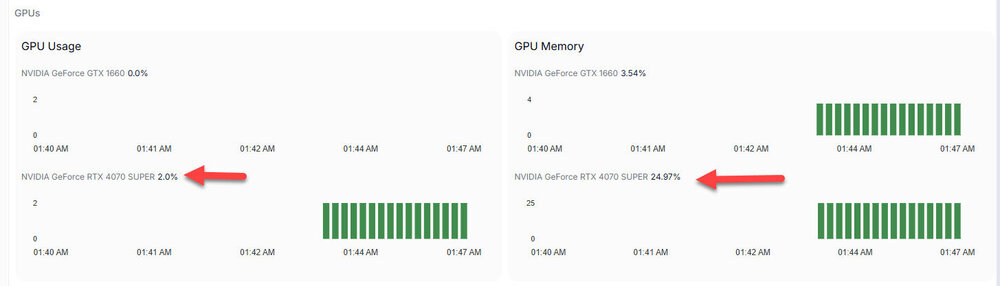
Hi, I have (2) GPUs installed on my unraid server: GTX 1660 and RTX 4070. I would like for Frigate to just use one, the GTX 1660. I have setup my parameters accordingly, but both GPUs keep showing up in the System Metrics. docker run -d --name='frigate' --net='bridge' --privileged=true -e TZ="America/New_York" -e HOST_OS="Unraid" -e HOST_HOSTNAME="Tower" -e HOST_CONTAINERNAME="frigate" -e 'FRIGATE_RTSP_PASSWORD'='xxxxxxxxxxxxxx' -e 'NVIDIA_VISIBLE_DEVICES'='GPU-bdacb15e-0574-7cb8-db6e-5eb63d550e36' -e 'NVIDIA_DRIVER_CAPABILITIES'='compute,utility,video' -l net.unraid.docker.managed=dockerman -l net.unraid.docker.webui='http://[IP]:[PORT:5000]' -l net.unraid.docker.icon='https://raw.githubusercontent.com/yayitazale/unraid-templates/main/frigate.png' -p '5000:5000/tcp' -p '8554:8554/tcp' -p '8555:8555/tcp' -p '8555:8555/udp' -p '1984:1984/tcp' -p '8971:8971/tcp' -v '/mnt/user/appdata/frigate':'/config':'rw' -v '/mnt/user/Media/frigate':'/media/frigate':'rw' -v '/etc/localtime':'/etc/localtime':'rw' --device='/dev/bus/usb/' --shm-size=1024mb --mount type=tmpfs,target=/tmp/cache,tmpfs-size=1000000000 --restart unless-stopped --runtime=nvidia 'ghcr.io/blakeblackshear/frigate:0.14.0-tensorrt' 6cff37359b8987a99e637657cc67ef72be2e9db04c866a132a2898a52334ee0f The command finished successfully!