





Synergy0026
Members
-
Joined
-
Last visited
Everything posted by Synergy0026
-
It seems that since I have disabled the following plugin, my server runs stable. The moment my system would crash was the same moment when the backups were in progress. I still can not pinpoint what exactly causes the system to crash when the backup kicks in. Should I proceed onto their Github or is this still a problem that is relates to the Unraid system? GitHubGitHub - Commifreak/unraid-appdata.backup: UNRAID AppData...UNRAID AppData backup plugin. Contribute to Commifreak/unraid-appdata.backup development by creating an account on GitHub.
-
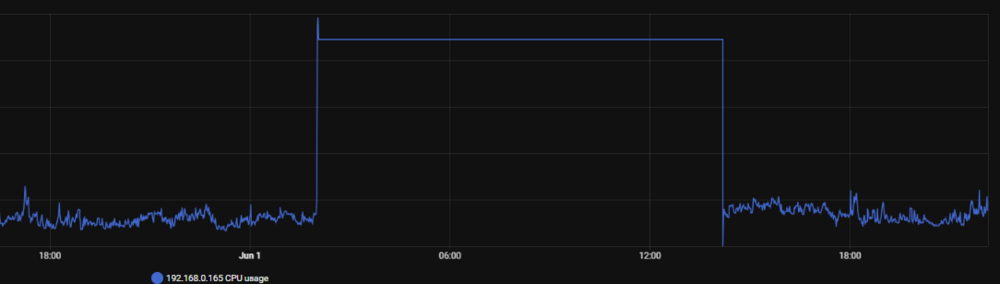
My system was unreachable again last night. Are there any more configuration things that can be set? I had to do a power cycle before it was reachable again. Is there any way I can collect the system logs from before the power down? I track my server power usage and stats like cpu usage in Home assistant and I can see that the usage spiked just before the system froze. Maby there is a commen cause skynet-diagnostics-20250601-2147.zip
-
Thank for your help. My server is now stable for 4 consecutive days so the problem seems solved.
-
I changed the bios settings as the thread suggested. This means: ""Power Supply Idle Control" (or similar) and set it to "typical current idle"", RAM config from 2667 to 2133 because I have 4 banks filled with single rank memory. I have one concern though, that is the BIOS update. The MB I have is the Asrock AB350M Pro4 combined with a Ryzen 5 2600 (aka Pinnacle). On the page where the BIOS can be found the follow warning is placed: "ASRock do NOT recommend updating this BIOS if Pinnacle, Raven, Summit or Bristol Ridge CPU is being used on your system." Source: https://www.asrock.com/mb/amd/AB350M%20Pro4/index.asp#BIOS I bought the MB with the P6.00 BIOS on it already, which has this warning. The supported CPU list says the CPU supported BIOS version is P4.70. Source: https://www.asrock.com/mb/AMD/AB350M%20Pro4/index.asp#CPU I find mixed signals if I look around on Reddit or other forums😅 Should I still opt for a BIOS upgrade??
-
Alright. Seems applicable. I will check these settings as soon as I have physical access to my server again and give feedback. Thanks a lot!
-
Hi guys, I am currently having problems with my system of which I am still unable to find the root cause. At fist my docker.img file was corrupt. I recently rebuild this file and started to build up my stack of containers again. After the first rebuild the system kept crashing. Not I build it up again but with fewer containers. The last one I installed is Jellyfin. It crashed again within a few hours. Before installing Jellyfin, the system was stable for approximately one day. I am not sure is Docker or Jellyfin is the cause of this. I would appreciate any help at getting on the right track on sorting this out. skynet-diagnostics-20250523-1159.zip

