13Aki37
Members
-
Joined
-
Last visited
-
Thanks, that seems to be a working solution for me now! Very much appreciated !
-
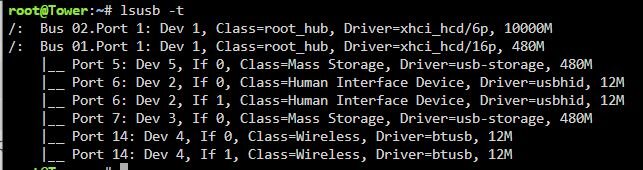
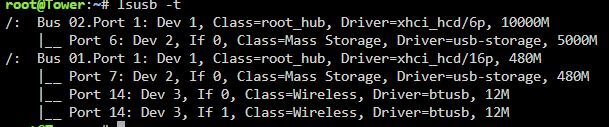
Thank you for the quick response! That could've been easy to troubleshoot myself... I've now been plugging the enclosure to different ports and I finally seem to have found one that is actually USB 3.0. I don't understand, why some were recognized/are built as USB 2 - according to Lenovos M720Q manual, that model exclusively has USB 3.0 and upwards. I have parity speeds ranging between 140MB/s and 180MB/s. Is that to be expected, or should that be higher? Currently my lsusb reads as following: Can I assume, that everything now works as expected? As a note: I have following devices/storage attached: 1x WD NVME SSD (internal/motherboard) 1x SATA Samsung SSD (internal/motherboard) 2x 4TB Seagate (1x USB 3.0 enclosure) 1x Unraid flashdrive (1x USB) Is there any way to figure out, which device is connected to which port, for future troubleshooting, should it happen again, when I plug in more drives? Thank you!
-
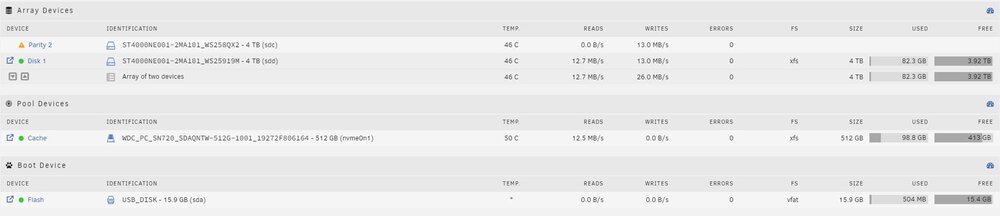
Hello people! I'm completely new to the Homelab topic, and linux in general, therefore my understanding of most things may be quite low. In the beginning I've used Unraid with just 1 SSD to try everything out, and see whether I'm comfortable with the OS or not. Speeds were as expected with the SSD and I proceeded to order myself some 2 x 4TB Ironwolf Pro (refurbished) as primary Array storage. Those are connected via a USB 3.0 enclosure (ICY BOX Dual HDD 3.0). I'm aware of the fact, that USB is sub-optimal, but I'm not seeing a way to SATA them up (with the exception of case modifications, SATA Cards, external PSUs to power them, etc...) without spending too much money on my initial setup, trying to figure out, whether to keep using it or not. According to the Lenovo M720q manual, the enclosure is connected to a USB 3.1 Port, so this shouldn't be the bottleneck. As soon as I've assigned the current SSD as the new cache drive via NewConfig and set up the HDDs as 1 Array/1 Parity, the "problems" hit. With the parity sync initiated, I've been consistent speeds between 15MB/s and 21MB/s. Trying to figure out, whether my CPU was a bottleneck, I've paused the parity sync after about 15 hours and tried to write to it from the SSD via "Mover". The same speeds kept occurring however - lower even. Since my understanding of linux troubleshooting is very low, my only solution up until now, was to google similar problems and try to find similarities. The only thing, that I hoped would solve my problem, was the command "hdparm -W1 /dev/sdb[c]". No change however. Does anyone have any ideas, what I could do/change at this point? With those speeds I'm afraid this wont be usable... Thank you for your help! If you need any more information, I'll gladly provide it! tower-diagnostics-20241231-0920.zip