





Egonic
Members
-
Joined
-
Last visited
Everything posted by Egonic
-
My problem appears to have been resolved with the upgrade to 7.0.1. Nothing I did would resolve the problem, copying between disks, between shares, setting write method to reconstruct write etc... No matter what I did every single docker service would stop responding and be unreachable during file copy/writes, however, after the latest upgrade I still see a high load but it does not get pinned to 100% and break the system. I consider Unraid to be functional again.
-
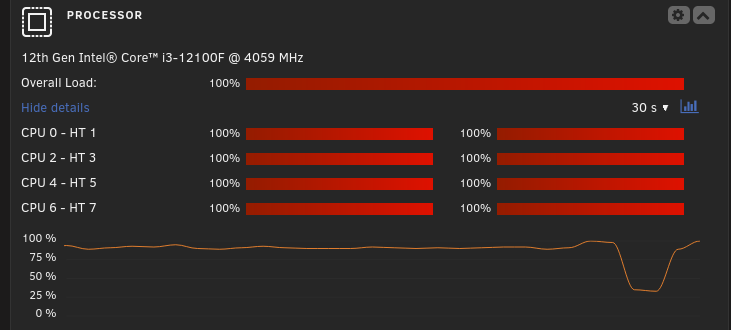
Hello, I have just started using and testing Unraid and it has worked fairly well, though I am now experiencing a highly disruptive problem where whenever I copy any files to a share or disk in the array, the whole server locks up on and off. You end up with all docker images going unresponsive, web portal is unresponsive, the copy itself freezes, the server is more or less unusable whenever a copy is in progress. Though the processor graph eventually drops from the consistent being stuck at 100% and then it works for a bit before it repeats. I have never had an operating system that cannot handle a copy, so I am a bit stumped as to where to troubleshoot this or what expectations I can have on Unraid to be functional. So I have tried various ways of copying over data, over network and directly attached external disks, using Rsync, CP, Midnight Commander, copying share to share, disk to disk. Nothing works. I can understand if the copying would saturate the parity disk and saturate the disks being copied to/from, but I am having trouble explaining how does the entire server lock up due to this? Especially with my docker images and appdata residing on an NVMe, which is not used during the copy. Any suggestions or tips would be greatly appreciated.
-
Hello, I have just started with Unraid an hour ago and upgraded to 7.0 RC 2 immediately, so I can't say that this is related to 7.0 only. Basically my problem is that after following the recommendations and using a password manager, generating a strong password, once I set my password I gain access to the GUI but if I log out my password is then invalid. After dealing with this problem twice, dealing with the annoying lack of localization support on the server so I can't type my password directly on the server, and then having to take it down, delete the password files to reset etc... I came to the conclusion that some special character breaks your account. I resolved it on my third attempt by using a different password. I also created a new user with the intention of testing what character may cause the problem, but I am only met with an error that says 'invalid username or password', which is a really poorly worded error if the reason is access restrictions to the web GUI for non root users. Password that I have problem with (for user root): nenUT/&.>}uS,NUrI,N(
