





chitchat9177
Members
-
Joined
-
Last visited
-
I previously posted about a large number of drive erros on error parity check. I diagnosed this as being the cheaap PCIe sata expander I had. I then went and bought an LSI 9211-81 in IT mode and saw a tremendous increase in spead and a complete disappearance in errors. However, I have started having pretty major issues again. I had Disk 1 and Disk 3 die on me. After replugging all the cables I managed to get Disk 3 back up and running and a full rebuild completed fine. Disk 1, however, would instantly error whenever I would start a rebuild. I have been meaning to take this out and RMA it as it is only a couple months old but I have been busy. I thought all my problems were somewhat averted and in having 2 parity drives I would be find handling another failure in the mean time. However, I noticed a couple days ago that Disk 3 has been disabled again. Thinking I could get round to it this weekend I logged on to see the first Parity disk is also spitting errors. Interestingly it hasn't been disabled like the other two have but it has spit nearly 3000 hours. I have attached the diagnostics that has been running for the last couple weeks. Disk 1 is not active in the array but Disk 3 was until a couple days ago and Parity 1 is. What is my best course of action to ensure minimal data corruption and be back up and running? I know some things have already corrupted but none of it is is majorly sensitive stuff. I am running 3x 16TB Ironwolf Pros that are almost exactly 6 months old and 3x 16TB Seagate Exos x18 that are just over a year and a half old. The 2 disk drives have passed all SMART tests I have run. Thanks for any advice and help. It is greately appreciated. mockingjay-diagnostics-20250518-1253.zip
-
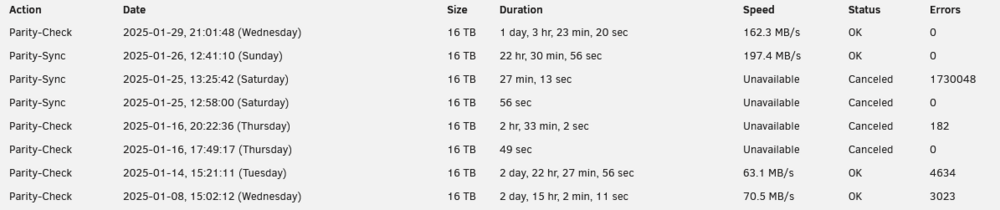
Fixed: Memory test showed no problems. Ran a correcting parity, then ran a parity check and had even more errors after a day. Then started to run another and had 182 after a couple hours so stopped and bought an LSI 9211-8i. Not only has my speed drastically increased (nearly maxing out the HDDs at 250MB/s each) but my errors are down to 0 for now. Partiy check seems to slow to about 150MB/s in the last 10% which is interesting but still way faster than before. 1 day instead of 3 is a big improvement. The big error check was one of the disks not being picked up when I first installed the new card but reseating all the cables fixed that.
-
Thanks for the information about the notification. I'll get on and do your recommendations and see if anything is revealed. Thanks.
-
Thank you for the information
-
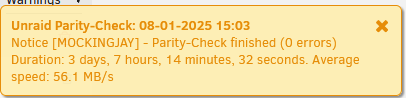
Does anyone know why the parity completion notifications differs from the summary at the bottom of the array page?

-
Do you mind telling me what information tells you this? I am very confident there is nothing wrong with the RAM. It's less than a year old and a brand I have been using my for ages. It was just a troubleshooting test I had read people suggesting when the drives seem okay.
-
Hello, I recently made the switch from a zfs pool in linux to unraid as I wanted to be able to upgrade my storage. I switched when I did because after a year of leaving my server running I found out you are supposed to run data checks. Well, after a year of not checking, I had loads of errors. I tried every cable trick and nothing helped. I don't know exactly how much data I lost but it was no more than a couple hundred GBs in array of 30TB. So not too catastrophic. I then switched to Unraid, hoping a dedicated OS would help me out. Well, I have been running this array for a little over a month and, as per community suggestions I had seen, the first quarterly Parity Check has started running. I am 70% through and there are a little over 3000 errors. I have seen people saying that anything more than 0 is a worrying amount. I have attached the Diagnostics ZIP file which should have all the information you need. I am running Unraid V6.12.13. My hardware is: Intel i5-13500 ASRock H610M-HVS 64GB (2x32GB) Corsair Vengeance DDR4-3200 x3 Seagate Exos X18 16TB HDD (A little over a year old) x3 Seagate Ironwolf Pro NAS 16TB HDD (A little over a month old) Diyeeni 8 port SATA expansion card. PCI-E x1 to SATA 3.0 If my interpretation of the smart data is correct then all the hard drives have a large amount of errors. Which is odd to me. I don't feel like its an HDD problem. When switching to unraid I copied across the 30TB of data to 2 of the new drives. Then I added the rest with 1 old and 1 new as the parity. I am running dual parity with 4 data drives. I am yet to run a mem test but my instinct is that it is my cheap (£40) chinese sata expander. I was looking to upgrade to one of those LSI expansion things but I haven't done proper research into what model to grab. If anyone has any advice for me on how to solve this, as it seems to be the same thing that ate away at my Linux ZFS Pool over the year I had it, I would appreciate the help. mockingjay-diagnostics-20250107-1913.zip

