spally
Members
-
Joined
-
Last visited
-
Here's new diags. If I rearranged the disks would it not come up with an invalid array error? Or would I need to do a full reboot / something similar. supernas-diagnostics-20250224-1535.zip
-
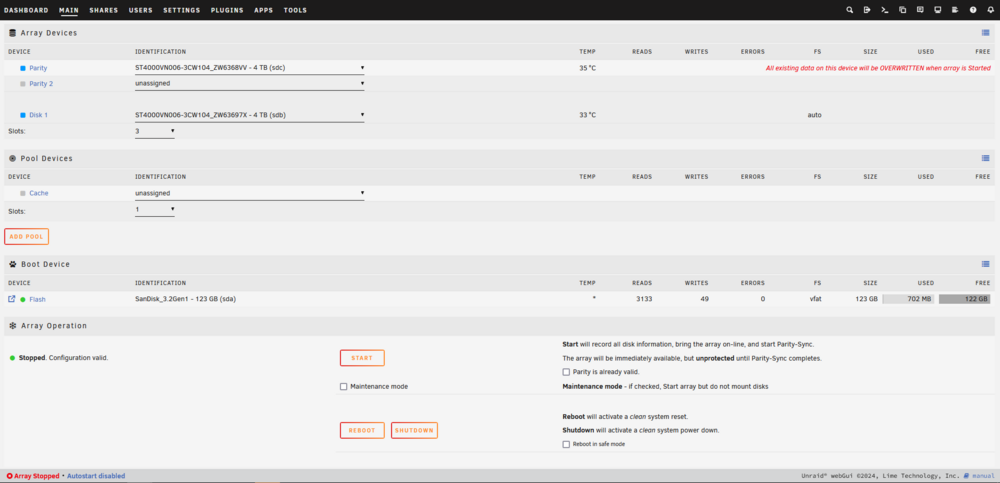
I had to redo an install after my USB drive corrupted before I realised I should back it up, and then I couldn't replace my trial key onto the new drive. So, I bought a license since I've been liking Unraid so far, and put that key onto the new drive. So now I need to figure out which drive is my parity. I did the suggested solution which is to mount both drives, and whichever one returns as unmountable is the parity drive. However, both disks mounted, and I still don't know which one is my parity disk. As you can see, it's seeing that the disks are partially filled as they should be but the file manager isn't finding any files. Any help would be appreciated supernas-diagnostics-20250224-1342.zip


-
New to Unraid, having issues attempting to start my array. When I click the start array button, and confirm the pop-up, the main page becomes completely unresponsive. I can still navigate to the dashboard/settings/tools etc, but when I navigate back to the main page, nothing has happened, the array is still stopped. I've tried using a different browser to no luck. Help appreciated. diagnostics-20250117-2141.zip