the_blackadder
Members
-
Joined
-
Last visited
-
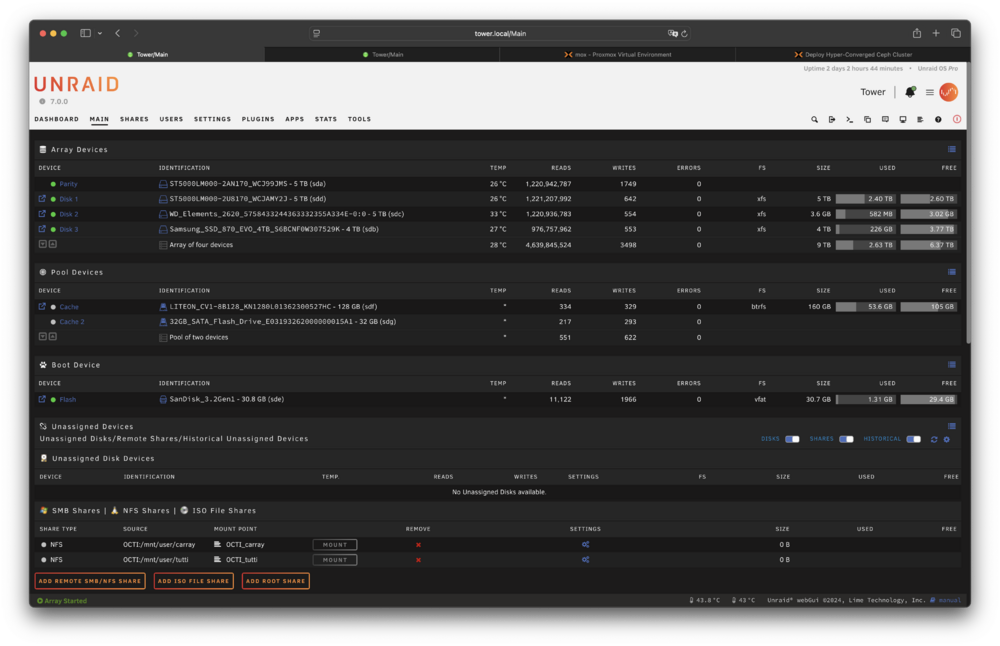
Well, I discovered a slight oversight regarding the network issues: The switch power cable had become unplugged. 🙈 Duh. So the good news is, I can access my server again. I now have installed a more recent backup on my flash drive and booted up again. Strangely enough, Unraid has asked me to set a new root password. After that, I could access my server. Basically, I'm almost back on square one now: - My server has its old name - Bloody Disk 2 is still there without any data on it - The 4 TB SSD resides in the array as Disk 3 I guess I'll just backup my flash drive now, remove Disk 2 and rebuild parity. I'm not willing to risk another odyssey like this, even though my array won't be parity protected during the rebuild.
-
Hmm, I've just checked the plugins on my server and it turns out that there's no Realtek driver plugin anymore. In Tools --> System Drivers it says that the driver r8169 (RealTek RTL-8169 Gigabit Ethernet driver" is currently in use. However, lspci shows this: 01:00.0 Ethernet controller: Realtek Semiconductor Co., Ltd. RTL8111/8168/8211/8411 PCI Express Gigabit Ethernet Controller (rev 15) Does this mean that there's really a discrepancy between the output of lspci and the output of the "System Drivers" menu in the Unraid GUI? And if so, what should I do about it? 🤔
-
Those SSD pools wouldn't be parity protected, if I'm not mistaken. That would be a no-go for me. Yes, I've installed a community plugin because of known stability issues with Realtek controllers. It has always worked flawlessy - up until now. I doubt that this is the root of the problem, but who knows?
-
Yeah, I know. The reasoning behind adding the SSD is that I want to gradually replace all the HDDs because of noise. I started with the worst HDD (its twin had already started failing and was replaced last week.).
-
Hello everybody, I'm truly at a loss here. Problem and general information: I wanted to shrink my array, which consisted of: Parity: 5 TB HDD Disk 1: 5 TB HDD Disk 2: 5 TB HDD --> this is the one I wanted to remove Then I wanted to add a 4 TB SSD into the array. There's a cache pool I'm using Unraid 7.0.0 I tried following method #2 as laid out in Spaceinvader One's video and used the unBalanced plugin to move the data off Disk 2. The idea was to shrink the array without losing parity. In another step, I added the 4 TB SSD to the array and moved a share from Disk 1 to it (which was probably a bad idea). Then I cleared Disk 2 and tried stopping the array, as suggested in the video. This is when things got ugly. The array refused to stop because Disk 2 couldn't be unmounted. The log claimed that it wasn't mounted - so it couldn't be unmounted. Basically, my server was stuck in a loop. Unmounting via CLI did not work. Shutting the server down via the GUI did not work. Shutting the server down via the CLI also didn't work. With growing concern and frustration, I opted for "poweroff -f", which didn't work either and got the server completely stuck. In the end, I did a hard shutdown by pressing the power button for several seconds. When I restarted the server, I didn't want to remove Disk 2 just yet in case anything went wrong, so I started the array and waited for the - very long - parity check to finish. Luckily, it didn't find any errors. BUT: The name of my server had reverted back to the default "TOWER" and I didn't know whether other settings had changed as well. Also, I still couldn't get rid of Disk 2 by following the procedure described above. It just wouldn't unmount. To be honest, I can't fully remember all the steps that happened next, but somehow after many tries and errors and restoring flash backups (because I wanted to restore the proper server name and revert other possible changes in the settings) I managed to remove Disk 2. FINALLY success, I thought! So I went ahead and saved the new config and followed all the remaining steps in Spaceinvader One's video. But when I rebooted my server, it turned out that it wasn't remotely accessible anymore. All I can do now is physically connect to the server, but all the shares, GUI and CLI are invisible on my network, because my router claims that my server is not connected. Booting up in safe mode is of no help. I tried restoring a flash backup again - but to no avail. My server uses the same static IP it has always had, yet for some reason it cannot connect to my router. In a desperate attempt to get my server going again, I even changed the name of "network.cfg" to "network.cfg.old" as suggested here: https://forums.serverbuilds.net/t/unraid-not-connecting-to-network/8984/18 Nothing seems to help. 😞 Any ideas would be greatly appreciated! Unfortunately, I can only offer you current diagnostics. octi-diagnostics-20250222-1733.zip