





ana1blitzkrieg
Members
-
Joined
-
Last visited
Everything posted by ana1blitzkrieg
-
Update: downgrading Unraid OS did not help. Replacing the CPU with an i9-9900K helped a lot. With no changes to my settings, I am getting 1GB/s write speeds to disk shares. I still get much lower writes to user shares (650-700MB/s), but from looking online this seems to be normal behavior. For now, I will keep writing to my cache via the disk share and let the mover take care of transferring it to the array.
-
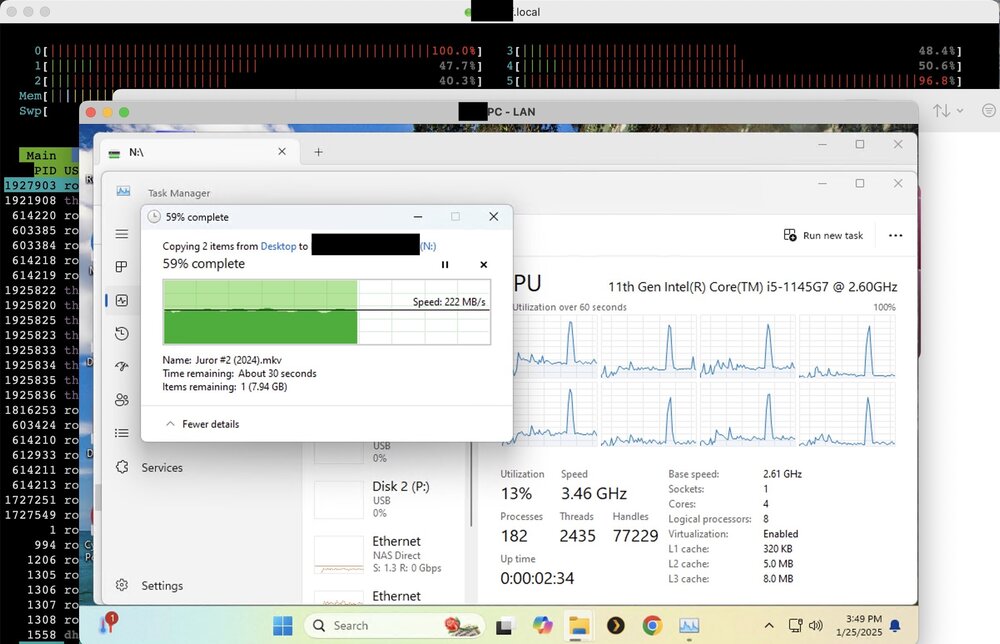
Testing with a 20GB movie, I get 220MB/s from PC to NAS and 300MB/s the other way. I might try downgrading Unraid and see what happens. Here is a picture of what is going on CPU-wise when transferring from the PC to the NAS. In the background is utop showing the NAS's CPU usage, and windows task manager is showing the PC's core usage. My understanding is that SMB has more overhead on the NAS side of things.
-
Encryption and compression are both disabled. My NIC is on a CPU-connected PCIe slot and the NVMe SSDs are on the chipset, so there shouldn't be an issue there. Is it possible you're seeing less core saturation simply because your 12th gen is likely much more efficient than my 8th gen? Edit: I also am using an SAS controller in case that is relevant. But this controller is also on the a CPU-connected slot, and the SAS drives have been spun down during my tests.
-
I notice on my dashboard or with htop that one or more of my cores reach 100% usage when running just about any task (e.g. mover, parity check, SMB file transfer). My real concern is writing to my SSD cache via SMB, where speeds max out at just 250-300MB/s. Below are some tests I have run. -I have a 10GbE NIC in my NAS that is connected directly to a windows PC (no router nor switch in-between, just a direct CAT6A cable into a thunderbolt 10GbE adapter on my PC). Using iperf3, I get 9.8 Gbit/s speeds, so network is not the issue. -If I test my SSDs directly with a test file (dd if=/dev/zero of=/mnt/cache/...) I get over 1GB/s speeds, so the SSDs seem to be fast enough, although the speed is slow for a gen3 NVMe SSD. This test full saturates a CPU core. -Using crystaldiskmark I get 250-300MB/s writes via user share. If I test writing directly to the disk share, I get about 500 MB/s. Both tests fully saturates a CPU core. -In all tests, one or more of my CPU cores reaches max usage. My understanding is that these processes are largely single core dependent (even with multichannel SMB). Therefore, this indicates to me that my CPU is the bottleneck for all of these file writing tests. Before I drop several hundred dollars on a better CPU, can anyone confirm that it is likely my current I5-8500T CPU that is bottlenecking these processes? I can understand SMB and FUSE overhead might do this, but it seems odd to me that it's apparently bottlenecking the write speed of the NVMe SSDs without these (i.e. getting 1GB/s write with dd command, so no SMB or FUSE overhead). a few more notes: -SMB multichannel is enabled -My 10GbE NIC has RSS support -am using jumbo frames -no SMB encryption -confirmed the SSDs are getting full PCIe x4 bandwidth -I swapped the two M.2 SSDs in my cache with another brand new M.2 SSD (on its own, so no RAID1). It made no difference. If anyone can help me confirm my CPU is the bottleneck, that would be greatly appreciated and then I can justify buying an i9-9900K.

