





Gyakusetsu
Members
-
Joined
-
Last visited
-
OHHH ok, dang, I guess that was still on there. I removed it, rebooted and yep, that seems to have solved all my issues. If you don't mind explaining, I don't remember changing this setting anytime recently so I am unsure why this suddenly would have caused issues?
-
@JorgeB Of course, here it is plexus-diagnostics-20250411-1139.zip
-
@JorgeB I have gone ahead and removed the gateway IP address from both of those interfaces and rebooted the system. Unfortunately that has not resulted in any change in behavior.
-
I recently started noticing an issue with one of my Docker apps, specifically Plex was giving me issues that only occur when it doesn't have an internet connection (e.g. not able to scan new library files, not getting metadata for new items, etc.). I was troubleshooting that particular app and got to the point where I decided to just remove and reinstall the container. Unfortunately now I am getting an issue with the Apps page at http://<serverIP>/Apps which is inhibiting me from moving forward. Community Applications requires your server to have internet access. The most common cause of this failure is a failure to resolve DNS addresses. You can try and reset your modem and router to fix this issue, or set static DNS addresses (Settings - Network Settings) of 208.67.222.222 and 208.67.220.220 and try again. Alternatively, there is also a chance that the server handling the application feed is temporarily down. See also this post for more information Last JSON error Recorded: Syntax error I have tried updating my DNS settings to 1.1.1.1, 8.8.8.8, and 208.67.222.222 with full system reboots between just to make sure it isn't my adguard DNS server muddying things up. Also verified DHCP and other such settings. Nothing glaringly obvious as I haven't changed anything with IP assignments. To my knowledge, nothing in my network settings, firmware, or anything has changed aside from my updating that particular Plex docker app from the list of Docer apps (http://<serverIP>/Docker) a couple of days ago, thus why I wanted to downgrade it but am now seeing this issue with the Community Applications page. The application's logs are showing entries like this: Apr 11, 2025 10:05:11.496 [22406386404152] WARN - [HttpClient/HCl#f3] HTTP error requesting GET https://plex.tv/updater/products/5/check.xml?build=linux-x86_64&channel=16&distribution=debian&version=1.41.6.9685-d301f511a (6, Couldn't resolve host name) (Could not resolve host: plex.tv) Looks to me like a DNS issue since it cannot resolve a URL, but I can't seem to figure out what setting needs to change to get everything back online. EDIT: I also just tried to manually download the update to 7.0.1 from 7.0.0 and got a network error from the installer: plugin: installing: unRAIDServer.plg Executing hook script: pre_plugin_checks plugin: downloading: unRAIDServer.plg ... plugin: unRAIDServer.plg download failure: Network failure Executing hook script: post_plugin_checks plexus-diagnostics-20250411-0948.zip
-
Yep! My settings JiC:
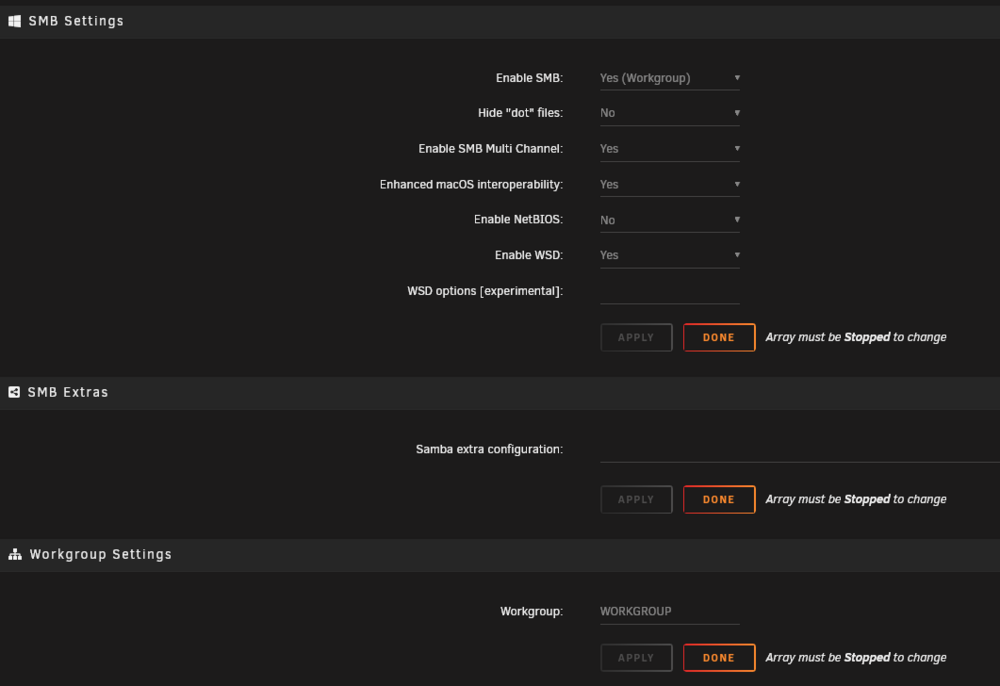
-
Gyakusetsu changed their profile photo
-
I have migrated to a newly built system with faster networking than my old Synology-based file server. I am however running in to issues with SMB share on the new UNRAID system (I'll refer to it as the host system from now on). My host system has three 2.5 gigabit network interfaces, all with static IP addresses assigned to them in the router and all accessible separately. I am still able to access my old server on my Window's client via SMB Multi Channel and thus getting higher throughput than a single nic. I am also able to see it connected when using the following command in PowerShell: Get-SmbMultichannelConnection Which results in the system displaying just the old Synology server, but not my new UNRAID host system, as shares with multi-channel support. I have disconnected and reconnected multiple times and am still unable to have any device on my network acknowledge more than one interface for this host system at a time for throughput. All IP addresses are ping-able from the client system. Curious if anyone else has run in to this and what I can do to get my throughput as high as I can. Most guides out there say it'll just work if it can, but mine is failing me. Any ideas?
-
OK, after taking a break, I had a moment of clarity. Here is what FINALLY solved it (JIC anyone else runs in to this). I was wondering if I could possibly go the reverse route and mount the UNRAID share to the Synology file system and do my data migration from there. Lo and behold, when I tried to add it I got an error "you can only enter the ip from another server" because the IP was already reserved in the network settings as itself and not the new device. 💡 I was using multiple network interfaces on the Synology NAS 2 device before and disconnected one so I could attach my new UNRAID device to it and give it that IP address. LAN 3 on the Synology was set to Static at the address 192.168.50.8 I removed the static network mapping for that LAN interface, and now everything works as expected. Pings, SMB connection from UNRAID, everything. I will be transferring happily now.
-
Hello, New to Unraid, looking to migrate off my Synology ecosystem. Just finished my build yesterday, everything seems to be running great EXCEPT... I'm encountering an issue trying to mount an SMB share from a second Synology NAS on my UNRAID server using the Unassigned Devices plugin. Just shows Offline and unable to mount. I have been troubleshooting for some time and could use some advice. Here's a detailed rundown of the situation and what I've tried: Environment Overview UNRAID Version: 7.0.0 UD Version: 2025.01.14 Synology NAS 1 "Backup" (Working): SMB shares mount successfully from this device. Synology NAS 2 "Plex Server" (Issue): UNRAID cannot ping this device or mount its SMB shares. Synology NAS 2 is accessible from other devices on the network. Network All devices (UNRAID and both Synology NAS devices) are on the same subnet and connected via the same UniFi switch. Static IP addresses are assigned to all devices. No VLANs or firewalls are enabled within the network. Key Symptoms Ping Behavior: UNRAID cannot ping Synology NAS 2 ("Destination Host Unreachable"). Synology NAS 2 can ping the UNRAID server successfully. Windows PC can ping Synology NAS 2 with no issues. Synology Settings I have painstakingly gone through every single setting/menu and compared the two devices side by side to make sure everything from SMB settings, security settings, network settings, user permissions, and share folder settings/permissions are identical aside from the physical addresses and names of the devices. The ONLY difference is that the one that is working is running a slightly newer version of DSM (7.1.1 vs 7.2.2) and therefore a slightly newer version of SMB service (4.15.9 vs 4.15.13). SMB Connection Error: Testing the connection from UNRAID's "Remote Server Test" results in: Server '192.168.50.7' does not respond to a 'ping' - check Server Name or IP address Testing SMB... Remote server 'SMB' port 445 is not open ** Remote Server is not online for SMB Troubleshooting Steps Tried Verify Network Configuration All devices are on the same subnet with correct gateway settings. Synology NAS 2 has no firewall enabled. Verify SMB Service Confirmed that port 445 is listening on Synology NAS 2. Restarted the SMB service via Synology GUI. SMB is enabled, and "Enable Local Master Browser" is also turned on. UniFi Switch Configuration No port isolation or VLANs are configured. No switch-level firewall is enabled. All devices (working or not) are connected to the same physical switch. Tried mounting the share using both hostname and IP address in UNRAID. I'm at a loss... Why is UNRAID unable to ping Synology NAS 2 when other devices can? Why does UNRAID report that port 445 is closed, despite the service being active? Are there any additional diagnostics or tools I can use on UNRAID to narrow down the issue? Any help or insight would be greatly appreciated! If there's additional information I should provide, let me know. Thanks in advance for your assistance!

