





falcon1411
Members
-
Joined
-
Last visited
Everything posted by falcon1411
-
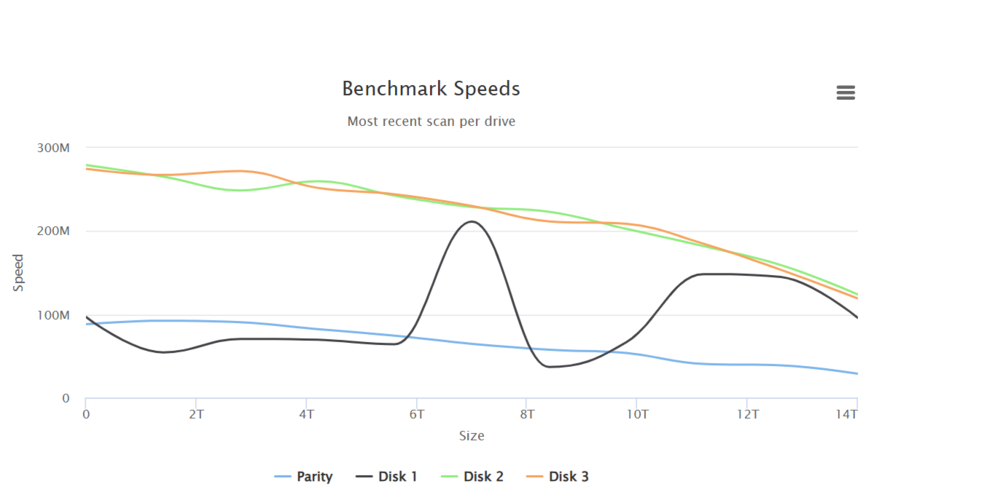
Hi everyone, I got new drives, cables, PSU after I managed to fry the drives on my previous build. This setup is newly build, drives almost empty. Have 3 newly bought, refurbished Seagate exos x16 14tb drives, from a very reputable ebay seller, and 1 14tb WD shucked white drive. I noticed parity and windows 11 VM is very slow. Parity check runs at under 10mb/s and gives ETA of 14 days. I can already tell by the graph below something is not right. (I'm more cautious now, so don't want to try things my way. I want to ask the community for guidance) Thanks. tower-diagnostics-20250215-2327.zip
-
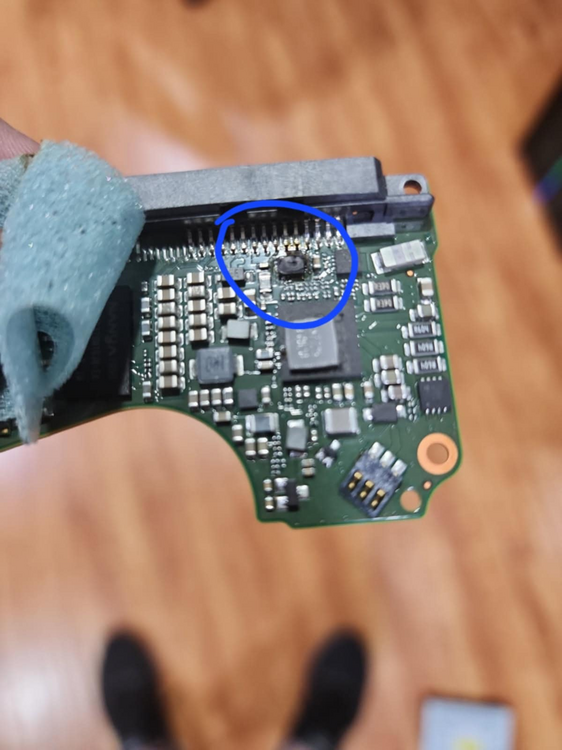
Well, things have gotten from bad to worse. More and more drives went offline. The power supply (Gigabyte PM750GM) I was using seems to have killed the drives one by one. 6 Drives total. I checked the pcb boards one by one, one of them had a fried chip. Others didn't. Was being hopeful that others may still be functioning somehow. Got a BRAND NEW power supply, (Corsair RM850X), drives dead, 0 sign of life. 1000$ worth of drives dead. Replacing boards is so tedious and way outside of my skills. I think we can consider this matter closed. Thank you mods for the help.
-
I have no choice but to use the USB. nothing else works. Changed motherboard and cpu, still same issue. got a pcie to sata card (not hba) still same. Im out of ideas. simply does not detect drives. googling shows that its apparently a thing that can happen. people on other forums have had this issue, baffling everyone who replied, with no solution. to summarize, drives that worked before on stopped being detected. I tried multiple motherboards, cards, cables, etc. wont be detected by bios, but work fine on a usb dock.
-
Little update. After the unbalanced process was done, I unmounted drive 9, and remounted. appears to be working fine? still have to go thru parity rebuild, we'll see then I suppose. Changed HBA card, 3rd time. I was able to figure out the minisforum bios little bit. The HBA card shows up in bios, along with drives plugged into it. it detects 5 of the 7 drives I have connected (and 2 of the 5 detected is connected via USB hub) . The ones not being detected are the 10tb drives. I tried yet another drive, 4tb WD Green, and detects just fine. In summary, the 10tb drives don't work on this system anymore, that worked before. They're same model as the 14tb drives that are working. Shucked WD white drives.
-
Right now Im using unbalanced to move data around, as 1 drive is showing emulated. Once thats done, Ill make a video and put on youtube, giving a walkaround of the server, bios, and unraid screen. Setup now is: 9 drives connected to unraid. 2 are via USB, being detected. 2 via hba, not being detected. 1 via hba, not being detected, emulated 4 via hba, detected, inlcuding 1 parity drive. Ill change the hba card and cables, to 3rd set. As for the 2 new drives being spining up, right now theyre sitting idle, and feels cold to touch. plugged in. when i first plugged them in, they only showed up on the historic unassigned devices section. but did not on unassigned. I clicked to remove from historic, and never showed up again.
-
Tried the 3.3v with tape. no luck. So i got 2 new drives, tested on windows, working. added to the array. Not being detected. have all the unassigned drive apps installed. Also tried downgrading to 6.12.14. Still nothing. Works when using usb dock attached to unraid. Will try other drives, but seems doesnt want to detect new drives.
-
The machine in question, Im using Minisforum BD795 motherboard, with limited bios. So doesn't have feature to show anything plugged in. Also, doesn't have any SATA ports. Im using HBA card. On other computers I tried, results are on my original post.
-
tower-diagnostics-20250205-1240.zip The drives in question are plugged in. might not show up on diagnostics because they're not detected.
-
Hi everyone, New to unraid, new to forum. 3 of 7 drive array went offline. haven't done anything to cause this to happen. was working fine for months. lets call the drives 3, 4, and 6. 3 and 4 are identical 10tb wd, 6 is 14tb wd. changed hba card, cables etc, no luck. 3 and 4 are detected if using usb dock on unraid and windows, only. 6 is detected if plugged in directly to sata port on motherboard. in conclusion, these 3 stopped being detected on hba card. other similar drives, work fine. tried on 3 different computers, windows and unraid, plugged in motherboard, hba and usb dock, same results as above. I've tried MULTIPLE troubleshooting techniques, and friend helped me, who is well versed with unraid and computers in general, and we're both out of ideas. If i posted this in wrong section, please move to correct place. Thank you.

