Sqwan
Members
-
Joined
-
Last visited
-
Thanks a lot. Worked like a charme!
-
I followed the instructions. I reassigned the drive as said in step 6. But now it is saying: All existing data on this device will be OVERWRITTEN when array is Started And next to the Start-Button it says: Start will start Parity-Sync and/or Data-Rebuild. Did I follow the right steps and can proceed with the start of the array?

-
How do I know if contents are ok? I can't look into it, can I?
-
Thank you for quick response! Please find attached the diagnostics. unraid-diagnostics-20250206-1133.zip
-
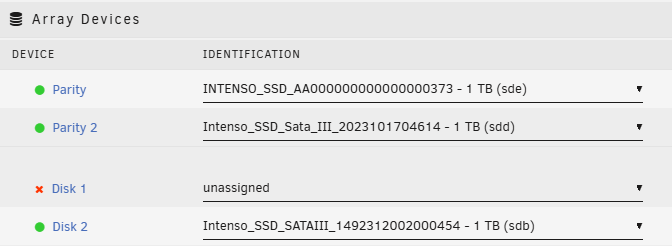
I have an issue with my unraid. One of my discs got disconnected. Now it is shown as unassigned: But it is still available: If I reassign it, I get a message, that all data will be removed / overwritten once I start the array. So I didn't start the array. How can I fix that the right way?