moshadron
Members
-
Joined
-
Last visited
Everything posted by moshadron
-
Well ... The comm issue came straight back but I had already got the files off the drive so mission accomplished and I didn't have to resort to the offsite backup. Did a new config and will see wtf is up with that drive later, I suspect it's for the bin.
-
Thank you so much!! The device is back, I have it mounted as unassigned and am moving the files, then I will continue with my efforts to adjust the cache!
-
Well, I believe I have a partial answer. From the syslog: Line 850: Feb 25 23:59:51 isengard kernel: ata3: SATA max UDMA/133 abar m2048@0x90502000 port 0x90502200 irq 128 Line 933: Feb 25 23:59:51 isengard kernel: ata3: link is slow to respond, please be patient (ready=0) Line 934: Feb 25 23:59:51 isengard kernel: ata3: COMRESET failed (errno=-16) Line 935: Feb 25 23:59:51 isengard kernel: ata3: link is slow to respond, please be patient (ready=0) Line 936: Feb 25 23:59:51 isengard kernel: ata3: COMRESET failed (errno=-16) Line 938: Feb 25 23:59:51 isengard kernel: ata3: link is slow to respond, please be patient (ready=0) Line 939: Feb 25 23:59:51 isengard kernel: ata3: COMRESET failed (errno=-16) Line 940: Feb 25 23:59:51 isengard kernel: ata3: limiting SATA link speed to 3.0 Gbps Line 941: Feb 25 23:59:51 isengard kernel: ata3: COMRESET failed (errno=-16) Line 943: Feb 25 23:59:51 isengard kernel: ata3: reset failed, giving up Now the question is ... how do I get unraid to accept the death of this drive and move on with it's life ... i.e. getting rid of the "cache - too many wrong or missing devices" message
-
Is this the old pool? This was an entirely separate pool that I am getting rid of, it had nothing on it and wasn't being used, I had essentially been experimenting with different configurations to see what they would do. This one appears to be mostly empty, any important data there? It's the missing 206GiB that I am interested in, yes. While the data is recoverable from elsewhere, it involves a multi-TB download from offsite storage unless I know which specific files it was even if the files themselves are not recoverable.
-
did a little more poking (I am barely resisting the urge to press too many buttons before understanding the situation correctly). The GUI no longer has the option for me to put that drive back in the pool (I can't remember if it did before I reboot or not) and checking blkid/lsblk the original cache device is not listed ... I'm guessing that means the drive failed just as I was rearranging the cache? I don't know how deep the unraid OS goes ... If that is the case, my question would become how do I convince unraid to let me carry on without that cache, I believe this is the time to press the new config button?
-
as requested: root@isengard:~# btrfs fi show warning, device 1 is missing WARNING: could not setup csum tree, skipping it ERROR: failed to read block groups: Input/output error Label: none uuid: c06a26b6-fa82-4364-bfc1-d2228167615d Total devices 2 FS bytes used 208.64GiB devid 2 size 931.51GiB used 2.03GiB path /dev/nvme0n1p1 *** Some devices missing Label: none uuid: d94d14b8-ebbb-4c83-85b1-fd87caaff15c Total devices 2 FS bytes used 144.00KiB devid 1 size 953.87GiB used 23.01GiB path /dev/sdc1 devid 2 size 953.87GiB used 23.01GiB path /dev/sdg1 root@isengard:~#
-
I am was in the process of getting things set up how I wanted them to run, this involved a certain amount of shuffling things around to be in the correct place which meant, ultimately, that I already had some data in play. What I was trying to do was add a second device into the existing cache (the existing is an SSD the new is NVME). I made the changes through the GUI as you would expect and went to restart the array. Once the array started it notified me that the disks were unmountable and said I need to format both drives. Obviously, I expected this for the new drive, yes I got the message it will delete that data, but not for the existing one ... I couldn't see any reason this should impact anything on that drive. There is data on the cache that it will be inconvenient to reconstruct (because I can't easiliy be sure what was on there at it will involve downloading an offsite backup, which will take take days on it's own, then I have to work out what's missing etc ... it's a ballache, but ultimately possible). Anyway, I stopped the array again my plan being to grab the cache disk, copy the files off, put it back, let unraid format the drive, however if I try to remove the device from the cache and restart the array I get the too many missing or wrong drives message. Next I tried to mount it as an unassigned device without restarting the array, that gives me an error, so I am thinking I might need to go and phsyically yank the disk ... but would appreciate some advice on what's the best way to preserve what's presumable still on the cache drive. Oh, and I would quite like to understand why unraid now wants to format both the new and the existing cache drive. It's entirely possible / probable this is some sort of user error and I'd prefer not to do it again. diagnotics attached isengard-diagnostics-20250225-2219.zip
-
Ah, cool, well I guess that's my 5 mins of code learning done for today. Sadly windows didn't like it anyway! Curently moving as much away from windows as humanly possible, can't wait to see the back of it.
-
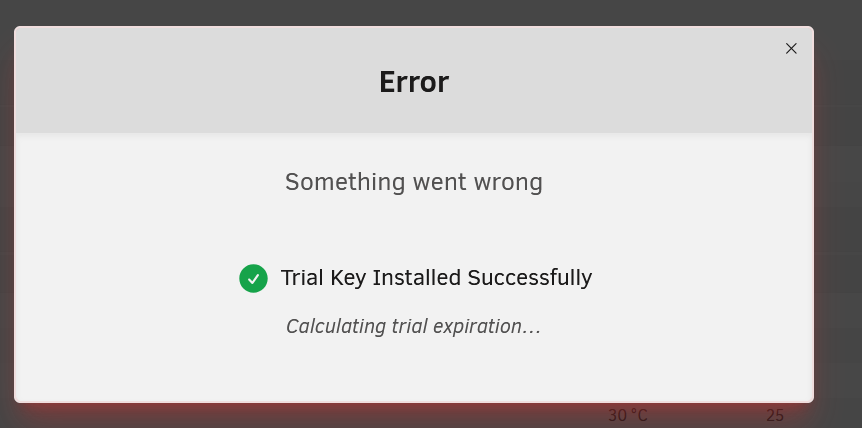
Been a trying process so far, unfortunately. First two USB's I tried, the USB creator wouldn't believe had GUIDs (even though I could see them through various tools). Third one (all sandisk 16GB usb3.2) recognised the guid but then 'couldn't' complete the format, not clear what the issue was there, because windows thought the formatting was fine, at that point fell back on the manual install. There appears to be a typo in the windows make bootable script and it failed as a result (pretty sure the below is meant to be setup) # from make_bootable.bat :select echo: set/p boot="Permit UEFI boot mode [Y/N]: " if /i %boot%==N ( # pretty sure this should be setup not set/p (at least that's what windows terminal thought it was trying to do): but even after fixing that it still didn't quite seem to work, every time I booted in, got the missing operating system message. At that point, I flipped the USB into zip mode, added an autorun to point it at syslinux and the .cfg and tried again. Worked like a charm, I am in, I have got in through the UI. Now, when I go to start the trial, I get something went wrong > Trial Key Installed Successfully > calculating trial expiration which may or may not be related to the trials that happened before this point.. Please let me know what additional info you need. Persistent of Gloucestershire.