





Davinci248
Members
-
Joined
-
Last visited
-
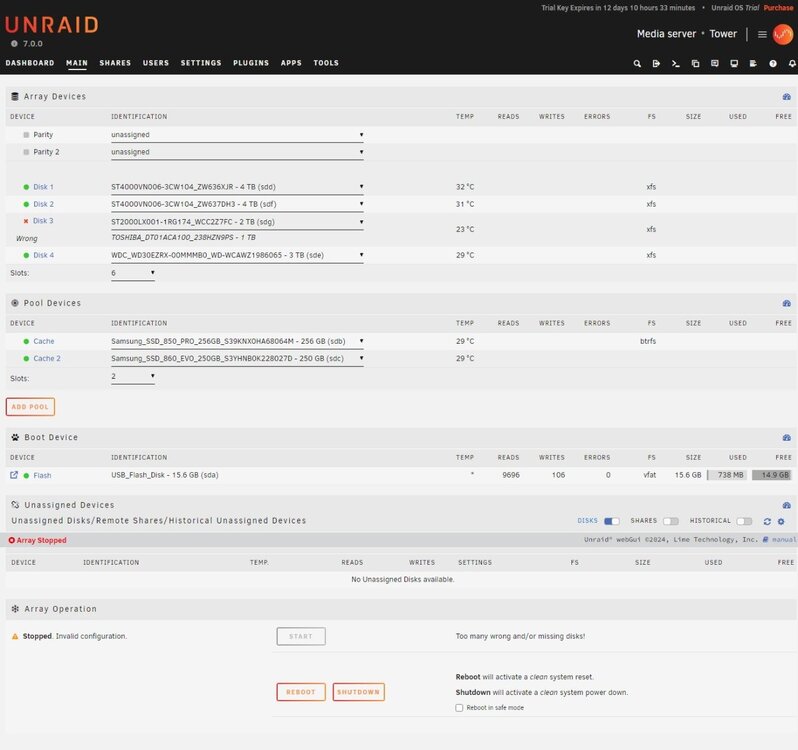
@JorgeB Thank you. That worked for one piece of the post. This UI process leaves a bit to be desired. It would be awesome if there was a simple button next to a drive slot in Main that would allow you to accomplish the same thing without the feeling of a scorched earth procedure. I get the same feeling when I click the format box which feels like your preforming a global format on the whole array vs the drive marked as unformatted. It would add confidence if there was some level of drive association with what seems like a global procedure. Again a format button or tickbox next to the unformatted drive would be awesome. Any comments on the other questions: So beyond what should I do next? .... a few more questions: 1. Is there a way to force remove a drive from the array... given above? 2. Best practice for hot-swapping drives which the mobo, LSI 3008 and chassis supports. Maybe this caused the instability? 3. Best practice: ....when the system will not shut down .....and steps to take after a dirty shutdown. Cheers.
-
Will the 4TB drives be readded with data intact?
-
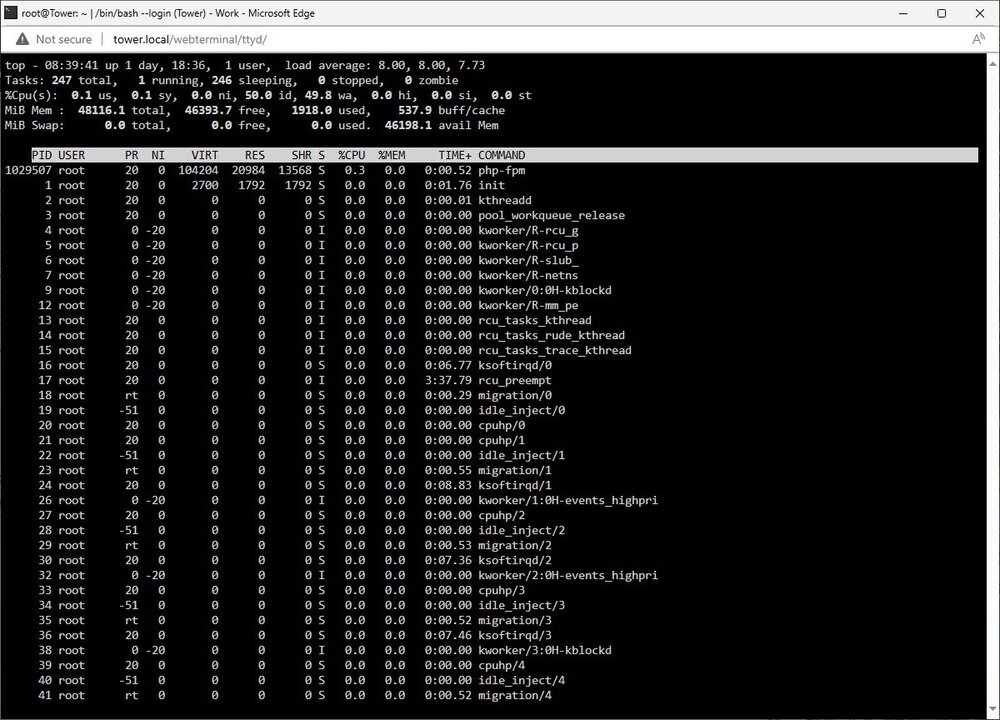
Hello. I'm still new to Unraid. Set-up a test with MSI Z170M MORTAR (MS-7972), i7-6700k, 46G DDR4, LSI 3008, Intel 10G Nic, 8-bay SATA/SAS chassis, Unraid 7.0.0. Started with new (1) 8TB Parity drive and (2) 4TB Data drives. I installed then removed the parity drive so that I can load data from a big pile of old drives. My plan was to move data off the old drives, then add them to expand the array. Then build the parity drive and setup cache pool once I had the array loaded. However, I ran into a cascade of problems after adding a drive that came up with a bunch of CRC errors (I didn't properly preclear it). It doesn't have any data on it yet. But when I try to swap it with a larger drive. I get a "Wrong" message in the drive slot and "Invalid configuration" in Array Operation. Most of the info I've seen about drive swaps rely on parity rebuild of the new drive. But there is no parity available and nothing to rebuild in this case. I know about the array reset option. But I'm not sure if I do that I'll loose the new data that's been added to the two 4TB drives? Part of the problem may have happened because I got confused by when the preclear process/plugin was finished. I think I added the drive while it was being precleared. Was not sure where to expect to see the preclear status? I though I saw the status in main > status bar? I found it afterwards in Tools > Preclear. Also is there any visual status of the clear process that happens outside of the plugin... when a non-precleared drive is added to the array or added when being precleared by the plugin? While trying to deal with the drive issue above I'm now seeing stability problems - not responsive to shut down/reboot command via UI or console. In an attempt to force a clean shutdown I tried to do a single press of the power button but accidentally hit the reset button, causing a dirty reboot. The system came back, all drives present. However after a bit I'm back to not responsive shutdown again and this time the local console is weird... delayed keyboard response, repeating Unraid version/IP info.... before I can get to a login prompt. CTRL+C did not clear the issue. The UI still works and I can get into the web console. I tried to collect the diag info but the process stalled (bouncing green dots) after the following line ... smartctl -x '/dev/sde' 2>/dev/null|todos >'/tower-diagnostics-20250303-1202/smart/WDC_WD30EZRX-00MMMB0_WD-WCAWZ1986065-20250303-1202 disk4 (sde).txt' So beyond what should I do next? .... a few more questions: 1. Is there a way to force remove a drive from the array... given above? 2. Best practice for hot-swapping drives which the mobo, LSI 3008 and chassis supports. Maybe this caused the instability? 3. Best practice: ....when the system will not shut down .....and steps to take after a dirty shutdown. Sorry in advance for the long post. Cheers.
-
Thank you that makes more sense now. I was thinking there was more fuzzy logic used in backend file management. I also was thinking that there might be more than one drive write/activity at a time (sudo strip)... writing of multiple files to the array at a time. Meaning File1 to drive A and File2 to drive B... With only me using it for the initial data load (repository of large system image files) I'm only seeing one file write to one drive at a time. So, the main benefit of the array is not throughput performance but allowing multiple different sized drives to be used with the parity protection as backup for all of them. This makes me think in terms of using the Array for near storage and an SSD raid (ZFS?) in the pool for faster performing storage and virtualization (future). I think I'm getting it! Cheers, Thank you again.
-
Davinci248 joined the community
-
I've been using network storage forever (RAID hardware, software, and dedicated NAS devices.) I understand the concepts. SO I figured unRaid looked compelling and I had some extra hardware to try. But the more I use unRaid 7 the more I have questions about proper configuration. I have two 4TB data drives with a 6TB parity in the array (just to start.l) I also have a 256GB SSD in the pool, named cache. All the docs talk about using the cache to buffer writes to speed up ingest of data while a backend process will write that data to the parity protected array. Sounds Good. The first transfer test didn't show any activity in the Pool SSD (I thought it was a default process). I dug into the docs and found references to a "Use Cache" setting in share settings. In 7.0.0 there is no option for this in the WebGUI? It finally dawned on me that there were likely setting files on the USB drive and sure enough I found the share settings file with shareUseCache="no". I changed it to yes and tried transferring files again. Still no activity on the pool cache drive. Restarted the system. Still nothing. I dug back into the Manual and found something about Primary / Secondary storage. So I reconfigured the share for the pool cache SSD as the primary and the array as the secondary. Now I was getting traffic pool cache SSD but nothing on the Array. That is until transfered data exceeded the size of the SSD and the transfer ended with an error. That's not expected. What am I missing here?

