





MetalOctopus
Members
-
Joined
-
Last visited
-
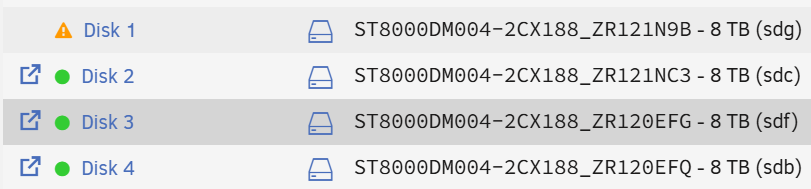
Sorry for the necro thread... Is this still an issue in current versions? I just picked one up and it promptly disabled disks and flagged others as unmountable. Assuming I'm experiencing something similar; these drives were AOK prior and my WD drives are perfectly happy post-migration. I'm on 6.12 - Do I go back to 6.8 or forward to 7.x?
-
Thanks Jorge, So I pulled everything I could, ran a 24 memtest with no issues. I cripted a report to syslog for power draw and CPU temp every few seconds - nothing usual there. Where else / how else could I look for the issue? Thanks again!
-
Heya, So generally more stable, but occasionally I find all the dockers +/- array stopped with "unclean shutdown detected" although I didn't have to turn the power back on. Does it self-recover from things? Diagnostics attached, and the original disk is now sitting next to me. Do I need to go back and find a list of all the files that didn't make it (?) through the filesystem check and try to copy those off? Thanks again! yokiunderground-diagnostics-20250309-1809.zip
-
Results attached. It was listing some client files, so have redacted filenames/directories, but otherwise unchanged. xfsrepair_redacted.txt
-
Righto. Doing that now. Will post when it's complete. Thanks
-
In maintenance mode, filesystem check without -n: Phase 1 - find and verify superblock... Phase 2 - using internal log - zero log... ERROR: The filesystem has valuable metadata changes in a log which needs to be replayed. Mount the filesystem to replay the log, and unmount it before re-running xfs_repair. If you are unable to mount the filesystem, then use the -L option to destroy the log and attempt a repair. Note that destroying the log may cause corruption -- please attempt a mount of the filesystem before doing this. With nothing thereafter.
-
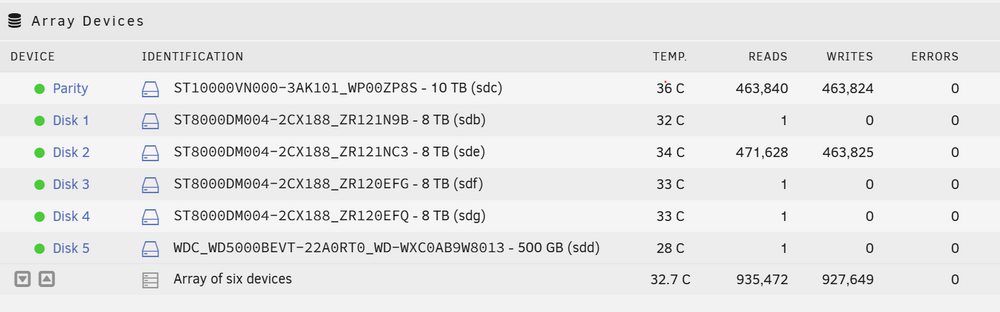
Oddly, just running the filesystem check, now it (Disk 2) appears as: Am I correct in thinking that nothing changed and now it magically mounts?

-
It showed unmountable some attempts, but happily wrote to it. Other times it seemed fine. It wouldn't let me format the drive before rebuilding to it; that option was greyed out no matter what I tried. Check Filesystem returns a few thousand lines like: Phase 1 - find and verify superblock... Phase 2 - using internal log - zero log... ALERT: The filesystem has valuable metadata changes in a log which is being ignored because the -n option was used. Expect spurious inconsistencies which may be resolved by first mounting the filesystem to replay the log. - scan filesystem freespace and inode maps... Metadata CRC error detected at 0x47191d, xfs_inobt block 0x186544da0/0x1000 btree block 3/13273527 is suspect, error -74 bad magic # 0x241a9c92 in inobt block 3/13273527 Metadata CRC error detected at 0x47191d, xfs_inobt block 0x186544ea8/0x1000 btree block 3/13273560 is suspect, error -74 bad magic # 0x241a9c92 in inobt block 3/13273560 agi_count 148096, counted 119936 in ag 3 agi unlinked bucket 26 is 441514586 in ag 3 (inode=6883965530) sb_icount 1215488, counted 1187136 sb_ifree 11975, counted 13899 sb_fdblocks 488198803, counted 501905031 - found root inode chunk Phase 3 - for each AG... - scan (but don't clear) agi unlinked lists... - process known inodes and perform inode discovery... - agno = 0 - agno = 1 Metadata corruption detected at 0x438a03, xfs_inode block 0x1239eab30/0x4000 Metadata corruption detected at 0x438a03, xfs_inode block 0x1239eab50/0x4000 Metadata corruption detected at 0x438a03, xfs_inode block 0x13d2355b0/0x4000 [...] imap claims in-use inode 6884027510 is free, would correct imap imap claims in-use inode 6884027511 is free, would correct imap imap claims in-use inode 6884027512 is free, would correct imap imap claims in-use inode 6884027513 is free, would correct imap imap claims in-use inode 6884027514 is free, would correct imap imap claims in-use inode 6884027515 is free, would correct imap imap claims in-use inode 6884027516 is free, would correct imap imap claims in-use inode 6884027517 is free, would correct imap imap claims in-use inode 6884027518 is free, would correct imap imap claims in-use inode 6884027519 is free, would correct imap 145f673ab680: Badness in key lookup (length) bp=(bno 0x19a51ed68, len 4096 bytes) key=(bno 0x19a51ed68, len 16384 bytes) 145f673ab680: Badness in key lookup (length) bp=(bno 0x19a51ed88, len 4096 bytes) key=(bno 0x19a51ed88, len 16384 bytes) [...] entry "L9326700_MF__pd100.grd.xml" at block 0 offset 2704 in directory inode 13537454310 references non-existent inode 13537555307 would clear inode number in entry at offset 2704... entry "L9326700_MF__pd100_5000.grd" at block 0 offset 2744 in directory inode 13537454310 references non-existent inode 13537555308 would clear inode number in entry at offset 2744... entry "L9326700_MF__pd100_5000.grd.gi" at block 0 offset 2784 in directory inode 13537454310 references non-existent inode 13537555309 would clear inode number in entry at offset 2784... entry "L9326700_MF__pd100_5000.grd.xml" at block 0 offset 2832 in directory inode 13537454310 references non-existent inode 13537555310 would clear inode number in entry at offset 2832... entry "L9326700_pd100.map" at block 0 offset 2880 in directory inode 13537454310 references non-existent inode 13537555311 would clear inode number in entry at offset 2880... entry "L9326700_pd100.map.xml" at block 0 offset 2912 in directory inode 13537454310 references non-existent inode 13537555312 would clear inode number in entry at offset 2912... entry "L9326700_pd100_5000.map" at block 0 offset 2952 in directory inode 13537454310 references non-existent inode 13537555313 would clear inode number in entry at offset 2952... [...] would have junked entry "65" in directory inode 1227282661 would have corrected i8 count in directory 1227282661 from 4 to 3 bad directory block magic # 0x241a9c92 in block 0 for directory inode 5645024174 corrupt block 0 in directory inode 5645024174 would junk block no . entry for directory 5645024174 no .. entry for directory 5645024174 problem with directory contents in inode 5645024174 would have cleared inode 5645024174 No modify flag set, skipping phase 5 Inode allocation btrees are too corrupted, skipping phases 6 and 7 No modify flag set, skipping filesystem flush and exiting.
-
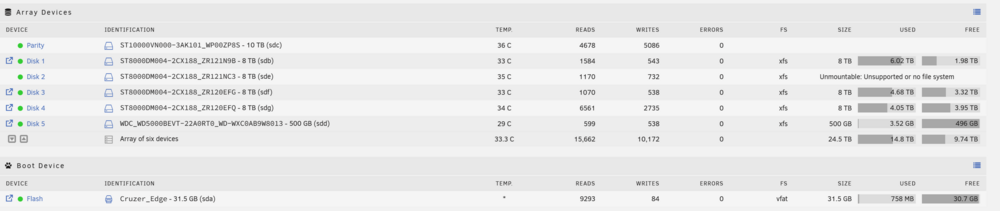
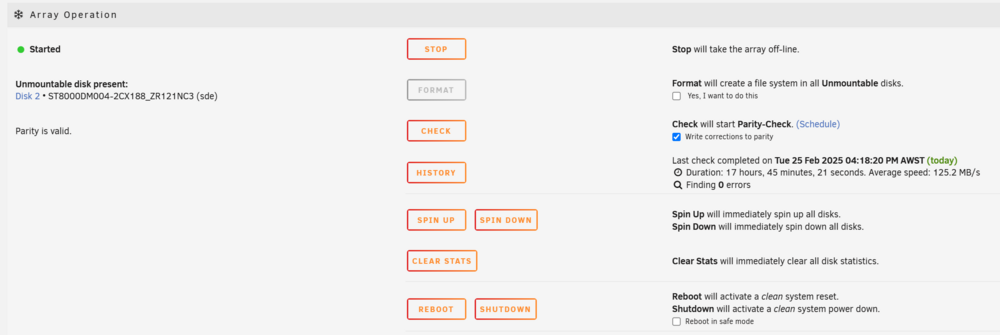
Not that my original issue is resolved, but: Now that I have rebuilt a whole drive, can anyone explain this? Disk is 100% rebuilt, but unmountable?
-
So we managed 24h uptime through a rebuild of an 8Tb drive without crashing. That was in safe mode, with literally everything disconnected. I also ran a script from /boot/config/ to report to rsyslog values for power consumption and cpu temperature. Neither reached anything near what I would consider a dangerous level. If anyone else wants to run this then here's what worked for me: #!/bin/bash #My Raspberry Pi IP and port. RSYSLOG_SERVER="192.168.0.252" RSYSLOG_PORT="514" #Initial readings for power use: prev_energy=$(cat /sys/class/powercap/intel-rapl:0/energy_uj) prev_time=$(date +%s%N) #every 10s, check power use and CPU temp. while true; do sleep 10 curr_energy=$(cat /sys/class/powercap/intel-rapl:0/energy_uj) curr_time=$(date +%s%N) cpu_temp=$(sensors | awk '/Package id 0/ {print $4}' | tr -d '+°C') #Power use is cumulative, so we need to subtract current from previous (see prev_energy declaration above) energy_diff=$((curr_energy - prev_energy)) time_diff=$((curr_time - prev_time)) if [ "$time_diff" -eq 0 ]; then continue fi time_diff_s=$(awk "BEGIN {printf \"%.6f\", $time_diff / 1000000000}") power=$(awk "BEGIN {printf \"%.2f\", $energy_diff / $time_diff_s / 1000000}") #Aaaand now that we have those vars, report them to syslog... logger -n $RSYSLOG_SERVER -P $RSYSLOG_PORT "Power Draw: $power W" logger -n $RSYSLOG_SERVER -P $RSYSLOG_PORT "CPU Temp: $cpu_temp°C" #Just in case... prev_energy=$curr_energy prev_time=$curr_time #Troubleshooting before this gets set behind the scenes. echo "Power Draw: $power W" echo "CPU Temp: $cpu_temp°C" done
-
Ok so that didn't work. Got to about 4h from finishing the rebuild and then found it hung again sometime between 8pm and 10:30pm. Now in safe mode, array started in maintenance mode and trying to rebuild (again). Pity a rebuild doesn't seem to be able to be resumed. I'd have finished 8 times over by now and be much less stressed. Will update on how this goes!
-
Thanks Jorge, appreciate you having a look. I disabled all c states previously and still had the issue; that was my next step after memtest. I don't see any thermal events, so my next guess is the PSU isn't handling peaks in power draw We'll see if I can complete the rebuild of this drive without the GPU installed.
-
Have now pulled the GPU and the external USB drive I was using for immich backups. Should note I'm now in maintenance mode trying to rebuild onto a new disk the contents of a dead drive with file system corruption - I suspect as a result of these system hangs. I was having these issues before having to rebuild the drive.
-
Crashed sometime between my last login and 2:48am. unraid_syslog.log
-
Hello, I'm trying to work out why I'm experiencing random full system hangs. I'm extremely new to unraid, but have tried the following so far: I've set up rsyslog to another machine, but there are only errors about shinobi trying to grab some missing icon from the web; never any panic, shutdown events etc. I've done a memtest for 24h with zero fails. I've disabled all power saving for the CPU in the motherboard's bios. Diagnostics attached. Hardware profile uploaded to LimeTech. Can anyone please help me with some ideas on where to go next? Thanks! yokiunderground-diagnostics-20250223-1209.zip


