





Zzzen
Members
-
Joined
-
Last visited
Everything posted by Zzzen
-
Hi, you were right, it was a correcting parity check. And I've got rid of all power cable splitters, and all runs well and it feels solid with stable power delivery. I've lost many files but mostly media files, nothing too serious. I thought the problem was solved so I deleted the diagnostics And I'm grateful for all the patience and help all along. Thank you! And community!
-
I can access the folder through the specific disk, but not from the share folder which says invalid path. Is the folder created in the disk where the files originally located? If so I might know what they are and how to deal with them, millions of folders lol Thanks for the reminders, I'll see to the connections after the parity check. Thanks for the support!
-
Update I've managed to rebuild and repair the whole system after several times of rebooting, rebuilding and formatting and parity check. I now believe the problem might be caused by hardware issue as every time I opened up the machine, something wrong popped up. I gave it 3 days for the whole data rebuild, the rebuild speed changed dramatically, but it completed at last, and I formatted the unmountable disk, thus lost all files from the original disk 1(toasted). then the disk 2 showed up as unmountable, but a filesystem fix then solved it. After rebuilding and checking and fixing corruptions the system shows all green for now. Now I see a 490G lost+found folder showed up located in disk2, i failed to go into the folder. Wondering if you may point me the way to restore whatever is in the lost+found folder? Also latest diagnostics attached, would you be so kind to check if everything is alright now? Any potential risks? Also I haven't done memtest yet, I know I shall do it sometime. Thanks in advance!
-
Understood, let me find a monitor with vga first
-
Is the live memtest plugin sufficient? Thanks!
-
So sad and strange. And no sir, no memtest done recently.
-
Rebooted without the failed old disk, nothing assigned, diagnostics attached. Now sdd is showing as unmountable...
-
Disk 1 unassigned, please see attached diagnostics. Thanks!
-
Sorry for the confusion. I meant the former parity sdb... Currently sdc. Is there any way I can fully cancel the rebuild, and lose this disk, format it and add into the array? I've backed up most of the files so should be ok. Thanks!
-
Or perhaps there is any way to stop this rebuild process, to totally ignore the swapping and copying and add back sdb formatted as new while remain the other disks and array config untouched? I can withstand the minor data loss of that one disk. Thank you!
-
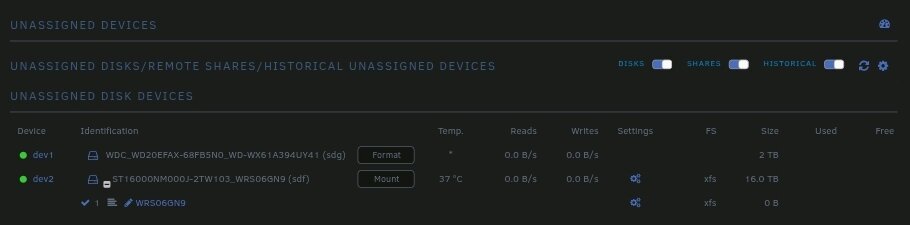
I think the following I did was why sdf thinks it has a valid filesystem because when I was messing up to start it I put it in the parity swap slot in the config to try if it can be started.. As for sdg, I've tried changing it's physical slots, re connect, but I think the disk itself may be broken physically, as it's buzzing when spinning.. could this be reported as the connection problem? Thanks!
-
Sorry my typo, sdg, 2t, the original failed disk, sdf, 16t, a new complete disk.
-
Sdg is the 6th new disk, prepared for expansion.
-
Screenshot attached.
-
Yes sir, sdg is the original failed disk. The machine has 6 sata ports splitting into 3 controllers each with 2 slots, if this is what you were referring to. Confirm plugin installed. Waiting for instructions. Thx!
-
Thank you for explaining. I see it might be the physical connection as I've opened several times these days. I've re-pluged everything firmly. Original failed disk attached, unassigned, array not started, diagnostics as attached. Thanks!
-
Matter of fact I did changed the config once before starting the array when I found it not starting, I changed the disk 1 slot to a 5th new disk attached, and the config was valid and I hit the start button, and 30mins later I shutdown before it actually started. I believe this did unmounted the disk during that once start-up.. I was too eagerly trying to get it started.. Yes I do have ports available for the disk. What shall I do?
-
Yes, the network was down for a while as I was upgrading the home network setup, and also I added a pcie NIC earlier today, went back and forth with the configs of interfaces for a while, but no actual connection problems that I recall. And the machine is currently online, connections are fine for now. Is the diagnostic showing any specific problem? Sorry I'm not a real superuser, not so good at reading through all the reports. I remembered getting a smart report of the disk, let me see if I can still find it on my PC later. Thanks for the help!
-
Thank you for the reply! No, I didn't unmount any disk the during this whole operation. And sure, I won't format, as it's still greyed out, though I wonder if this is prepared for the disk when complete data-rebuild? And for the estimated 100 days, I haven't checked if I have full access to the files yet, but if the data remains intact I don't mind 100days of rebuild lol One more thing, I originally had two shares, one was exclusively assigned to 2t disk1, while the other assigned to the other 4t disks. When the failure warning turned up, I re config the share of disk1 to disk2 & 3, excluding disk1. (Maybe I was thinking this might activate some sort of data moving between disks). And during the several self rebuild processes, I saw the exact share folder appeared in the disk2 & 3, I presume maybe the data was indeed or partially moved? Yes, the original 2t disk 1 still in hand. If you have any idea on how I may deal with this, please let me know. Appreciate your time and help!
-
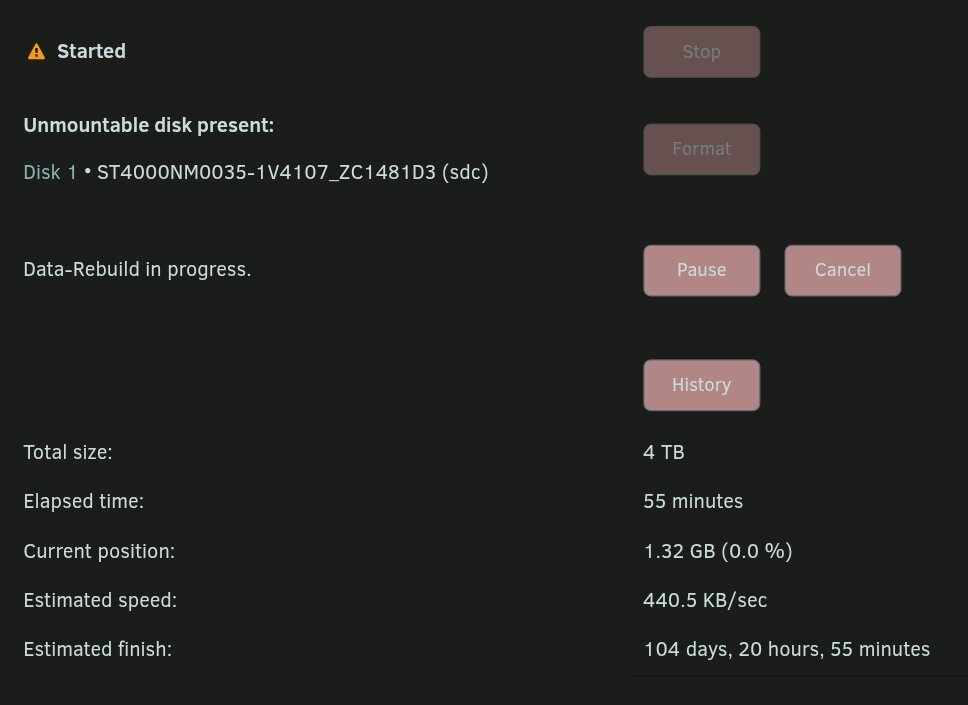
Thank you for your prompt reply, please see attached diagnostic zip. To my surprise the array was started and all services on the run about 50mins ago. However on the main page, it says data-rebuild in progress while a format button appears for the old 4t disk at the same time, says needs formatting. Please see the following screenshot also showing the estimated time of over 100days.. The gui shows writes into this disk, but how is it unmounted at the same time? Thank you!
-
Dear community, Been using unraid for over a year, and earlier this year data disk one reports a failure, after trying self-rebuild learned from the manual with no luck, I decided to swap the failed disk with a bigger one, thus I followed the instruction step by step for a parity swap. Fomer config Parity: 4t Data disk 1: 2t Data disk 2: 4t Data disk 3: 4t New config Parity: 16t Data disk 1: 4t (formerly parity disk) Data disk 2: 4t (formerly disk 2) Data disk 3: 4t (formerly disk 3) Upon parity swap, I shut array down, unassign failed disk (showing content emulated), shut down, turn on, unassign the old 4t from parity, assign the new 16t as new parity, and reassign the former 4t parity as data disk 1, as the main page showed the config is valid, I started the move process, after it's done, the copy buttons showed up, thence I started the copying. So far I believe I followed every step of the instruction. Stupid as I was when I saw the estimate time rised up to 100 days, I stopped the process, and the array won't start ever since. Upon start of the machine without auto disk start, a valid config shows as above, and hit start, it only shows 'array is starting' and takes like forever but won't start.. tried several times.. Did I break anything when I canceled the copy process of data-rebuild? Anyone might help with any idea on the situation? Thanks in advance.
