





APM
Members
-
Joined
-
Last visited
Everything posted by APM
-
Thank you, i will try with the generic paths for now. That would be a bit clunky, but if it works it works ig. As for clients, i am on IOS and there the only app i found that offers offline download, playlist management and (most importantly for iphone, as natively it isnt supported without serverside transcoding) can play .flac is one called play:sub. Update: it works. Guess i will have to change a bit in my Pipeline then. Thank you! For future Users: Playlists need to be located in the config subfolders to be properly recognized, inside a directory of your userID. UserID for the admin login is "1". Other user IDs idk.
-
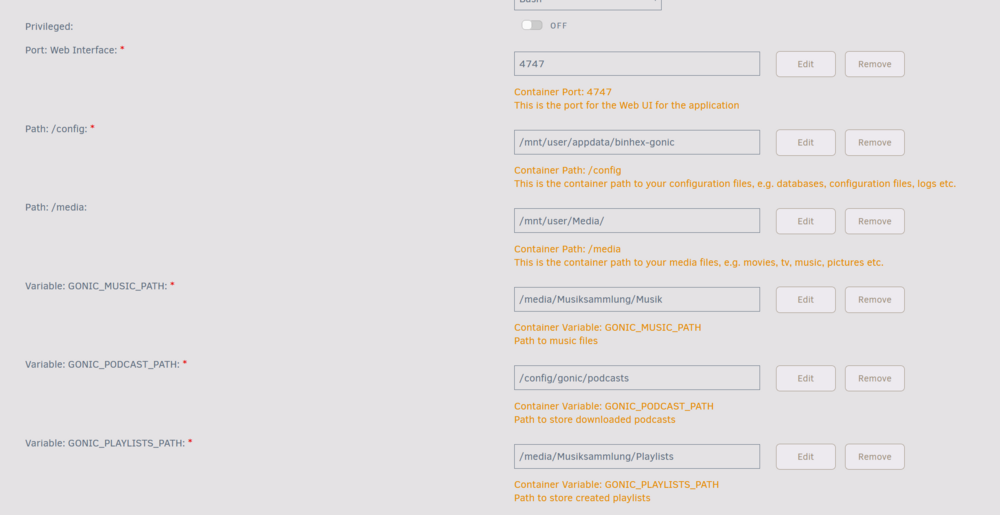
I currently struggle with getting playlists in order. If i set the playlist path variable to reference the path outside the conainer (same as the /media folder) the container complains. However if i map the path to incontainer logic (example "/media/playlists") there seems to be no recognition of any playlists which are already present. I am aware gonic goes by userID (wherever that one is defined, but admin should be "1"), so i put all my present playlist m3u files inside a folder named "1" in my playlist path. Yet neither in the WEBUI can i see the recognition of those playlists, nor can i access them via local endpoints that usually work well with the subsonic api (used airsonic previously). Other than that, gonic really is so much faster than Airsonic in its transcoding, i just cant seem to figure out that bit. That I can access present playlists with /get-playlists. my folder structure is "<GONIC_PLAYLISTS_PATH>/1/<playlists>.m3u" and my container is structured like this. Am i missing anything?
-
Thanks, I just did a shallow copy to /temp (sorry not that deep in bash functionality), but i believe thats just some parts loaded in ram. Essentially i just used that to check if my files are still there (it still had my shares as folders etc.). I dont think there is data on there thats necessary to be kept, so i guess Reformatting it is? Can i just use the Unraid GUI feature for that and create a new partition? Or is there a way i can load off everythign currently stored on there to some place on my two other disks that i use as array? I am not even sure whcih parts of my files are located on the SSD and which arent, the structure of Unraid working in shares makes this a bit hard for me to understand sorry. Thanks for your help
-
Thank you for your answer, yeah the "p1" being part of it was indeed an oversight. fdisk -l /dev/nvme0n1 gives Disk /dev/nvme0n1: 1.82 TiB, 2000398934016 bytes, 3907029168 sectors Disk model: Samsung SSD 970 EVO Plus 2TB Units: sectors of 1 * 512 = 512 bytes Sector size (logical/physical): 512 bytes / 512 bytes I/O size (minimum/optimal): 512 bytes / 512 bytes Disklabel type: dos Disk identifier: 0x00000000 Device Boot Start End Sectors Size Id Type /dev/nvme0n1p1 2048 3907029167 3907027120 1.8T 83 Linux Which lines up again with the data from this problem ( After starting the array, i downloaded the diagnostics like you mentioned. diagnostics-20250306-1414.zip
-
Good day, Since yesterday (after a hard shutdown i had to do because the server was no longer reachable), i have gotten the above error for my One Cache Drive i use since Dec 2023. I have done the following research and fix steps already (following loosely this thread here). I have also tried: Restart, stop array, reassign mounts, start array, Restore from backup earlier that day (couldnt find an older version). The following (hopefulyl relevant) commands return the following: btrfs fi show Label: none uuid: 46f2df36-e9e3-4e60-b618-fa56936b6a5a Total devices 1 FS bytes used 340.00KiB devid 1 size 20.00GiB used 536.00MiB path /dev/loop2 Label: none uuid: cef1ec31-8a35-4148-93d3-2c1ddde40ff0 Total devices 1 FS bytes used 783.53GiB devid 1 size 1.82TiB used 851.07GiB path /dev/nvme0n1p1 So apparently the device is not completely corrupt. II tried creating a read-only mount next and creating a backup, as recommended here mount -o usebackuproot,ro /dev/nvme0n1p1 /temp this showed me no errors, it just took a while. Browsing in /temp also showed my old data structure As far as i am aware, this is just a shallow copy in the RAM so i wanted to do an actual backup in case something goes wrong du -sh /temp ls /temp | wc -l This also completed after some time Afterwards i got recommendet to check if the backup checksums were matching: btrfs restore -l /dev/nvme0n1p1 | wc -l find /temp -type f | wc -l which they were not (first command = 314, second command = 0). i Then cautiously went back to the original helpthread, and tried to go from there > fdisk -l /dev/nvme0n1p1 Disk /dev/nvme0n1p1: 1.82 TiB, 2000397885440 bytes, 3907027120 sectors Units: sectors of 1 * 512 = 512 bytes Sector size (logical/physical): 512 bytes / 512 bytes I/O size (minimum/optimal): 512 bytes / 512 bytes whcih is a different result than the user in that post was getting. And the fix that was proposed typing in sfdisk /dev/nvme0n1p1 with 2048 gives me Welcome to sfdisk (util-linux 2.38.1). Changes will remain in memory only, until you decide to write them. Be careful before using the write command. Checking that no-one is using this disk right now ... OK The device contains 'btrfs' signature and it may be removed by a write command. See sfdisk(8) man page and --wipe option for more details. Disk /dev/nvme0n1p1: 1.82 TiB, 2000397885440 bytes, 3907027120 sectors Units: sectors of 1 * 512 = 512 bytes Sector size (logical/physical): 512 bytes / 512 bytes I/O size (minimum/optimal): 512 bytes / 512 bytes sfdisk is going to create a new 'dos' disk label. Use 'label: <name>' before you define a first partition to override the default. Type 'help' to get more information. >>> 2048 Created a new DOS disklabel with disk identifier 0x31d59598. The device contains 'btrfs' signature and it may be removed by a write command. See sfdisk(8) man page and --wipe option for more details. Created a new partition 1 of type 'Linux' and of size 1.8 TiB. /dev/nvme0n1p1p1 : 2048 3907027119 (1.8T) Linux /dev/nvme0n1p1p2: Which is a different thing that the user in the support thread i referenced got. So i CTRL+C it, and tried with 64 Welcome to sfdisk (util-linux 2.38.1). Changes will remain in memory only, until you decide to write them. Be careful before using the write command. Checking that no-one is using this disk right now ... OK The device contains 'btrfs' signature and it may be removed by a write command. See sfdisk(8) man page and --wipe option for more details. Disk /dev/nvme0n1p1: 1.82 TiB, 2000397885440 bytes, 3907027120 sectors Units: sectors of 1 * 512 = 512 bytes Sector size (logical/physical): 512 bytes / 512 bytes I/O size (minimum/optimal): 512 bytes / 512 bytes sfdisk is going to create a new 'dos' disk label. Use 'label: <name>' before you define a first partition to override the default. Type 'help' to get more information. >>> 64 Created a new DOS disklabel with disk identifier 0xb8388533. The device contains 'btrfs' signature and it may be removed by a write command. See sfdisk(8) man page and --wipe option for more details. Created a new partition 1 of type 'Linux' and of size 1.8 TiB. /dev/nvme0n1p1p1 : 64 3907027119 (1.8T) Linux /dev/nvme0n1p1p2: Which is also different. At that point i was too afraid to continue in fear of messing something up with my amateur workings. I also looked into it (after unmounting) with btrfs check /dev/nvme0n1p1 Which gave me a pretty long dump of text i dont want to paste here, i attached it. But all in all there were multiple errors found. So i am left at this point, and would love to have some professional opinions on what my next steps should be. I didnt want to try "restore" or simliar because in the "FAQ for Unraid" it gets called a lsat resort, able to mess stuff up. Thanks a lot for your time! btrfs check.txt

