





mgkwong
Members
-
Joined
-
Last visited
Everything posted by mgkwong
-
Cables were the solution. I am using a SATA to SATA power adapter on the parity and disk 1 because the hard drives have the 3.3V Power Disable Pin. The adapter for the drive failed since the HDD booted up with the parity's adapter. I opted to cover Pin 3 on the SATA power connector with electrical tape since I did not have another adapter cable. Once the pin was covered, Unraid was able to recognize the drive. However, I had to rebuild it. Everything is back to normal after rebuild.
-
Ok I missed that detail. I wasn't aware that a filesystem check on a disk can be completed by parity emulation. Considering Disk 1 is not present in the BIOS, what would my next steps be?
-
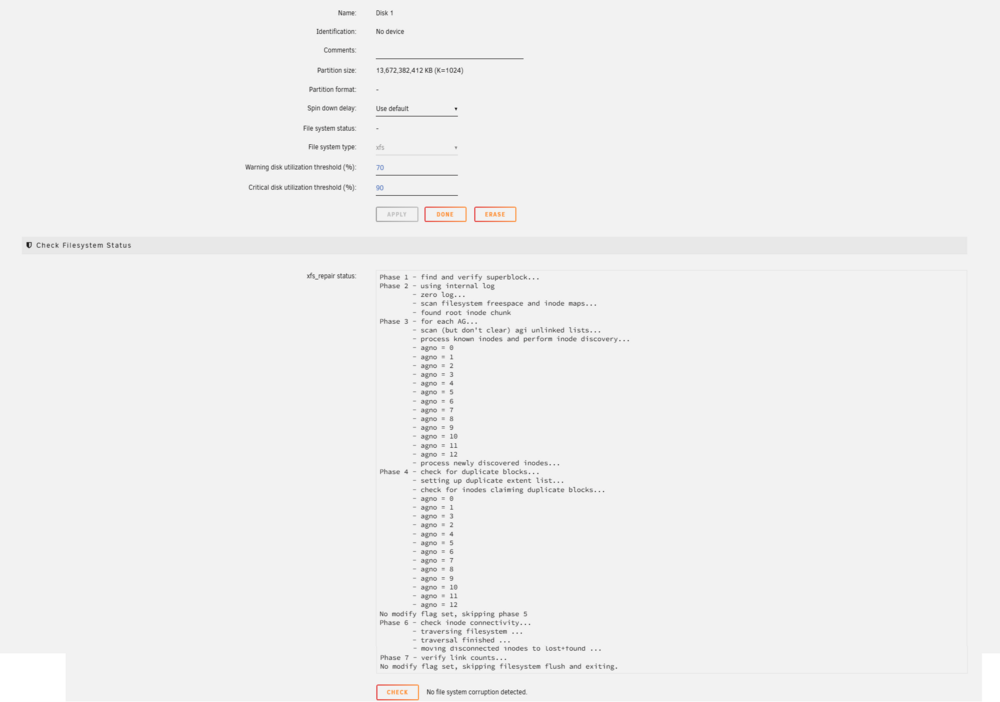
I entered maintenance mode to Check Filesystem Status. It appears Unraid can talk to the Not Installed Drive but doesn't find anything wrong?
-
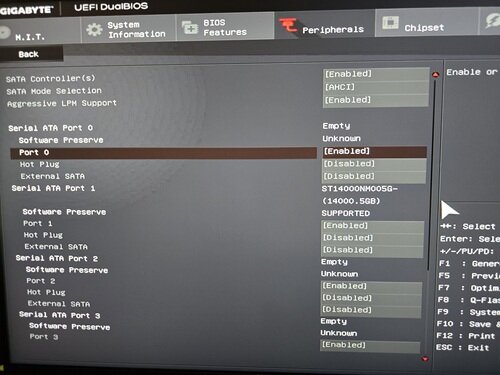
Sorry had a brainfart. Unfortunately, only 1 of 2 drives show's in BIOS. Every other SATA Port (0-5) shows Empty Disk 1 is connected to SATA Port 0
-
Well that's good news. My motherboard is Gigabyte GA-H170-D3HP ATX LGA1151. It's an old gaming desktop rig. How do I enter the BIOS to check?
-
Hello, I have an issue in my Unraid. I have a total of two drives. One is a parity of the other. Initially the problem was against Disk 1: Device Disabled, Contents Emulated. I could not spin up the disk as it was in a persistent error state. Server was shut down to check cable connections. After boot up, Disk 1 says "Not Installed," yet the main page shows the Used Space and Free Space of Disk 1. Swapped SATA power cables for Disk 1 and parity - Only parity shows up. Disk 1 not installed Replaced the SATA data cable for Disk 1 - Disk 1 not installed Is Disk 1 dead? I have attached diagnostics mk-unraid-diagnostics-20251211-0730.zip



