Zockerwolf22
Members
-
Joined
-
Last visited
-
So Hallo nochmal, nach langem recherchieren und ausprobieren, hab ich nun eine Lösung mit der ich zufrieden bin. Erstmal danke an alle die hier ihre ganzen Ideen geschrieben haben, welche zum Endergebnis geführt haben. Die Idee mit dem VPS fande ich so an sich richtig gut. Aber Tailscale hat mich nicht wirklich überzeugt. Also suchte ich und fande Pangolin und muss sagen es ist eine genauso tolle Sache wie Tailscale. Man hostet aber bei Pangolin alles selber und hat keine Benutzergrenze was ich sehr begrüßend finde. Das Endergebnis ist also bei mir ein VPS mit Pangolin (https://www.youtube.com/watch?v=sXuUODTQekI nach dieser Anleitung installiert). Verbunden mit meinen Containern Zuhause läuft das alles super Stabil und für Websiten kann man auch noch zusätzlich eine Anmeldemaske erzeugen. Noch mal vielen Dank an alle und einen schönen Start in die Woche.
-
Das sich jeder einen Account anlegt ist leider keine Lösung mit der ich arbeiten könnte. Ich informiere mich mal ob man mit einem User mehrere Verbindungen gleichzeitig mit verschiedenen Endgeräten aufbauen kann. Falls das nicht möglich wäre finde ich den Ansatz mit VPS ganz interessant, dass würde ich mir gerne etwas anschauen. Aber nur damit ich es richtig verstehe meine Docker müsste ich peer VPN Tunnel mit dem VPS verbinden. Der VPS hat eine Öffentliche IPv4 Adresse über die man diesen erreichen könnte. Dazu kommt auf dem VPS ein Reverse Proxy zum Einsatz mit den jeweiligen Ports offen. So kommt man dann auf die jeweiligen Docker und es ist Quasi dann einfach nur ein "Gateway" zu meinem Heimnetzwerk.
-
VPS + Reverse Proxy wäre definitiv auch eine Idee. Wegen Tailscale hätte ich noch kurz eine Frage. Man ist limitiert auf 3 User in der Free Version, aber ist es möglich das mehrere Leute über den gleichen User gleichzeitig auf z.B. einen Spieleserver spielen können? Und wäre es vllt Sinnvoll dann zwei kostenlose Accounts zu erstellen bei Tailscale ,um den einen für sich zu nutzen und der anderen für die "öffentlichen Container"?
-
Ich habe mir erstmal Tailscale angeschaut. Aber ich verstehe nicht wirklich was Tailscale mir für einen Vorteil gibt außer das es mit DS-Lite funktioniert. Habe ich da etwas übersehen? mfg
-
Hallo, ich überlege aktuell wie ich am besten meine Container von außerhalb meines Netzwerkes erreichen kann. Folgende Möglichkeiten habe ich akutell in sicht: 1. VPN/Wireguard Wireguard Container oder WG-Easy wobei ich bei WG-Easy auch Port Forwarding machen müsste um mich auf der Weboberfläche anmelden zu können. (SSL-Zertifikate/NGINX) 2. NGINX/Port Forwarding Bekomme ich locker hin nur es fehlt mir etwas an Sicherheit wie ein Passwort oder ähnliches. Bei den Containern handelt es sich einmal um Spieleserver und einen Teamspeakserver. Und falls möglich auf meine Nextcloud und andere Privatecontainer. Ist es möglich die Container schön von einander zu trennen, das bestimmte User nur auf bestimmte Container zugreifen können? Ich kam da bisher nur auf Wireguard mit GlutenVPN, so das dieser auf bestimmte Container nur zeigt. Eine andere Möglichkeit wäre vllt noch VLAN. Dabei müsste ich mir nur einen VLANfähigen Router besorgen. Was noch ein Problem in der Zukunft sein könnte ist das ich bald Glasfaser erhalte und vllt auf DS-Lite umgestellt werde. Habt ihr andere Ideen/Vorschläge wie ich das Projekt umsetzen könnte?
-
Hi tut mir leid für die späte Antwort konnte nicht früher es ausprobieren. Hatte den Docker und VM Dienst gestartet aber hat nicht funktioniert. Dann habe ich Unraid nochmal neu installiert und danach hat es einfach funktioniert. Vielen lieben Danke für die schnelle Antwort.
-
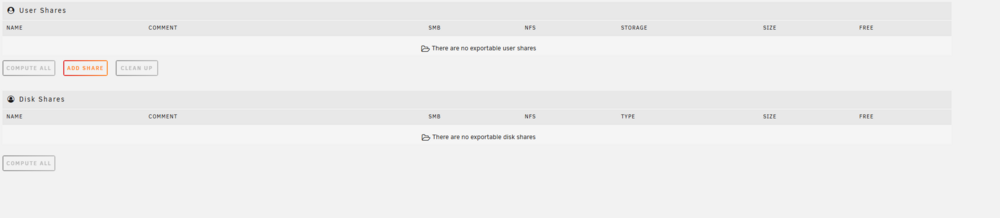
Hallo, ich wollte meinen Unraid-Server neu installieren da ich zu viele Sachen kaputt gemacht habe. Also habe ich meinen USB-Stick mit dem Unraid USB Ceator neu gemacht. Nach dem neu installieren von Unraid, fehlen mir nun immer appdata und system Share. Muss erst der Parity-Sync durch laufen damit die Standardshares angezeigt werden? mfg