RappScallion
Members
-
Joined
-
Last visited
-
The device is syncing as I write but it looks fine so far. Thanks for your support. :)
-
Any idea why it was disabled?
-
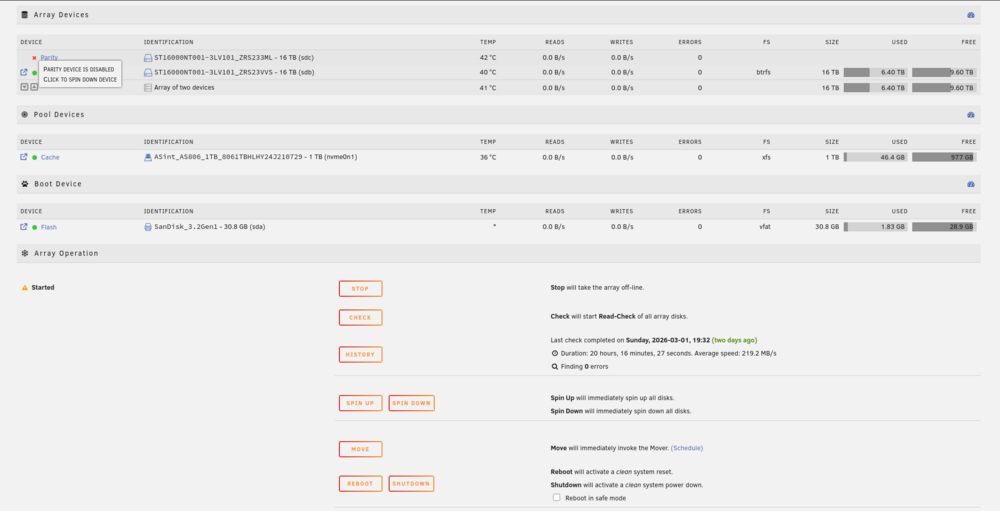
Hi! Less than a year ago I set up UNRAID on an AOOSTAR R1 with two spanking new Seagate IronWolf Pro 16 TB. All to run mainly Plex and store my media. The main drive is sdb and the parity drive is sdc. Everything has been going swimmingly for months until I discovered this weekend that my parity device has been disabled and there an X right next to it (see attached screenshot). If I mouse over the X it says "Parity device is disabled. Click to spin down device". That is the current status. What I've tried: Taking down the array, restart the machine and take the array online again. Same issue. Taking down the array and shutting the machine down. Removed drive and reseated them, can see nothing visually wrong. Run Quick and Extended SMART test. No errors found. Nothing in the Smart error log. Why wont the device go online, what might be wrong and how do I fix it? I've attached a screenshot and the diagnostics logs. Appreciate any help. diagnostics-20260303-1921.zip