





jonasmapache
Members
-
Joined
-
Last visited
Everything posted by jonasmapache
-
Thank you so much! The mover is moving files again
-
Okay thanks - just to be clear on how to solve it: i need to shut down the server, remove the usb stick and delete said file, while it is attached to another PC? or is there a way to open some kind of file explorer where I'm able to do that?
-
root@UNRAID:~# ls -lah /boot/config/shares total 144K drwx------ 2 root root 16K Apr 10 17:17 ./ drwx------ 11 root root 16K Apr 10 16:40 ../ -rw------- 1 root root 446 Apr 10 17:17 MEDIA.cfg -rw------- 1 root root 426 May 20 2024 ROMs.cfg -rw------- 1 root root 467 Apr 3 21:47 appdata.cfg -rw------- 1 root root 432 May 9 2024 backupprivat.cfg -rw------- 1 root root 161 May 1 2024 domains.cfg -rw------- 1 root root 153 May 1 2024 isos.cfg -rw------- 1 root root 154 May 1 2024 system.cfg
-
I've tried to change a few settings, save them, etc. The mover always stops working right after clicking the button: Apr 10 17:08:42 UNRAID emhttpd: shcmd (1333): /usr/local/sbin/mover start |& logger -t move & Apr 10 17:08:42 UNRAID move: mover: started Apr 10 17:08:42 UNRAID move: mover: finished Apr 10 17:08:45 UNRAID emhttpd: shcmd (1334): /usr/local/sbin/mover start |& logger -t move & Apr 10 17:08:45 UNRAID move: mover: started Apr 10 17:08:45 UNRAID move: mover: finished I've attached a new diagnostics file after trying to change the settings - maybe it will help... unraid-diagnostics-20250410-1718.zip
-
Attached is a screenshot of the settings of this share. Unfortunately I don't understand which setting I need to change. As mentioned before, this is how it was set up for more than a year and has worked flawlessly. Could you elaborate?
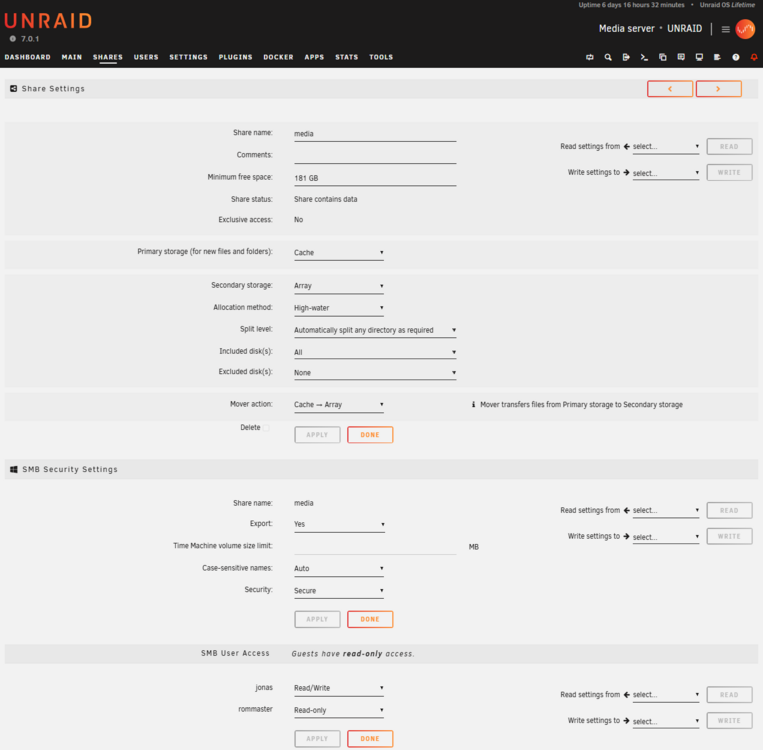
-
Hi, here is the diagnostics file unraid-diagnostics-20250410-1334.zip
-
I've had my unraid server runnig for well over a year now and everything was fine, just as I intended. New files will be copied to my SSD Cache (because I wanted to make use of my 2,5 Gig Networking) and would be copied over to my HDD-Array at night. During initial data ingest process I've even started the mover automatically to move stuff "live" while new files were coming in. That has worked as described since the beginning. Lately I noticed that my Cache was completely filled up and when clicking the "Move" button, nothing happens. This state hasn't changed since a few days. Can someone help me figure out, why Nothing is moved over to the HDD-Array anymore? In the log files it seems that there was an imagefile that was automatically backup up in my immich docker that had an awfully long file name and therefore caused some Kind of problem - but even after deleting this file nothing has changed. syslog.txt

