Armadageddon
Members
-
Joined
-
Last visited
Everything posted by Armadageddon
-
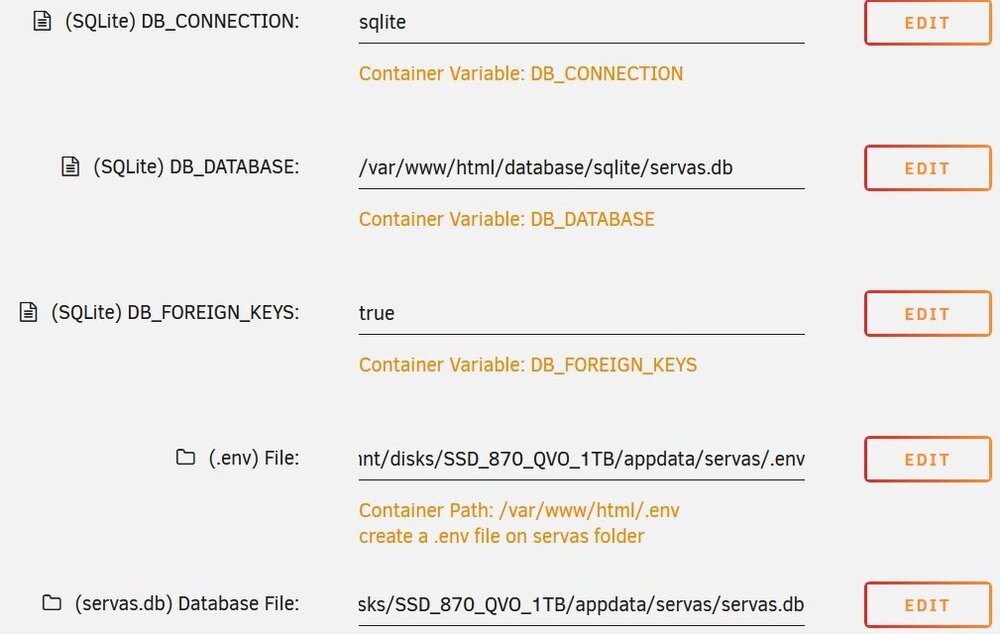
@HuSoSThanks for your clarification! I tried to start from scratch and did the following: - created .env file (with APP_KEY= in it) in appdata/servas/ - created servas.db in appddata/servas This leads to a error code 500. Then I changed the settings according to your suggestion. Unfortunately I still get the error code 500. I thought, when I set it up from scratch, that it should be possible to just swap out the servas.db file. Sadly the app does not work out of the box anymore...
-
Hi, I'm using Servas with SQlite on Unraid and I'm very happy with it so far. A few days ago I updated to Version 0.5. Since then I'm unable to get to the login page. I always get an Errorcode 500. I read the instructions (https://github.com/beromir/Servas/releases/tag/v0.5.0) according to the change where path for env changed but I don't understand what I have to do. Attached is a picture of my current settings (unchanged) for Servas. Can someone help me with this problem?