zerickk
Members
-
Joined
-
Last visited
Everything posted by zerickk
-
Thank you so much for all the help!
-
tower-diagnostics-20250416-0912.zipThank you. I have finished the mover and checked the shares. It appears everything moved properly. Also the fix common issues plugin errors cleared up. Here are the diagnostics.
-
Excellent. The mover finished successfully. Here are the diagnostics. I imagine this will be the next issue I need to address? tower-diagnostics-20250415-1135.zip

-
Here is my new setup: 127G /mnt/cache/appdata 228G /mnt/cache/plex 9.4G /mnt/cache/downloads 0 /mnt/cache/domains 2.3M /mnt/cache/nextcloud 0 /mnt/cache/data 364G /mnt/cache Thank you

-
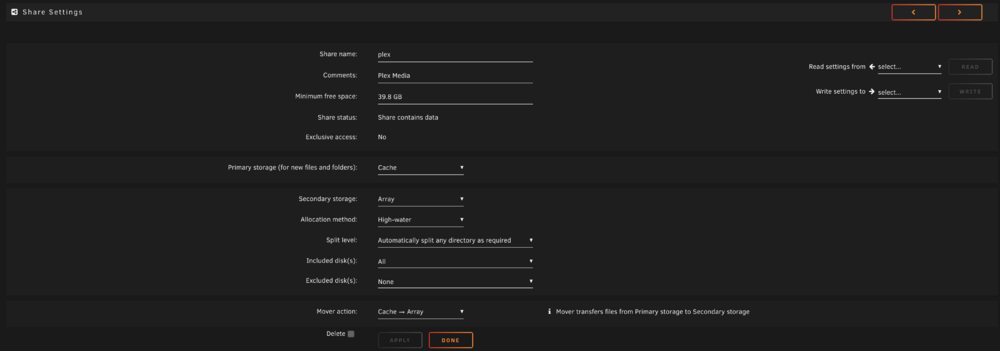
Ok I installed the Fix Common Problems plugin and see that there are some items needing attnetion. Ok the Plex.cfg issue makes sense to me now. I went in and deleted it and then reconfigured the plex user share to Primary:cache; Secondary:array; Mover action:cache->array. Here are the new diagnostics. Thank you again! tower-diagnostics-20250415-0741.zip
-
Ok both on cache I added the new diagnostics file. Thank you! tower-diagnostics-20250414-2054.zip

-
Looking at the link you provided, I should move my VM from a different SSD to this location and set it as cache only to properly use this share. I will fix that. I think I understand this now. I should have both on either cache or array not a mix like I do now? I can set both to cache when I can sort out the space issue. Thank you, yes I mean docker with lowercase Thank you, I didn't realize this either. You are pointing out many configuration issues I have here and I appreciate it. I see that the docker.img i have in the "docker" cache only share hasn't been modified for some time and is clearly not current. To rectify this, I would delete that "docker" share and move the "system" share to cache to align with the issue above where my "appdata" is on cache? You are right. Here is the full result: 60G /mnt/cache/docker 127G /mnt/cache/appdata 209G /mnt/cache/plex 396G /mnt/cache Is this not configured to write to cache and move to array? Will do. Thank you. Done. Thank you. They already are set this way. In the past this would move with mover and keep my cache from filling, but now mover isn't moving them. Thanks again! I have used unraid for 6 years now and see that I have a fair bit of configuration improvement opportunities.
-
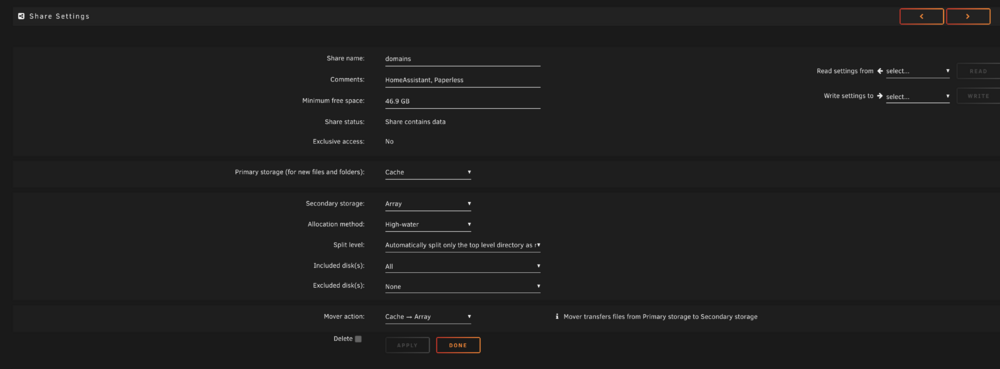
Thank you. Valid point for the shares setup. I don't actually have any VM's or docker data in domains so it should be ok as cache --> array. But i have set appdata as cache only and system as array only. I believe that should be ok? Docker is my docker image and is set to cache only. I have plex set for cache --> array to mitigate daily writes and speed write time every time new movies are added. I want plex to load to the array with mover nightly. du -h -d 1 /mnt/cache command provides this" 60G /mnt/cache/docker I have attached a photo of my current cache disk files. It is the plex data that is filling it with content that isn't moving to the array. Thanks again for your assistance.

-
tower-diagnostics-20250414-1640.zipThank you. here is the diagnostics
-
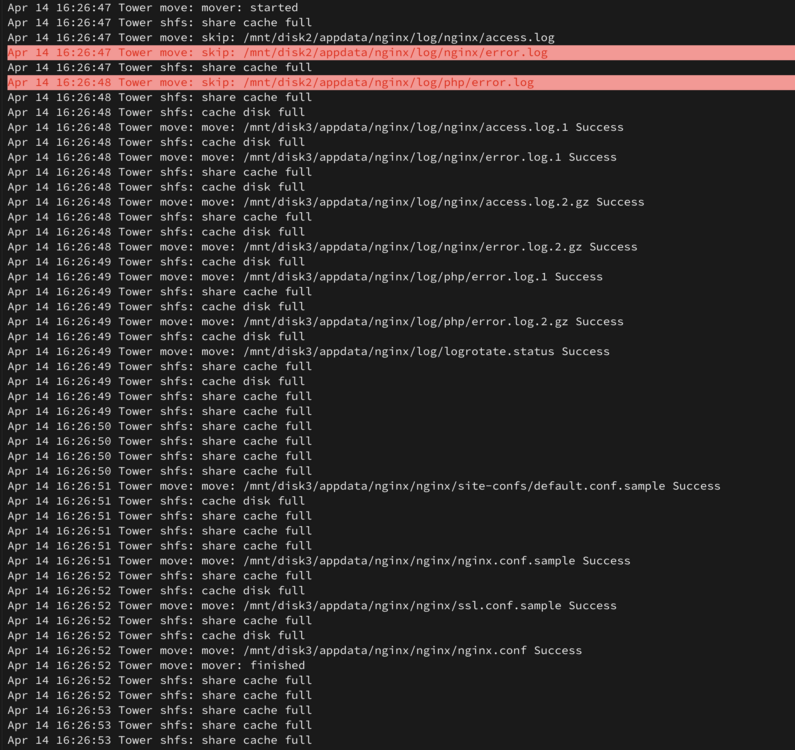
Hello, I have an issue where my cache is filling because the mover isn't moving as I believe I have it set to. I do not nor have I ever installed the mover tuning plugin. The cache has filled and is not being used per my settings to not exceed 90% capacity, but it will not move on my nightly schedule. I have attached how my shares are configured, and a copy of the logs. Any thoughts or ideas would be appreciated. Thank you