brandon13ke
Members
-
Joined
-
Last visited
-
Had VPN via Unifi, but this weekend just phased that out and installed and setup Tailscale. Within Tailscale added in local IP's for my firewall, Unraid, and HA server only, nothing more. Also got my Zigbee dongle working almost instantly when phasing out of HA docker doing HAOS via the VM. That also let me phase out like 4 or 5 docker apps now that I'm running HAOS via VM.
-
Dockers are now back online! I'm actually going to switch my HA from a Docker instance to a VM for HAOS sooooo I'll be toying around with the VMs tonight for that migration. Tired of trying to get this Zigbee USB stick to pass through 😅. Z-Wave was easy but this Zigbee one is a PITA. I really appreciate your help and support trurl, been a huge help guiding me along. If there are any resources or things you recommend I should look into and learn based on our brief interactions I'm all ears!
-
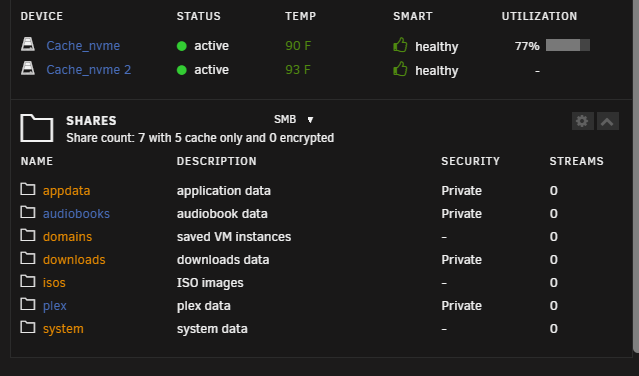
Empty Folders - Yeah I likely created them during my initial setup process. Then moved it once cache_nvme pool was added so it was legacy, they are now deleted. Good to know those folders may be recreated if I re-enable VM Manager, I might want future VM's to always have everything on the cache_nvme in the future if I spin something up but I'll look into that when I get there. No future plans as of now. Moving Tuning - I removed it when I read your post yesterday, so it did not run. I'll try it out later if needed in the future. Moving TO cache_nvme - /mnt/disk1/system only has a docker folder in it, which has docker.img for the 21.5gb /mnt/disk1/appdata has 3 folders, audiobookshelf, radarr, and sonarr each with their db files None of these were moved last night via Mover because I turned Docker back on (I know, my bad). I disabled Docker this morning, went to Main > Array Operation and then ran the "Move" option to kick it off manually. After just a few mins, Mover finished. I rechecked the /mnt/disk1/ folders to see what was there and both the /system and /appdata folders were successfully moved! Moving TO array - /mnt/cache_nvme/downloads was fully moved last night, it is no longer on the cache_nvme at all. cache_nvme only has 2 folders in it, appdata and system as of now. Confirmed via: Attached are recent diagnostics after running the Mover this morning just a bit ago. Just want to say, really appreciate your assistance with everything getting my system dialed in. Its been a huge help and I feel wayyyy more confident in the system now long-term. Thank you. tower-diagnostics-20250417-1043.zip
-
In theory --- with the new settings changed for the downloads share, the Mover should kick-off tonight/early tomorrow morning and start moving everything from the cache_nvme to the array? If it does that, then the 1TB cache_nvm will go from something like 250GB free to more like 800GB free so minimum won't be an issue. I looked up the Mover Tuning Plugin and installed it, reviewing it all now. For those 4 shares on disk1 they are empty, just folders. I went ahead and deleted them!
-
It doesn't let me set a minimum free space on the cache_nvme pool, its grayed out. I have 2 NVMe drives in my system, a 1.5TB and a 1TB basically in mirror (1TB usable which is expected)
-
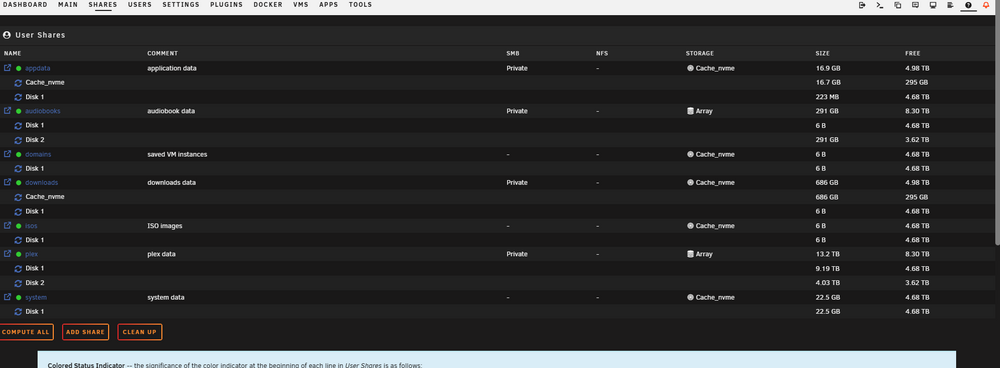
I should be OK on space for the minimum free just went through all my shares and settings confirmed the following: array My most 'full' drives disk1 and disk2 have 4.6TB and 3.6TB space remaining on them 2 other disks are nearly completely empty cache_nvme It's got 259 GB free of the 1TB I move on average maybe 75GB a month incoming and outgoing so not a ton of movement there, so no chance it just "fills up" As for the Shares minimum free space, I just went through all of them and they are a range from 30GB at the smallest to 146GB at the largest. All of them are set to high-water for allocation method and auto split only the top level dir as required
-
Gotcha, wasn't aware of that so that's good to know. I just updated downloads share to not have any disks selected for include or exclude, will leave it all default.
-
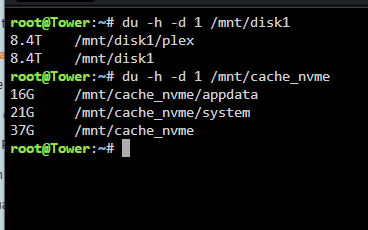
User Shares Cleanup button complete! Set downloads share primary cache_nvme, secondary array Set Mover action from cache_nvme-->array Also set/added one extra thing, to only use disk4 and disk5, exclude disk1 and disk2 Set appdata, domains, isos, system shares to Primary cache_nvme with Secondary as the array Set Mover action from array-->cache_nvme Command line for the cache_nvme results are: 16G /mnt/cache_nvme/appdata 673G /mnt/cache_nvme/downloads 688G /mnt/cache_nvme Command line for the disk1 results are: 21G /mnt/disk1/system 213M /mnt/disk1/appdata 0 /mnt/disk1/domains 0 /mnt/disk1/isos 0 /mnt/disk1/downloads 0 /mnt/disk1/audiobooks 8.4T /mnt/disk1/plex 8.4T /mnt/disk1 re-ran diagnostics after all the steps were completed above. See attached! tower-diagnostics-20250416-1435.zip
-
Docker disabled. VM Manager disabled (Didn't have any VMs so should have no impact). Left the system running for about 10-15mins after those changes then ran a new diagnostics, see attached. tower-diagnostics-20250416-0925.zip
-
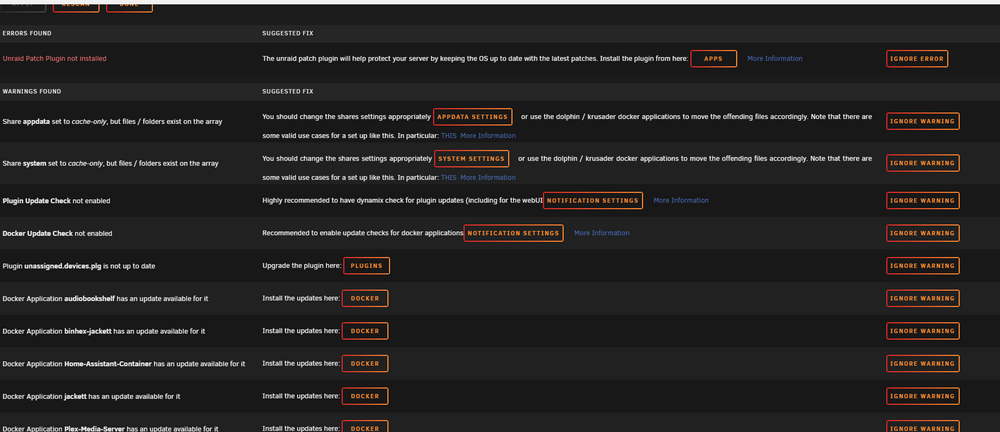
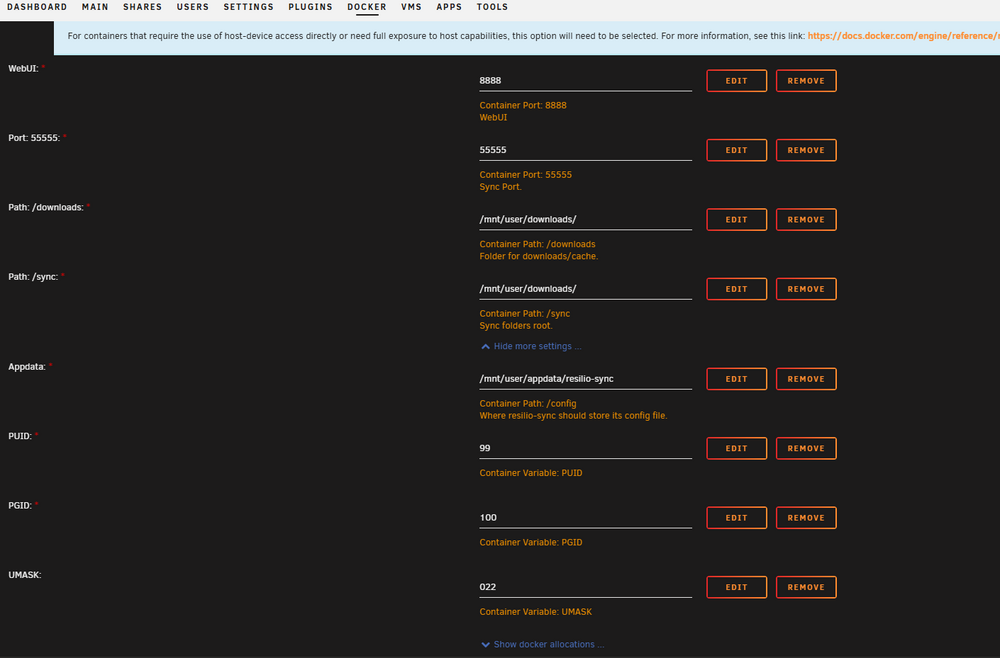
Thank you so much for such a detailed response, seriously --- thank you. As for the link and Shares setup, this does not surprise me 😥. I read that article plus like 4 or 5 other related ones + watched all the Space Invaders vids on the topics before doing the first time setup and I was still a bit shaky. First time using Unraid, spun the system up in Sept/Oct so still learning the ways. As for the Shares: Appdata - I would love for all the Appdata for all my Docker apps and really anything that requires anything "Fast" to be stored purely on the cache_nvme. That was always the plan and if I'm being honest, I thought I did that 😅, so it wasn't for lack of trying. If you could assist or help clean that up for one Docker app I think I could mirror it for the others? Downloads - I thought it was only on cache_nvme, not the array/both. The reason is because of the Resilio-sync App, which I could not figure out or configure for the life of me during setup. I would love for it to live solely on Disk1 or Disk2 or w/e on the main Array. This is basically a folder sync App between another remote system and it mirrors the folder contents from that remote system syncing it to this one. I used Syncthing for years but also could not get the dang app working but could get Resilio working so here I am. Only thing that needs to monitor the Downloads area are some other apps like Sonarr and Radarr. FixProblems - Downloaded and going through a few of the things. You are correct it shows the Appdata shares thing you talked about. For the command I get the following response: 16M /mnt/disk1/appdata/audiobookshelf 87M /mnt/disk1/appdata/radarr 110M /mnt/disk1/appdata/sonarr 213M /mnt/disk1/appdata Here is my Resilio app settings if you could take a look or point out what I've done wrong: Really appreciate your help with this. Ready for next steps or recommendations! In System it shows Docker continues to climb, now at 10.2GB so I need to figure this out before it starts uninstalling and stopping Dockers apps
-
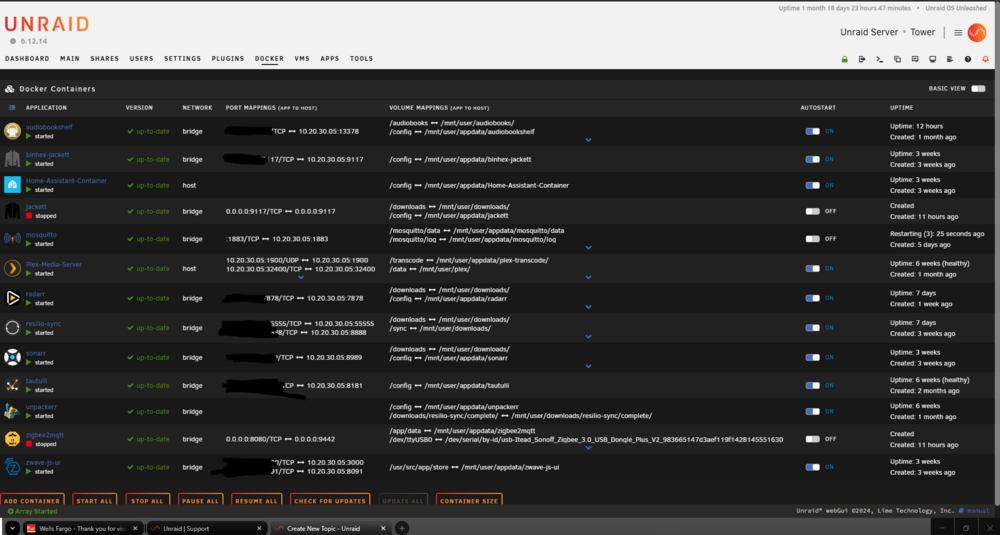
As title suggest, my system is only 6 or 7 months old and I've got some sort of memory leak with something, I'm thinking I configured something wrong in a Docker App but I haven't found it yet. Its a slow creep, fresh reboot in system Docker will show about 5gb in use (32gb total system RAM). My up-time right now is nearly 50 days and Docker is now showing over 10gb in use. I haven't changed a thing. The first time I noticed this leak was when some Docker apps stopped working.... logged in after 3 or 4 months uptime and not only did some Apps stop, some were uninstalled completely. Just poof, gone not even listed in the Docker area as started or stopped. After a hard reboot 1 or 2 reappeared as stopped needing updates. The other 1 or 2 I had to reinstall but all my files and settings were still present. I don't want this to happen again so looking for some assistance. I've been slowly trying to reboot or update Docker Apps and configs to see if it clears the in use RAM but nothing has helped, I'm out of ideas and need some help. Diagnostics attached! OS 6.12.14 Unleashed 32GB Ram Apps in screenshot, blacked out WAN IP Storage I've got 2 Arrays; Array (50TB) for Storage & a Cache_nvme Array (1TB) for downloads, appdata, docker apps etc. I tried setting it up so all my Docker apps and their temp files are all saved in that Cache nvme within Appdata but I feel like I suck and didn't do the volume mappings correctly or something Any feedback or ideas are appreciated. IF there is something I should attach or provide please let me know and I can assist. Thank you for your help in advance if you do end up replying to my post; honestly appreciate it. tower-diagnostics-20250414-2152.zip