Debu_Ranger
Members
-
Joined
-
Last visited
-
Really! I'm so happy I was able to finally contribute back to the community! I was trying to figure this out for days and finally got it up and thought there has got to be someone that wants this to work too!
-
I made a forum post that I built off of this one to get it working.
-
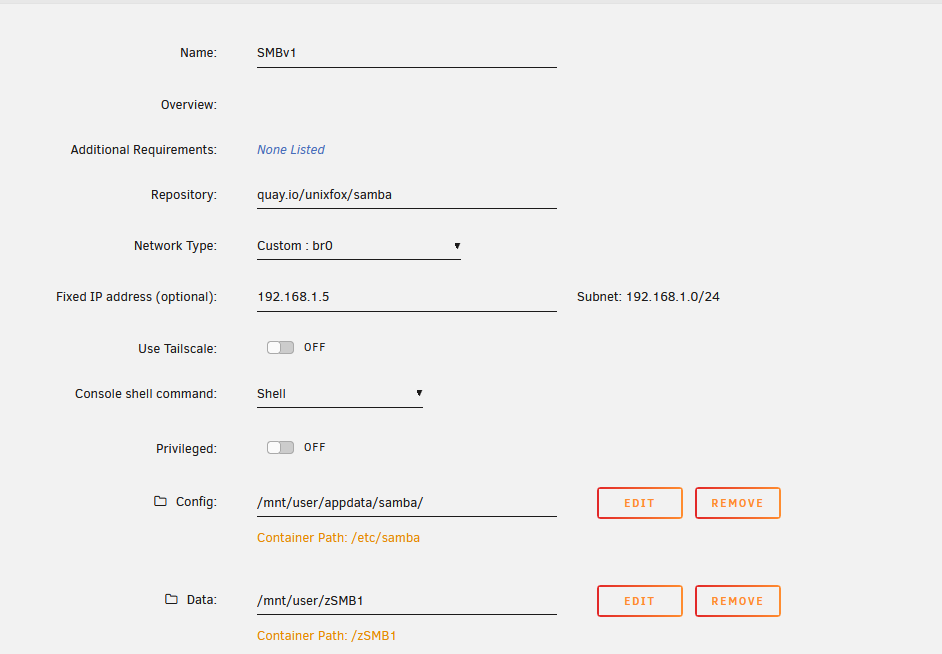
Hi there, I spent a lot of time figuring this out and finally got it working. I'm by no means a dev but I know how to run containers. I also don't have a lot of samba experience so someone might point out I'm dumb and could do this better. For warning, I'm pretty dumb in general. OPL only supports SMBv1. There are tons of posts out there asking for SMBv3 support but I don't think that will ever happen. This Post got me started: https://forums.unraid.net/topic/147999-guide-how-to-have-smbv1-for-old-printersscannersmfp-without-activating-it-in-unraid/ You need a new share, I called it SMBv1 and created it like they did in the forum post created in UnRaid. You need a directory /mnt/user/appdata/samba You need to create a smb.conf file there that has this in it under the /mnt/user/appdata/samba. I know there are ways to pass this stuff as you build the container, but I was struggling. So what we will do is inject this file into the container as a volume and mount this path in the container as /etc/samba. I set it up with zero security. No username, nothing. So your family jewels are showing. Also why it is in it's own share. Also, OPL has zero log data other than error codes and I didn't want to complicate it with user accounts. smb.conf [global] workgroup = WORKGROUP server string = Samba Server server role = standalone server log file = /dev/stdout max log size = 50 dns proxy = no map to guest = Bad User guest account = nobody server min protocol = NT1 server max protocol = SMB3 [zSMB1] path = /zSMB1 browsable = yes read only = no guest ok = yes force user = nobody force group = users veto files = /.apdisk/.DS_Store/.TemporaryItems/.Trashes/desktop.ini/ehthumbs.db/Network Trash Folder/Temporary Items/Thu> delete veto files = yes In UnRaid under docker this is how I created my container. I used 192.168.1.5 for my ip address of the container. You'll have to adjust that to your network. Other than that you can see under Config and Data how it should look when you add paths. Please see the other forum post if you need help in that OP did a great job explaining it. On OPL, you will want to setup the Networking section to use IP (do not use NetBios) and plug in the ip address like mine 192.168.1.5 and your share. If you look at my smb.conf it is zSMB1. I use a username guest and no password. And by a miracle, I was finally able to connect to UnRaid via SMBv1. It took so long to figure this all out since there is little debugging in the container that I know of at my level. I don't think this is the best written Howto out there. I'm no expert. There are probably mistakes.