



Skip to content
View in the app

A better way to browse. Learn more.

Unraid

A full-screen app on your home screen with push notifications, badges and more.

To install this app on iOS and iPadOS
  1. Tap the Share icon in Safari
  2. Scroll the menu and tap Add to Home Screen.
  3. Tap Add in the top-right corner.
To install this app on Android
  1. Tap the 3-dot menu (⋮) in the top-right corner of the browser.
  2. Tap Add to Home screen or Install app.
  3. Confirm by tapping Install.

thecroupier

Members
  • Joined

  • Last visited

  1. Sounds like unraid isn't for me...
  2. Yes, I was hoping to create one pool with a mix of internal and external drives and another pool with the same for some resilience
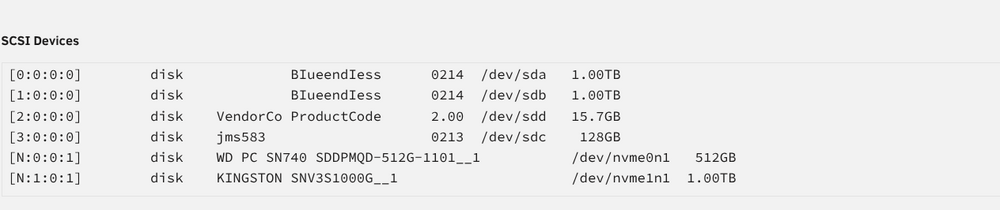
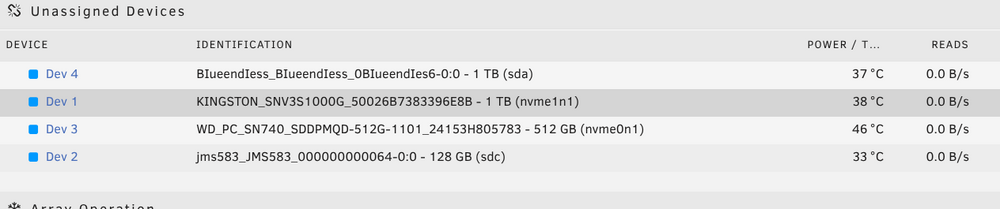
  3. Nope i only plan to use the following + the sdb thats not showing up. So 2 internal drives and 2 external drives

  4. List of USB devices from an app
  5. Thanks, for the speedy reply but other OS's see both drives, any way to make unraid see them?
  6. Here you go... your my only hope! tower-diagnostics-20250419-1623.zip
  7. Hi Everyone, I'm new here and currently reviewing unraid with a trial license. But want to purchase it if its functionality checks out. Anyway I see my external nvme enclosure in system devices but i dont see the disks in the main tab. Any suggestions? Happy to upload my diagnostics. Thanks in advance...
Account

Navigation

Search

Search

Configure browser push notifications

Chrome (Android)
  1. Tap the lock icon next to the address bar.
  2. Tap Permissions → Notifications.
  3. Adjust your preference.
Chrome (Desktop)
  1. Click the padlock icon in the address bar.
  2. Select Site settings.
  3. Find Notifications and adjust your preference.
