stence
Members
-
Joined
-
Last visited
-
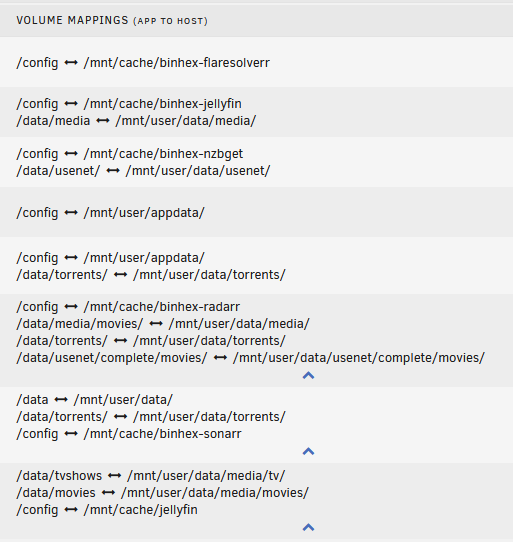
I attempted this for the first container, seemingly successfully. I tried again for the Radarr container as it is relatively new/unused, but I think something went wrong with appdata as it did not populate any information I'd set within the container for configuration, treating it as a new setup. At first I disabled Docker as suggested, however that means I am unable to change the mapping. So instead what I did was the following: 1.) Stop the container 2.) Use file manager to move the files to /mnt/cache/appdata/binhex-radarr/ 3.) Map /config to /mnt/cache/appdata/binhex-radarr/ and apply to start the container It seems like the existing appdata information was not read so I have avoided further moves for the time being.
-
Ok thank you. Sounds like I'll need to do some reading and start things over in a more sane way. "Working" isn't the same as "working properly" I suppose.
-
So that likely requires a rebuild of the containers then? Or is it a matter of changing them, restarting the containers, then deleting the originals?
-
Honestly, attempting to follow Docker guides and misunderstanding the correct way to do things. I'm well versed in Linux but am a total Docker noob. I'm not confident that any of my cache setup is valid/accurate/best practice. Yes several are /mnt/user, see attached screenshot.
-
Looks like that share is on the cache drive as indicated by the warning: :~# df -h /mnt/user/log/ Filesystem Size Used Avail Use% Mounted on shfs 932G 251G 680G 27% /mnt/user :~# df -h /mnt/user/data/ Filesystem Size Used Avail Use% Mounted on shfs 18T 3.3T 15T 19% /mnt/user
-
The warning is still present, notably the "Log Settings" button goes nowhere and reloads the /Settings/FixProblems page.

-
Syslog server is disabled and Appdata Backup hasn't been configured/used at all. Installation is just shy of two weeks old.
-
Permissions have been adjusted. I have no idea how that folder was created, it wasn't intentional and none of the container paths reference anything containing "log". The folder itself does not contain any files. I suppose I wrongly assumed it was part of a default UnRAID configuration.
-
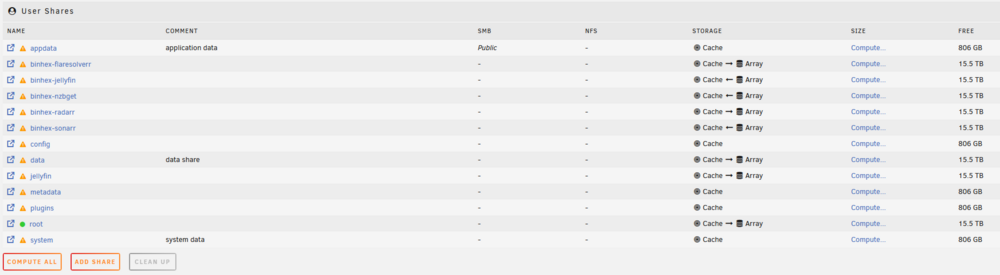
:~# ls -lah /mnt/user total 28K drwxrwxrwx 1 nobody users 45 Apr 24 21:25 ./ drwxr-xr-x 9 root root 180 Apr 24 21:13 ../ drwxrwxr-x 1 nobody users 126 Apr 12 20:33 appdata/ drwxrwxr-x 1 nobody users 48 Apr 18 16:37 binhex-flaresolverr/ drwxrwxr-x 1 nobody users 86 Apr 12 17:20 binhex-jellyfin/ drwxrwxr-x 1 nobody users 70 Apr 24 21:13 binhex-nzbget/ drwxrwxr-x 1 nobody users 242 Apr 25 00:40 binhex-radarr/ drwxrwxr-x 1 nobody users 232 Apr 25 01:03 binhex-sonarr/ drwxrwxrwx 1 nobody users 112 Apr 19 22:28 config/ drwxrwxrwx 1 nobody users 26 Apr 19 22:32 data/ drwxr-xr-x 1 nobody users 168 Apr 24 21:25 jellyfin/ drwxr-xr-x 1 root root 0 Apr 21 16:50 log/ drwxrwxrwx 1 nobody users 0 Apr 19 22:28 metadata/ drwxrwxrwx 1 nobody users 28 Apr 19 22:28 plugins/ drwxrwxrwx 1 nobody users 29 Apr 19 22:28 root/ drwxrwxrwx 1 nobody users 12 Apr 12 05:09 system/ Based on this, seems like it may be a permissions issue for the log share, should it also be nobody:users perhaps?
-
Thank you, diagnostics attached nasty-diagnostics-20250424-1814.zip
-
Hi All, New UnRAID user getting used to how everything works. My array is up and running with several Docker containers for media. Current setup is a 5 disk array (1 parity, 4 storage) with a 1 TB NVMe cache drive under UnRAID 7.0.1. The Fix Common Problems utility is reporting the following message, but I am unable to locate a setting for the "log" share, as it is not visible via the WebUI. "Share log is an implied array-only share, but files / folders exist on the cache" Attaching a screenshot of the visible shares and their current settings. I am open to any feedback on how things are currently configured, as I said I'm getting used to the system and probably making common mistakes. I appreciate any assistance/guidance you are able to provide. Thank you.