J4CKT
Members
-
Joined
-
Last visited
-
Thank you very much for all the help. I've got both new drives in successfully and have moved my files and will start removing the small drives following the unraid guides.
-
ok - extended smart tests done and preclears just finished! Now if I'm going with option 1 of dropping my parity disk do i just physically disconnect the parity drive from the machine after power down and on power up I will have the ability to assign one of the 18tb drives in it's place? Then wait for rebuild and do the same with disk1? Was going to ask more questions about this but decided to just go with dropping and replacing the drives 1by1 as I had done before with the disks that had started showing errors.

-
Would you mind going into why Option 1 is better than option 2? Ill still be doing what you recommend, just would like to better understand the logic behind it. I would have thought Option 2 would be faster and easier, especially since Option 1 requires 2 drive rebuilds and then file moving etc vs a New array and share and just copying all data across.
-
Thank you very much - installed and had a look at unbalanced - looks very cool. Looking forward to trying this out just as soon as SMART comes back and then Preclear completes on the new disks. Do you have any thoughts on on the Preclear vs Badblocks question?
-
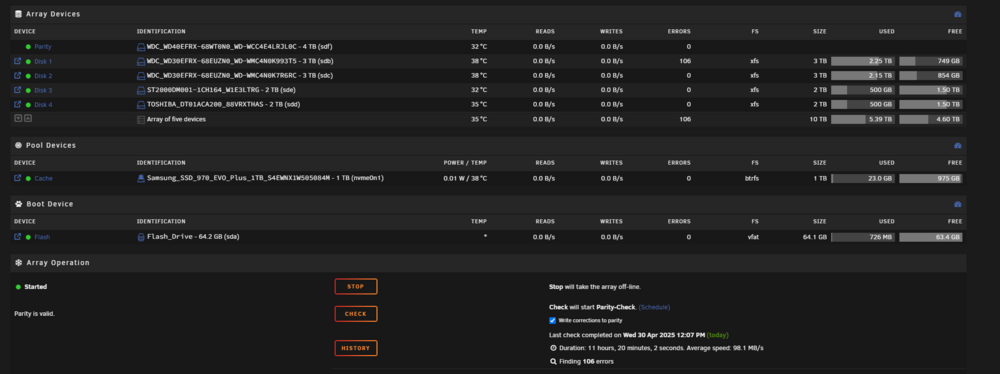
Thank you very much for your help, since my last post all my cables and fans came in and I now have full functionality of all 8 bays of my NAS case with those brand new blue low profile sata cables for all bays. I've also installed an m.2 > sata port expander card so I'm using 4 of the mobo's 6 ports and 4 of the expanders ports to hook up all the drive bays. I've since successfully replaced disk1 with errors from the screenshot above with the 4tb drive like i planned and the very next moment as disk1 was being rebuilt from parity, read errors showed up on the parity drive but the rebuild did complete successfully. I've ordered 2x 18tb HC550 drives which arrived today and I am now wondering what is the best way to upgrade my array with those 2 drives with the end goal being to get rid of the 5 small old drives and eventually have all 18tb drives. But before that I need to make sure the new disks are good and I am planning to: -SMART test both new drives -if SMART is all good, move to preclearing both new drives. I've also read that running badblocks is something people do, which would you recommend or should i do both? I've read that badblocks writes alternating patterns making a pass from that procedure potentially more conclusive? So far I can see 2 options to the upgrade path: Option 1: -drop the parity disk (which is also now showing errors) -install 1st 18tb drive as parity -rebuild parity -drop disk1 -install 2nd 18tb drive -rebuild disk1 However after that is done, i'm not sure how to remove drives from this array and how to handle offloading the data from all non-18tb disks onto the 18tb drive... Option 2: -create a new pool/array with the 2 18tb drives, 1 as data and 1 as parity -create a new share -copy across all data from first share to new 18tb share -remove entire first array and drop all other drives to be left with just the 2x18tb drives in the system What would be the best way forward?
-
Also with regards to the hardware: -sata cables are old but never used. They've sat in motherboard boxes until now but i have the slimline flexy blue ones in bundles on order from Ali -power cables are direct from psu (2 molex connectors plugging into 2 molex connections on the case backplane) to case. I have a Sagitarius case with 2x 4bay sata backplanes. Waiting on molex splitters to com in to split out the PSU molex from 2 to 4 plugs in order to power the 2nd backplane in the case and activate all 8 bays. -im not using any m.2 expander cards yet as I have 6sata ports on the board.
-
Thank you for the suggestions - just turned off the server and powering on again to see if anything changes. This time all the drives showed in all their appropriate slots and when the array was started , parity was present so that's progress. I may try unplugging that 3tb disk1 drive again and replacing with a 4tb drive in the hopes of upgrading it like i planned. Should i stop the array before shutting the server down since it is stopped by default when i restart?
-
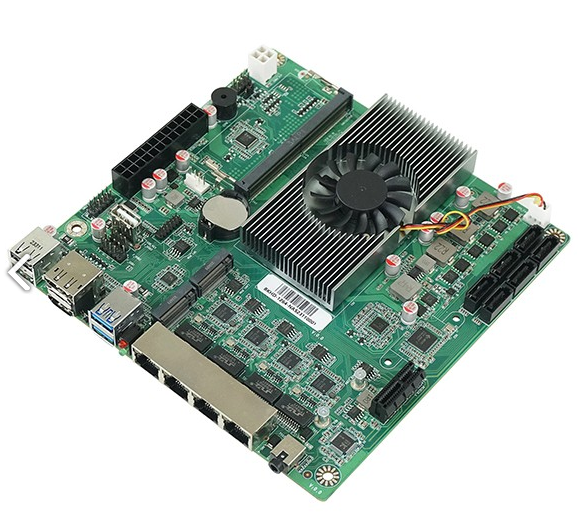
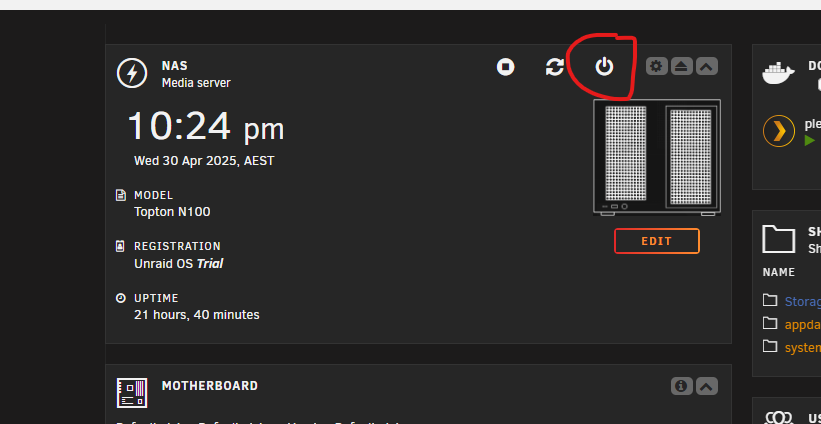
Hi guys, Completely fresh Unraid (7.0.1) user here - just built my first diy NAS with this NAS mobo after wanting to expand past my Synology DS413 and reusing my 4tb drives from it: https://www.bkipc.com/en/product/1264-NAS-MB.html To give the full picture, the new NAS is built with some drives I've found that were unused. 1 of which is now starting to show some read errors. My DS413 with 4x4tb had a failed 4tb drive in but i wasn't too sure which one it was, so after getting unraid setup I copied over all my data which worked fine. Also installed and got Plex app working in unraid too which is great so i no longer need to run the Plex media server on my pc. The next thing i did was pull all the drives out of the DS413 and added 1 drive to the new NAS to use as a Parity. It was a serial ending in "ZZ", parity failed with approx 2k errors and i couldn't even see the drive info anymore so this must have been the faulty drive, I then powered down the drive, binned the faulty ZZ drive and threw in the next 4tb drive - parity op began again and completed this time after 10 or so hours. This is when i noticed the read errors in the screenshot above. So i figured now with a parity drive I can upgrade the drive with the read errors to the next 4tb drive pulled from the DS413. I shutdown the server by clicking the power button in Unraid: Removed the drive with read errors and inserted a 4tb drive in it's place - However, when i powered back on, my array was gone , the parity drive was unallocated and unraid was showing that it was looking for the "ZZ" drive in it's place. and because the parity drive was gone everything was gone and unmounted. So I powered down again, replugged the 3tb drive with read errors back in and rebooted. Once it was back , the parity drive was gone again and it was looking for the ZZ drive. But I was able to select the 4tb drive that is in there but the parity was gone. It started from scratch again. This was earlier today and it's rebuilt the parity drive and I'm back to wanting to replace that 3tb drive with read errors but now scared the same thing will happen again and not sure what to do. Any help would be greatly appreciated. I've attached the diagnostics aswell, are there any other drives in the array i should be concerned about? nas-diagnostics-20250430-2208.zip