




Skip to content
View in the app

A better way to browse. Learn more.

Unraid

A full-screen app on your home screen with push notifications, badges and more.

To install this app on iOS and iPadOS
  1. Tap the Share icon in Safari
  2. Scroll the menu and tap Add to Home Screen.
  3. Tap Add in the top-right corner.
To install this app on Android
  1. Tap the 3-dot menu (⋮) in the top-right corner of the browser.
  2. Tap Add to Home screen or Install app.
  3. Confirm by tapping Install.

oops_all_unraid

Members
  • Joined

  • Last visited

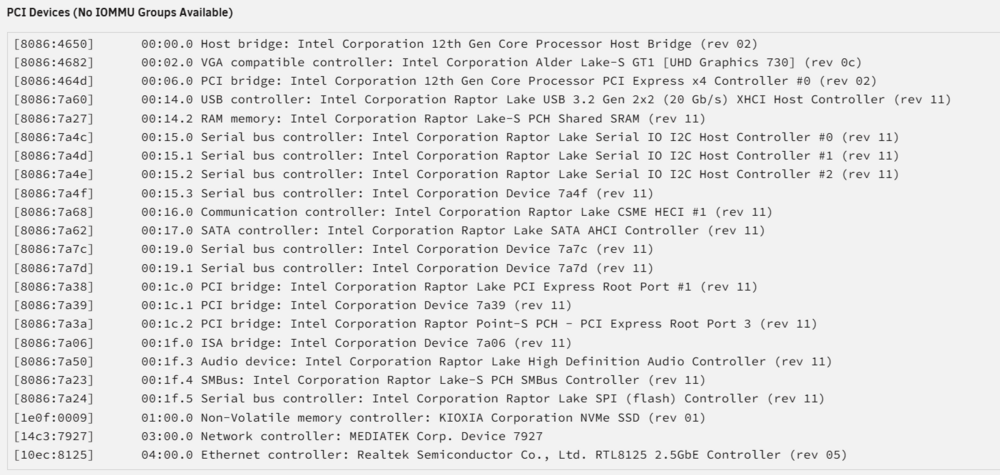
  1. Ah then that's the Mediatek 7927 that shows up in the devices list. Guess I'll have to wait for an update.
  2. Yeah can't figure out what chipset it uses. Did see some reviews on Amazon citing Linux compatibility so was chancing my arm a bit. I've attached the diagnostics file. tower32-diagnostics-20250509-1730.zip
  3. Trying to get Wifi working on my Unraid box as the Powerline connection it is currently on is a bit of a bottleneck. Upgraded to 7.1.1. and installed a TP-Link Archer TBE550E. Don't have a Wifi option in the Network Settings page. Also unsure if the card is actually being detected?
Account

Navigation

Search

Search

Configure browser push notifications

Chrome (Android)
  1. Tap the lock icon next to the address bar.
  2. Tap Permissions → Notifications.
  3. Adjust your preference.
Chrome (Desktop)
  1. Click the padlock icon in the address bar.
  2. Select Site settings.
  3. Find Notifications and adjust your preference.