




Skip to content
View in the app

A better way to browse. Learn more.

Unraid

A full-screen app on your home screen with push notifications, badges and more.

To install this app on iOS and iPadOS
  1. Tap the Share icon in Safari
  2. Scroll the menu and tap Add to Home Screen.
  3. Tap Add in the top-right corner.
To install this app on Android
  1. Tap the 3-dot menu (⋮) in the top-right corner of the browser.
  2. Tap Add to Home screen or Install app.
  3. Confirm by tapping Install.

dhammon

Members
  • Joined

  • Last visited

  1. attached... media-diagnostics-20250515-1744.zip
  2. I'm new to Unraid, so I have a lot to take in.... The problem I have is this: I got the array started on my NAS... I went to Windows to map the drive... created folders in it, transferred several files to it... now, not sure what I did, but the shares were deleted. The files I transferred do not show up in windows after my error. I do see that the data is still on my array tho'...
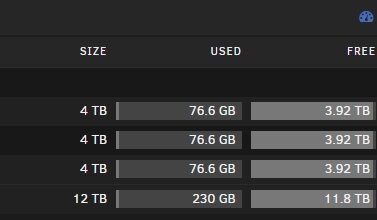
  3. looking for the file structure/tree in Unraid. I had files visible, but lost connection and now I can't remember what folders I had created through Windows 11.
Account

Navigation

Search

Search

Configure browser push notifications

Chrome (Android)
  1. Tap the lock icon next to the address bar.
  2. Tap Permissions → Notifications.
  3. Adjust your preference.
Chrome (Desktop)
  1. Click the padlock icon in the address bar.
  2. Select Site settings.
  3. Find Notifications and adjust your preference.