





Steve_UR
Members
-
Joined
-
Last visited
-
Hi again, I finally found time to work on the server: Moved docker.img to a cached system folder removed the small 16GB NVME and replaced with 1TB NVME for caching user files and system images etc. retained the 128 GB SSD to cache just appdata and frigate recordings. @trurl thanks for your help on this. I think I have it set up reasonably well now. Deleted the rest of my original post due to stupidity ;) S.
-
Hi again, Thank you for your advice, much appreciated. I haven't found the time to make these changes yet, but now have a new 1TB NVME drive (to replace the old 128 GB cache drive) and plan to do it soon. I couldn't find anything in the Unraid documentation that describes where and how to set up the docker.img file. ChatGPT says to create a user share called "system" on the cache drive and put it there. Is that considered best practice? My current cache drive consists of 2 x 128 GB mSATA SSDs on a PCIe adapter card. Any suggestions for how to make use of them now after making this change, or are they just redundant? I'm thinking virtual machines should also reside in /mnt/user/system/ rather than the way I had set it up to use a separate SSD. I can't remember where I found the original instructions that told me to set up separate SSDs for docker.img and libvirt.img, probably ChatGPT, so want to be sure I do it right this time! Thanks again.
-
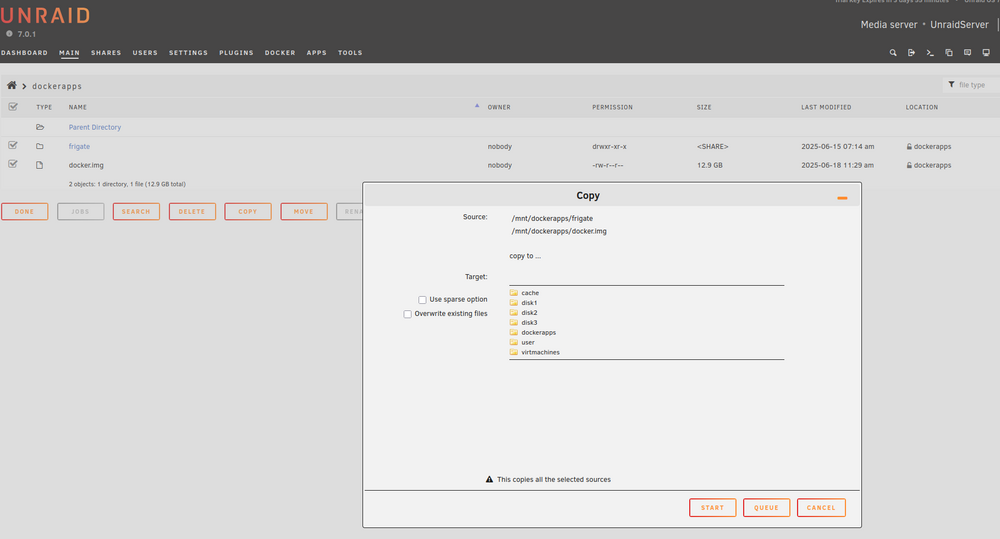
Here is what I propose to do. Note that I only have 1 NVME slot so cannot copy directly to new one. Please let me know if this is correct: Stop all docker apps. Using file manager, copy the contents of the dockerapps NVME drive to virtmachines drive (since it is currently empty). Shut down Unraid machine and change NVME drive to larger one. Boot up and assign new NVME drive to be dockerapps. copy contents of old dockerapps from virtmachines to new dockerapps drive. Start docker apps Does it look like this will do it? unraidserver-diagnostics-20250618-1152.zip
-
I am out of space on my dockerapps disk and need to swap it out for larger. I searched around and couldn't find any info on doing this. Does anyone know of any instructions or can advise me how if you've done it before? thanks! S.
