





JuSteve
Members
-
Joined
-
Last visited
-
Thanks everyone...I got my cache rebuilt and my Dockers restored. Appreciate the assistance!
-
OK....I looked on Cache and there only seems to be directories and no files. I backed up Appdata and System which seemed to already be on the Array (so, now two copies of each). So probably OK to start over with Cache?
-
Since it appears that the data on the Cache is only available through the pool devices and not a share, is it OK to copy the contents to an individual drive in the Array? It seems as though that's my only option...
-
What is the best backup method at this point? Unless I’m reading things wrong, the appdata is now on the array?
-
I am assuming that I need to take the following steps to return this whole thing to a healthy state: Get my cache drive to a healthy state (needing and getting help on this currently) reduce the size of the cache from 2 > 1 (I'm assuming I need to do this prior to adding the new Cache drive?) add the new cache drive and increase pool size to 2 rebalance the cache (does it do this automatically?) change settings for System and Appdata to Array > Cache Run Mover Change settings again on Appdata and System to be Cache only Restore my Dockers one at a time using "Reinstall with Previous Settings" Is this about right? By the way, the VERY next step for me is to install Appdata Backup so I have a parachute next time!
-
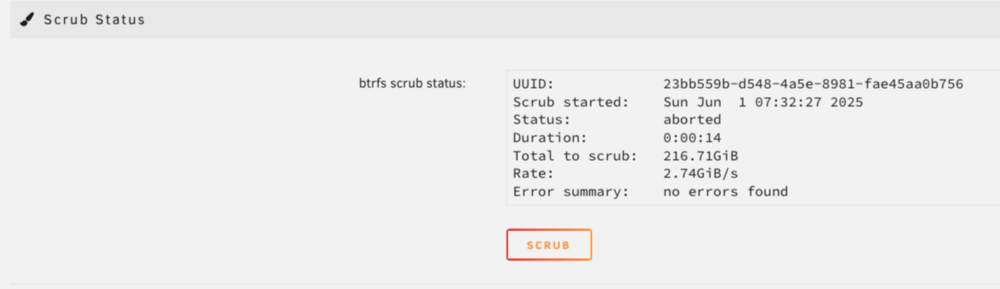
@JorgeB Results: I also noticed that appdata and system are now located on Array? Thank you!

-
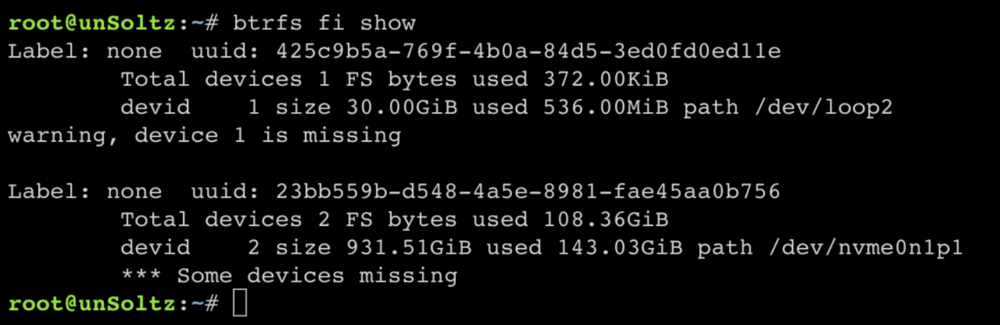
OK, I created a new pool and removed the old one, creating the new pool with one slot and using the nvme drive. It seems to have mounted and and now, for the first time, not seeing the unmountable error. It looks like it is looking for the removed drive: The shares all seem to be back but I am getting an "unprotected" warning: Here is the new diagnostic: unsoltz-diagnostics-20250531-1017.zip How would I proceed to restoring my Dockers? I'm assuming I at least need to add the second cache drive to the pool and rebalance first, correct? Thank you for the help, @JorgeB !


-
When you say "importing," do you mean create a new pool with just that device? Sorry, complete beginner....
-
Thank you!
-
Hello All, I am a major newbie here... I had ignored some SMART warnings and eventually one of my two cache drives failed. I made a series of mistakes at this point, including a couple of reboots (without getting diagnostics first) and playing around with the size of the cache pool. I now have replaced the bad drive with a new one. The old one was a 2 TB SSD and the secondary cache drive was a 1 TB nvme. I have replaced the bad drive with a new 1 TB SSD. Now I have: Cache is the old Cache 2. I have also tried to: Remove all disks from the Cache Pool and restarting array with no cache drives and got an "unmatched" warning Deleting the original Pool and creating a new one with two slots...still unmountable I never actively formatted the new SSD drive. I think the only mistake I DID NOT make was to format the nvme, so I am hoping I can still recover my Dockers. Any help for this oldie but newbie would be appreciated. I also do not have backups. So there's another mistake I will never make again... unsoltz-diagnostics-20250530-1621.zip




