N4MY
Members
-
Joined
-
Last visited
-
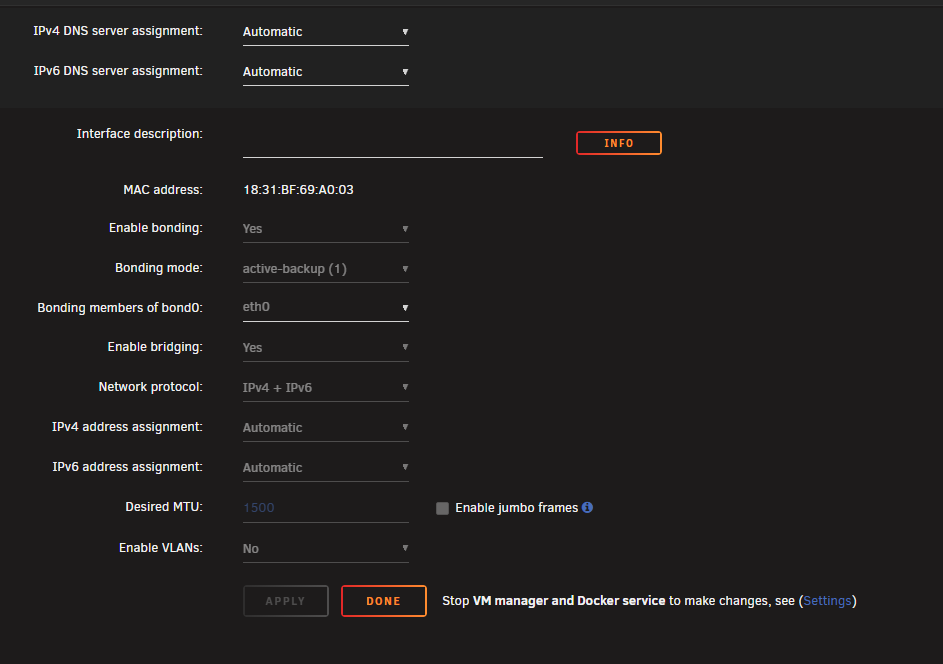
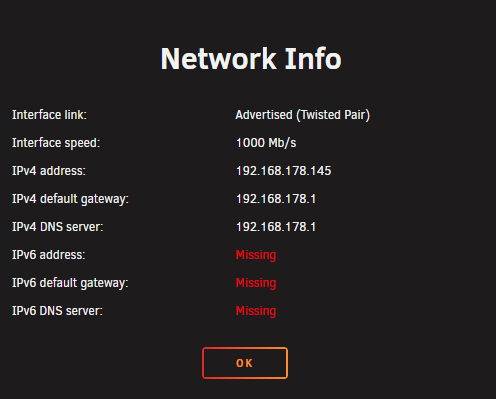
Hi everyone, I'm trying to make my Unraid server reachable from the internet via IPv6 – specifically to host a Minecraft server in a Docker container. However, Unraid does not seem to obtain a public IPv6 address, even though the Fritzbox router assigns one correctly. Setup: Unraid 7.12 Fritzbox 6690 Cable (Dual Stack Lite / DS-Lite) Unraid is connected directly via Ethernet Docker container runs in bridge network mode Problem: The Fritzbox shows the Unraid server has been assigned an public IPv6 address But on the Unraid terminal (ip -6 addr show), I only see the local IPv6 IPv6 autoconfiguration is enabled in Unraid network settings IPv6 port forwarding (port 25565) is active on the Fritzbox Tailscale is also installed but not used for this scenario DHCPv6 seems to be working on the Fritzbox side Goal: I want Unraid to accept and properly use the public IPv6 address so I can expose services like a Minecraft server. Right now it seems the OS rejects it or can't complete the address assignment. Any help would be highly appreciated! Thanks in advance! Unraid Network Settings: Interface Info: