knal
Members
-
Joined
-
Last visited
Everything posted by knal
-
I found what the problem was: unraid and my PC are on a different VLAN, with inter-VLAN traffic blocked. my PC was allowed to VLAN-hop to unraid, but not the other way around. I added an exception that unraid is also allowed to hop back to my PC and now the direct connection is established. Thanks for the help everyone.
-
When doing tailscale netcheck swag I get the following output: UDP: true IPv4: yes IPv6: no, but OS has support MappingVariesByDestIP: false PortMapping: According to the tailscale https://tailscale.com/kb/1411/device-connectivity documentation, when PortMapping doesn't either return UPnP, NAT-PMP or PCP, getting a direct connection might be difficult. However, a netcheck on my unraid server gives back the same values, and that does get a direct connection. Is some kind of port forwarding or other config needed in the swag container so unraid knows how to properly handle the connections?
-
I do have a public IP address. Strangely enough my connection to myunraid.tailnet.stuff is direct (according to tailscale status), but the connection to swag running on unraid itself is relayed. So maybe the problem lies with some unraid/swag config setting after all? My swag container uses the following settings: network type: proxynet (a net I made cause I was following a spaceinvaderone video, I have no idea what it actually does) use Tailscale: yes Be a Tailscale exit node: no Tailscale Userspace Networking: Enabled Enable Tailscale SSH: no Tailscale serve: no advanced settings: all default On the recommendation of tailscale config, I added a port-forwarding rule on my ISP's modem to forward port 41641 to my unraid server. If I disable that rule, the unraid server also gets relayed. Maybe I need to add another rule to also port forward my swag ports themselves on the same IP as my unraid server? I don't know if that makes sense, nor if it is wise to be doing port forwarding. Wouldn't want to expose myself unnessarily. I'm seeing the following tailscale behaviour when I did a couple tests: from my PC: tailscale ping unraid -> direct connection from my PC: tailscale ping swag -> relayed connection from unraid: tailscale ping swag -> direct connection
-
I can't find any info on what my local ISP does, but I suspect I'm not behind CGNAT.
-
When doing tailscale status on my PC, it says that it's using a relay (even though the machine it's looking for is on the same LAN). Pretty bizarre, but gonna try to figure it out. It's probably not a swag problem like I originally thought. Thanks for the tips.
-
Maybe it really does have something to do with tailscale itself. On my phone (still on my local LAN) I get the feeling I don't get the slowdown/fuzzy thumbnail lag when going through tailscale/the immich app. So maybe the problem is my PC itself. I still get the problem when I disable tailscale dns on my PC, so that's not it per se. Maybe I should re-ask this question over at tailscale instead of here. I dunno. I still find it weird that traceroute doesn't clearly resolve when I give my domain, whilst I know I can access the swag which is behind the domain, so it does resolve. Thanks for the tips so far.
-
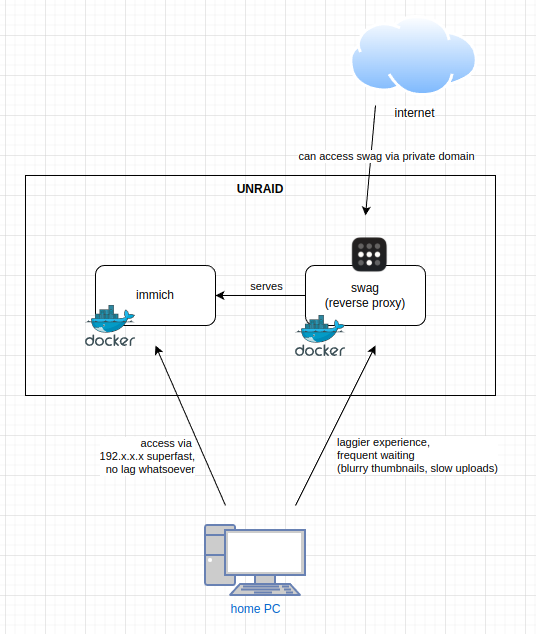
Hello friends, I've been running an immich & swag container for a while (largely based on spaceinvaderone's videos/tips) and I can't help but noticing that there's a slowdown happening when accessing immich via the swag reverse-proxy. I'm hoping somebody can give some tips on why this could be happening so I can fix it. Scrolling through my timeline on the immich app, or uploading 2000 files at once is blazingly fast when I do it via the IP address of the immich-container itself (when I'm on the local LAN of the server). But it's very choppy and laggy when I go via the swag container (still on the local LAN essentially). I find myself frequently waiting for thumbnails to load, and uploading files is markedly slower. I'm tempted to conclude swag is bottlenecking something, for some reason, but I don't know how to troubleshoot or figure out why. This is a basic diagram of what the setup looks like: Some further potentially relevant details: running traceroute immich.mydomain.xx gives me a lot of * * * * output. I can access the app/domain fine in firefox however. I can't tell if this is abnormal or not, considering tailscale is in between. all apps are fully up to date the immich container log isn't displaying any errors when I'm scrolling the timeline via swag/domain. neither is swag is showing any errors (that I can see) in the logs. Perhaps something is wrong in my immich proxy-conf? I already tried adding the proxy_buffering stuff (at the top) to remedy the issue, but it doesn't really help. (IP's and ports hidden) ## Version 2024/10/15 # make sure that your immich container is named immich # make sure that your dns has a cname set for immich # immich v1.118+ only. For earlier versions, change $upstream_port to 3001 server { listen 443 ssl; listen [::]:443 ssl; server_name immich.*; include /config/nginx/ssl.conf; client_max_body_size 0; proxy_buffering off; proxy_buffer_size 16k; proxy_busy_buffers_size 24k; proxy_buffers 64 4k; proxy_force_ranges on; proxy_http_version 1.1; # enable for ldap auth (requires ldap-location.conf in the location block) #include /config/nginx/ldap-server.conf; # enable for Authelia (requires authelia-location.conf in the location block) #include /config/nginx/authelia-server.conf; # enable for Authentik (requires authentik-location.conf in the location block) #include /config/nginx/authentik-server.conf; location / { # enable the next two lines for http auth #auth_basic "Restricted"; #auth_basic_user_file /config/nginx/.htpasswd; # enable for ldap auth (requires ldap-server.conf in the server block) #include /config/nginx/ldap-location.conf; # enable for Authelia (requires authelia-server.conf in the server block) #include /config/nginx/authelia-location.conf; # enable for Authentik (requires authentik-server.conf in the server block) #include /config/nginx/authentik-location.conf; include /config/nginx/proxy.conf; include /config/nginx/resolver.conf; set $upstream_app 192.x.x.x; set $upstream_port xxxx; set $upstream_proto http; proxy_pass $upstream_proto://$upstream_app:$upstream_port; } location ~ (/immich)?/api { include /config/nginx/proxy.conf; include /config/nginx/resolver.conf; set $upstream_app 192.x.x.x; set $upstream_port xxxx; set $upstream_proto http; proxy_pass $upstream_proto://$upstream_app:$upstream_port; } } Any tips and help is much appreciated, Thank you.