





dpyo
Members
-
Joined
-
Last visited
-
Great, thanks for the help
-
Correct, that is disk 4. Installed UD plugin, mounts the disk fine, seems to be empty? Wouldn't this typically have my share folders even if no data was stored on this disk?
-
Screenshot of main attached. Correct, I understood that it would invalidate parity, which didn't matter since it was already invalid. I did try doing md4p1 first, as well as through the gui, but both failed.
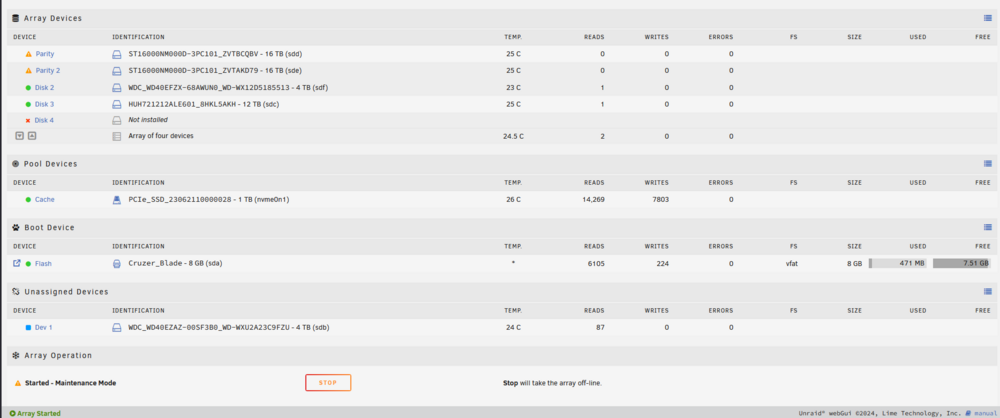
-
Had a power outage, upon logging in, noticed one parity drive was missing. Rebooted again, it appeared, I started the array somehow now both of my parity drives are invalid, and parity rebuild is ongoing. I figured that this wasn't much of an issue (naively), and checked my drives to discover that Disk 4 is Unmountable: Unsupported or no file system. I troubleshooted this, and found that I needed to run xfs_repair. Tried to run through the GUI on disk 4, but it was failing with IO errors. Then I tried to run through the command line on sdb1p1, and it repaired the filesystem successfully, but upon rebooting again, the drive still shows up as Unmountable. I then stopped the array, removed the device, started the array, stopped the array, and added the device back, but it will not let me start the array. Currently it does say that disk4 is emulated, but I'm not sure how that is since my parity is invalid? How should I proceed? I figure that my parity is lost, and my data on disk 4 is also lost, but I figured I would ask for help before just accepting defeat. I've included diagnostics from earlier in my troubleshooting process, and my most recent diagnostic from my current state tower-diagnostics-20250619-2321.zip tower-diagnostics-20250619-2157.zip

